
BlitzCut vs Zubtitle: One Tool vs. Two
Zubtitle only adds captions — you still need a separate editor. BlitzCut does both in one native Mac app with no double subscriptions or exports.


Zubtitle built its reputation doing one thing well: accurate automatic captions for video. Upload a finished clip, get captioned output in a few minutes. The tool works.
The problem is what Zubtitle doesn't do. It has no silence removal. It can't cut a section from the middle of a video. It can't remove a filler word, delete a bad take, or trim a rambling conclusion. For anything beyond adding captions to a pre-edited clip, creators using Zubtitle still need a separate video editor.
That means: edit in App A → export → upload to Zubtitle → add captions → export again. Two tools, two subscriptions, two upload/export cycles per video.
In 2026, that workflow is solving a 2020 problem. Tools that handle editing and captions in the same session have made the caption-only category harder to justify for active creators. This comparison looks at both tools honestly — where Zubtitle still makes sense, and where the two-tool overhead stops being worth it.
What Zubtitle Is
Zubtitle is a browser-based video captioning tool. Its core workflow: upload a video (MP4, MOV, or M4V) → AI transcribes speech → captions are burned into the video → resize for social platforms → export.
It is not a video editor. Zubtitle explicitly positions itself as a captioning and social formatting tool. There is no timeline editing, no clip library, no silence removal, no mid-clip cutting.
Pricing (2025/2026):
| Plan | Monthly price | Annual price | Videos/month | Max length |
|---|---|---|---|---|
| Bootstrapper (free) | $0 | $0 | 1–2 | 20 min (watermarked, 720p) |
| Guru | $19/month | $190/year | 10 | 20 min |
| Agency | $49/month | $490/year | 30 | 20 min |
| Custom | Contact sales | — | Custom | 30 min (max) |
The per-video credit structure: Unlike subscription tools that give unlimited access, Zubtitle charges per video count. 10 videos at $19/month = $1.90 per video processed. A daily poster needs the $49/month Agency plan (30 videos = roughly one per day). There is no unlimited plan.

Zubtitle's upload interface. Every video starts here — the tool cannot process footage until the upload completes.
What Zubtitle Does Well
Caption accuracy. Zubtitle uses Google's speech recognition engine. For clear, single-speaker English audio with a decent microphone, accuracy is high — typically 95%+ for standard talking head content. Multiple users describe the transcription as "shockingly good" for their use case.
Speed for simple captioning. Upload a finished, pre-edited clip and get a captioned version in a few minutes. For a creator who only needs to add captions to a clean video and nothing else, Zubtitle's workflow is fast and focused.
Karaoke-style captions. Zubtitle's "Highlight" animation moves a color across words as they're spoken — the word-by-word style that dominates TikTok and Reels in 2026. This is available on all paid plans.
SRT and TXT export. In addition to burned-in captions, Zubtitle automatically generates SRT and TXT subtitle files on every export. Useful for uploading captions separately to YouTube or other platforms that accept external subtitle files.
Branded style templates. Pre-built brand kits allow consistent caption styling across all videos without manually reconfiguring style settings each time.

Zubtitle's caption editor. Transcription happens first, then errors are corrected manually before export.
What Zubtitle Cannot Do
This is the section that matters most for any talking head creator evaluating Zubtitle as a core tool.
No silence removal. Dead air, long pauses between sentences, awkward gaps — all remain in the exported video exactly as recorded. If your raw recording has 3 minutes of silence in a 15-minute take, your Zubtitle output has 3 minutes of silence.
No mid-clip editing. You cannot cut a section from the middle of a video in Zubtitle. The tool supports trimming from the start and end of a clip only. Cutting a bad take from minute 4–5 of a 10-minute recording is not possible in Zubtitle.
No filler word removal. Zubtitle transcribes "um" and "uh" accurately. It doesn't remove them.
No timeline or clip splitting. There is no NLE timeline. Zubtitle works with one clip at a time. The tool's own documentation confirms: "Changing the speed of the video applies to the whole video, which is quite limiting when it comes to editing."
20-minute video length cap. Even on the $49/month Agency plan, videos are hard-capped at 20 minutes. Longer recordings must be cut in another tool before uploading. Enterprise custom plans unlock 30 minutes — the absolute maximum.
No joining multiple clips. Zubtitle processes one file at a time. If your recording spans two separate clips, they must be joined externally before uploading.
No desktop app. Zubtitle is browser-only. No native Mac app, no Apple Silicon optimization, no offline capability.
The Two-Tool Workflow Problem
Every talking head creator using Zubtitle as their caption solution is running a two-tool workflow:
- Edit in tool A (iMovie, Final Cut Pro, DaVinci Resolve, CapCut) — remove silences, cut bad takes, trim the video
- Export from tool A — render and save to disk (takes time)
- Upload to Zubtitle — wait for upload to complete
- Transcribe and correct — review AI captions, fix errors manually
- Style captions — apply brand template
- Export from Zubtitle — wait for cloud render
- Download — wait for file download
- Final file ready
Two render cycles. Two upload/download waits. Two separate subscription costs. For a creator doing 10 videos per month, this adds 30–60 minutes of wait time per month that an integrated tool eliminates.
Real creator feedback on why they moved away from Zubtitle:
"I was paying for captions while still doing all the actual content creation work manually."
"If you want deep editing options, it's not the right tool."
"Users wanted to create shorter sections, cut out dead time, speed up sections, and add transitions — Zubtitle can't do this."
The 25+ alternatives listed on AlternativeTo for Zubtitle share a consistent theme: creators move to tools that combine editing and captions in one workflow.
What BlitzCut Is
BlitzCut is a native macOS video editor built for talking head creators. It handles silence removal, transcription, editing, and caption generation in a single session — no external tools required, no upload-wait-download cycle.
Price: $16.99/month · $69.99/year · $129.99 lifetime* · 3-day free trial (all features, no watermark).
*US prices. BlitzCut pricing varies by region; see the price in your country.
Core workflow:
- Import footage → silence removed automatically in background (on-device, no internet required)
- Transcript appears as editable text, 1–2 minutes after import
- Delete sections of transcript → footage cuts automatically
- Generate captions in one tap — standard, bold center, or word-by-word karaoke
- Export in 9:16, 16:9, or 1:1 at up to 4K
No upload before you start. No credits per video. No separate captioning step after editing. One session from raw recording to captioned export.
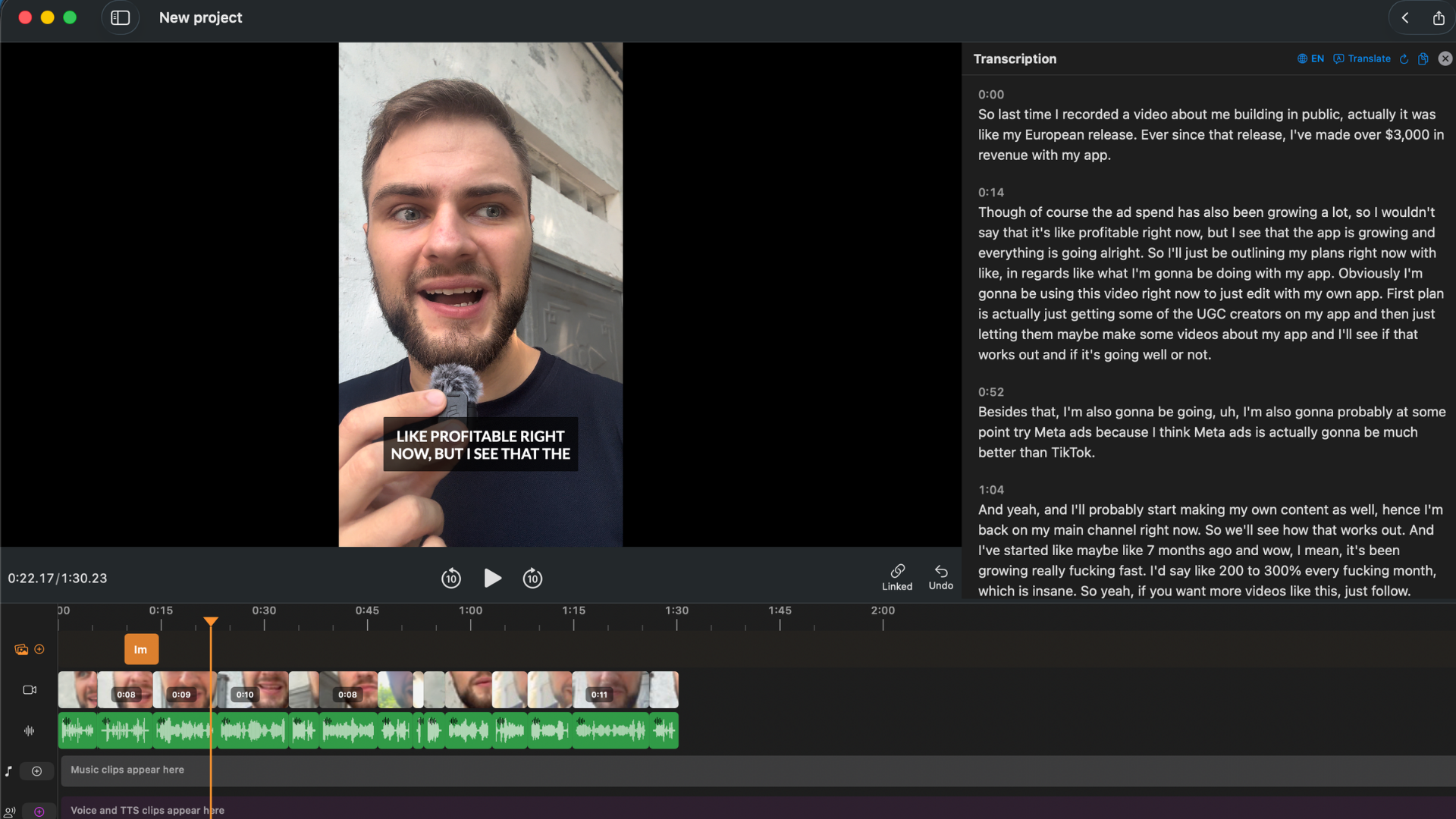
BlitzCut's workflow: import, remove silence, edit transcript, generate captions, export — one tool, one session.
Direct Feature Comparison
| Feature | BlitzCut | Zubtitle Guru ($19/mo) | Zubtitle Agency ($49/mo) |
|---|---|---|---|
| Price | $69.99/yr or $129.99 lifetime | $228/year (monthly) or $190/year | $588/year (monthly) or $490/year |
| Videos per month | Unlimited | 10 | 30 |
| Auto captions | Yes — unlimited | Yes | Yes |
| Karaoke captions | Yes | Yes | Yes |
| SRT/TXT export | No | Yes — auto-generated | Yes |
| Silence removal | Yes — on-device, automatic | No | No |
| Mid-clip editing | Yes — via transcript | No | No |
| Filler word removal | Yes — delete from transcript | No | No |
| Multiple clips / joining | Yes | No | No |
| Video length limit | No hard limit | 20 min | 20 min |
| Text-based editing | Yes | No | No |
| Native Mac app | Yes | No | No |
| Upload required | No | Yes — mandatory | Yes — mandatory |
| Offline capability | Silence removal works offline | None | None |
| iOS app | Yes | No | No |
| Per-video pricing | No | Yes | Yes |
| Watermark on free/trial | No (3-day trial) | Yes (free plan) | Yes (free plan) |
Workflow Comparison: 10-Minute Talking Head Video
Zubtitle + Separate Editor
In your video editor:
- Import footage
- Manually cut silences and bad takes
- Export at target resolution
In Zubtitle: 4. Upload the exported video (wait for upload — 3–5 min typical) 5. AI transcribes speech 6. Correct transcription errors manually 7. Style captions 8. Export captioned video (wait for cloud render) 9. Download finished file
Active time + wait time: 45–75 minutes total across both tools.
BlitzCut
- Import footage — silence removal runs automatically in background
- Transcript ready in 1–2 minutes, silences already removed
- Read transcript, delete any unwanted sections
- Generate karaoke captions in one tap
- Export
Active time: 10–20 minutes. One session. No upload wait. No second render.
The Per-Video Math
At 10 videos per month (common for regular content creators):
| Tool combination | Monthly cost | Cost per video |
|---|---|---|
| Zubtitle Guru alone | $19/month | $1.90/video |
| Zubtitle Agency alone | $49/month | $1.63/video |
| Zubtitle Guru + iMovie (free) | $19/month | $1.90/video (still need manual editing) |
| Zubtitle Guru + Final Cut Pro | $19/month + $299 one-time | $1.90/video + $29.90/month amortized |
| BlitzCut Annual + iMovie (free) | $6/month effective | $0.60/video |
| BlitzCut Lifetime + iMovie (free) | $0/month after purchase | $0/video |
At 30 videos per month (daily poster):
| Tool combination | Monthly cost |
|---|---|
| Zubtitle Agency | $49/month |
| BlitzCut Annual | $6/month effective |
| BlitzCut Lifetime | $0/month after purchase |
BlitzCut covers unlimited videos. Zubtitle caps you and charges more per plan tier as volume grows.
Caption Quality: Accurate Words, But Style Is Dated
Zubtitle's transcription accuracy is genuinely high for clean audio — the words are right. Where the comparison gets more nuanced is style and correction workflow.
The dominant caption format on TikTok and Reels in 2026 is large, bold, word-by-word animated captions. Zubtitle's "Highlight" animation functions, but multiple reviews note the style library is dated compared to newer competitors. Individual word styling requires manual selection one word at a time — there is no global style with per-word exceptions.
BlitzCut generates word-by-word karaoke captions automatically from the transcript. Corrections made to the transcript carry through to caption timing automatically — there is no separate caption editing step.
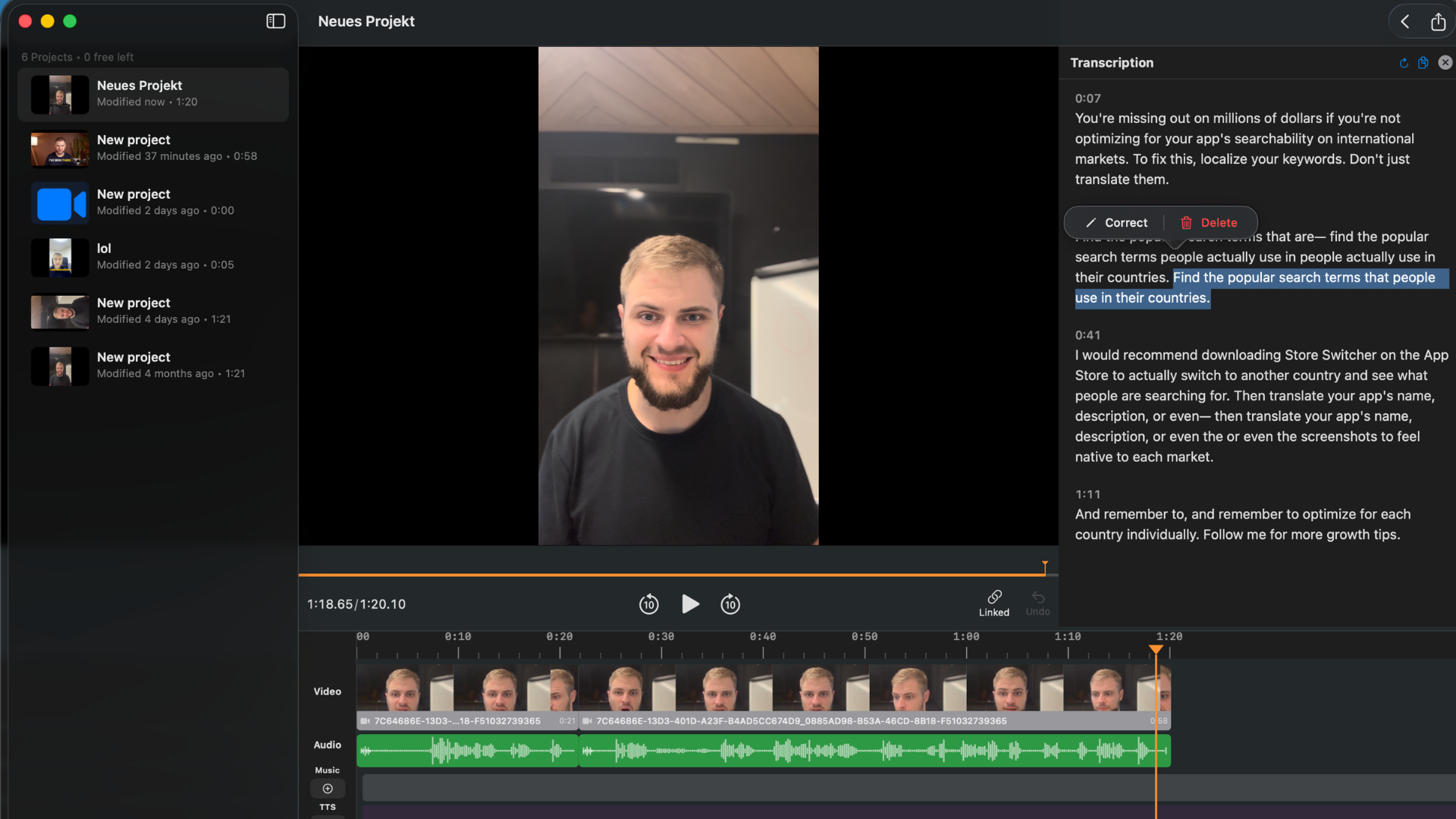
Delete a sentence from the transcript — the corresponding footage is removed and captions update automatically. Zubtitle has no equivalent.
The Refund Policy Problem
Zubtitle's official policy: "Zubtitle.com does not offer refunds at this time."
A documented case: a user purchased an annual plan with 120 credits, used only 28 over the full year, and requested a partial refund for 92 unused credits. Zubtitle initially offered 20% back, then walked it back on follow-up, saying they had "misread the message" and couldn't refund at all.
Annual subscribers who don't use their full credit allocation forfeit unused credits. For a creator who signs up for Agency ($490/year) and posts less than expected, there is no recourse.
Where Zubtitle Is Genuinely the Right Call
You already have a video editor you love and only need captions. If your editing workflow in Final Cut Pro or Premiere is working perfectly and the only gap is caption generation, Zubtitle's focused tool may be simpler than switching your full workflow.
SRT file export is required. Zubtitle auto-generates SRT and TXT files on every export. If your platform (YouTube, LinkedIn, broadcast delivery) requires a separate SRT file alongside the video, Zubtitle's output includes it automatically. BlitzCut outputs burned-in captions in the video file only.
Team captioning workflow. For a team where one person edits and a separate person handles captions and social formatting, Zubtitle's single-purpose tool is a clean handoff.
You process finished, clean clips only. If you produce scripted, tight recordings with no dead air — polished presentations, formal interviews — Zubtitle's caption-only workflow may genuinely cover everything you need.
Where BlitzCut Replaces the Two-Tool Stack
You're paying for both a caption tool and a video editor. One integrated tool at $69.99/year replaces both.
Your raw recordings have silence, filler words, or bad takes. Zubtitle can't touch any of these. BlitzCut handles all three in the same session.
Your videos are longer than 20 minutes. Zubtitle's hard cap means splitting any longer recording before uploading. BlitzCut has no length cap.
You want to edit by reading, not scrubbing. The transcript-based editing approach — read your recording as a document, delete what you don't want — is faster than timeline scrubbing for talking head content. Zubtitle has no equivalent.
You post more than 10 videos per month. Zubtitle's Guru plan covers 10. Daily posters need the $49/month Agency plan. BlitzCut covers unlimited videos.
Frequently Asked Questions
Is Zubtitle a video editor? No. Zubtitle is a captioning and social formatting tool. It burns captions into a finished video and resizes for platforms. It cannot remove silence, cut mid-clip, remove filler words, or perform any timeline editing beyond trimming from the start or end.
Does Zubtitle have silence removal? No. Silence, pauses, and filler words remain in the output video unchanged. A separate video editor is required to remove them before uploading to Zubtitle.
How many videos can I process with Zubtitle per month? 10 videos on the $19/month Guru plan, 30 on the $49/month Agency plan. There is no unlimited plan.
Is there a 20-minute video limit in Zubtitle? Yes — on all standard plans. The absolute maximum is 30 minutes, available only on custom enterprise plans. For typical YouTube talking head content (10–20 minutes), this is fine; for longer interviews or webinars, it's a hard wall.
Does Zubtitle have karaoke-style captions? Yes — Zubtitle's "Highlight" animation moves a color across words as they're spoken. Available on all paid plans.
Is BlitzCut cheaper than Zubtitle? Yes, significantly. BlitzCut at $69.99/year vs. Zubtitle Guru at $190/year (annual) or $228/year (monthly billing). BlitzCut covers unlimited videos; Zubtitle Guru caps at 10/month.
Can I export SRT files from BlitzCut? BlitzCut outputs burned-in captions in the video file. Zubtitle auto-generates SRT files alongside every export. If a standalone SRT file is required for your publishing workflow, Zubtitle covers this and BlitzCut does not.
Does Zubtitle have a desktop app for Mac? No. Zubtitle is browser-only with no native Mac, Windows, or mobile app.
What happens to unused Zubtitle credits? Unused credits expire at the end of the billing period with no rollover. The refund policy states no refunds are issued, including for unused credits on annual plans.
Related: Best Auto Caption App for iPhone · Best Subtitle Generator for Mac 2026 · Auto Caption Generator for Mac 2026
Editing a talking-head video?
BlitzCut is available on Android, iPhone, iPad, and Mac. It is designed for recorded UGC-style videos, founder-led ads, tutorials, and testimonials and other talking-head content.
Try it for freeRelated Articles
Keep Reading

How to Add Music to a Video on iPhone: Soundtracks and Imports
Learn how to add music to a video on iPhone with soundtracks or imported audio, balance it beneath speech, and finish the edit in iMovie or BlitzCut.

How to Add Pictures to a Video: Clips, Cutaways, and Overlays
Learn how to add pictures to a video as clips, cutaways, or overlays in iMovie and BlitzCut, while keeping narration and image timing clear.

YouTube Studio Setup Under $200: A Home Studio for Content Creators (2026)
A YouTube studio setup under $200, built around your phone: two budget tiers, gear ranked by impact, and what to skip for YouTube, TikTok, and podcasts.