
BlitzCut vs Kapwing: Native Mac App vs. Browser Editor
Kapwing works in any browser, but has a real ceiling: slow uploads, Chrome memory limits, cloud dependency, and credits that run dry. Full comparison.


Kapwing's appeal is frictionless entry: no download, no installation, open a browser tab and start editing. For creators who don't want to commit to software, that accessibility matters.
The tradeoff is architecture. A browser-based editor is constrained by what browsers allow: limited memory per tab, mandatory cloud round-trips for every operation, upload bandwidth before any editing can begin, and no direct access to Mac hardware — the Neural Engine, GPU, or local file system. These aren't Kapwing bugs. They're structural properties of running inside Chrome.
For short social clips where you need quick captions and a resize, Kapwing works well. For regular talking head content — 10–20 minute recordings, multiple videos per week — the architectural limits compound into real friction. This comparison covers both tools across the dimensions that matter: workflow speed, privacy, pricing structure, caption quality, and performance on longer content.
What Kapwing Is
Kapwing is a browser-based video editing platform designed for social content creation. It runs entirely in a web browser — Chrome is the recommended browser; Kapwing explicitly notes that other browsers are not fully supported.
Pricing (2025/2026):
| Plan | Cost (annual billing) | What you get |
|---|---|---|
| Free | $0 | Watermark on all exports, 720p max, projects deleted after 3 days, 10 AI credits |
| Pro | $16/month | No watermark, 1080p/4K, 6GB uploads, 1,000 AI credits/month |
| Business | $50/month per member | 4,000 AI credits/month, team features |
Key free tier issue: Projects are permanently deleted after 3 days on the free plan. This is not a warning — the work is gone. Multiple creators report losing significant project work before discovering this.
What Kapwing does:
- Timeline-based video editing (trim, cut, arrange clips)
- Smart Cut — automatic silence removal
- Auto-captions with karaoke/word-highlighting option
- 100+ caption style presets
- Team collaboration features
- Background removal, platform resizing
- AI subtitle translation (50+ languages)

Kapwing's editor runs in a browser tab. All files must upload to cloud servers before editing begins.
The Architectural Ceiling
Kapwing has no native app. The company has stated they hope to launch one "in the future" — but that statement has remained unchanged for years. The tool is and will remain browser-only for the foreseeable future.
The practical implications for a talking head creator:
Upload before you edit. Every video must fully upload to Kapwing's Google Cloud Platform servers before you can touch it. A 1GB 1080p talking head recording (approximately 10 minutes at typical bitrates) takes 3–8 minutes to upload on a standard home internet connection. 4K footage takes longer. Editing cannot begin until the upload completes.
BlitzCut imports from your local drive. No upload. Editing starts immediately.
Browser memory limits. Chrome enforces per-tab memory limits — typically 2–4GB depending on system configuration. A native Mac app like BlitzCut can request the full RAM available on the machine. Kapwing requires at least 8GB RAM and 30GB free disk space "just to run the browser editor" according to their own documentation.
For longer recordings or complex projects, this creates real problems. Kapwing's own troubleshooting documentation states: "As videos become more complex, the program can't download them and users need to break them up into chunks."
Latency on every operation. Edits go to Kapwing's servers and return as results. On a fast connection this is near-instant for simple operations; on slower connections or during peak server load, it's noticeable. Native app edits process locally — no round-trip, no variance.
Internet dependency. Kapwing has no offline mode. If your internet drops, editing stops and recent unsaved changes may be lost. The editor saves "every few minutes" — not after every action. BlitzCut's silence removal works entirely on-device without internet.
Privacy: Where Your Footage Goes
For creators working with unreleased content, client footage, or confidential interviews, this is a meaningful difference.
Kapwing: Everything uploads to Google Cloud Platform servers in us-east1 and us-west1 regions. Kapwing's privacy policy explicitly states that Kapwing employees can access user content for support, bug investigation, and product improvement purposes. There is no local processing option — every file, every frame goes through their cloud.
BlitzCut: Silence removal and silence detection run entirely on-device. Your video file never leaves your Mac for this step. Transcription uses AI processing over the network, but the raw video file is not uploaded — only the processed audio for transcription is transmitted.
For creators processing confidential client work or pre-release content, BlitzCut's approach provides meaningfully better privacy.
The December 2025 AI Credits Change
In December 2025, Kapwing consolidated all AI features into a single unified "AI Credits" pool:
- Pro: 1,000 credits/month
- Business: 4,000 credits/month
Every AI operation — transcription, captions, Smart Cut, eye contact correction, translation — now draws from this pool. Previously, many AI features had their own separate monthly limits.
What users experienced: Multiple Pro subscribers reported running out of credits within hours of subscribing. One documented case: a creator subscribed, received 1 credit instead of the promised 1,000, and ran out "within 2 hours." Support response was slow.
For a creator posting daily with captions on every video, 1,000 credits sounds sufficient — but credit consumption per video is opaque, varies by length and features used, and the calculator is widely described as confusing.
BlitzCut has no credit system. Import a video, get captions — no credit deduction, no monthly limit.
What BlitzCut Is
BlitzCut is a native macOS video editor built for talking head creators. It installs as a native Mac app and accesses Apple Silicon hardware directly — Neural Engine, GPU, local file system — with no browser overhead.
Price: $16.99/month · $69.99/year · $129.99 lifetime* · 3-day free trial (all features, no watermark).
*US prices. BlitzCut pricing varies by region; see the price in your country.
Core workflow:
- Import video from local drive — silence removal starts immediately on-device, no internet required
- Transcript ready in 1–2 minutes, silences already removed
- Edit by deleting text from the transcript — footage cuts automatically
- Generate captions in one tap — standard, bold center, or word-by-word karaoke
- Export in 9:16, 16:9, or 1:1 at up to 4K
No upload wait. No download wait. No credits.
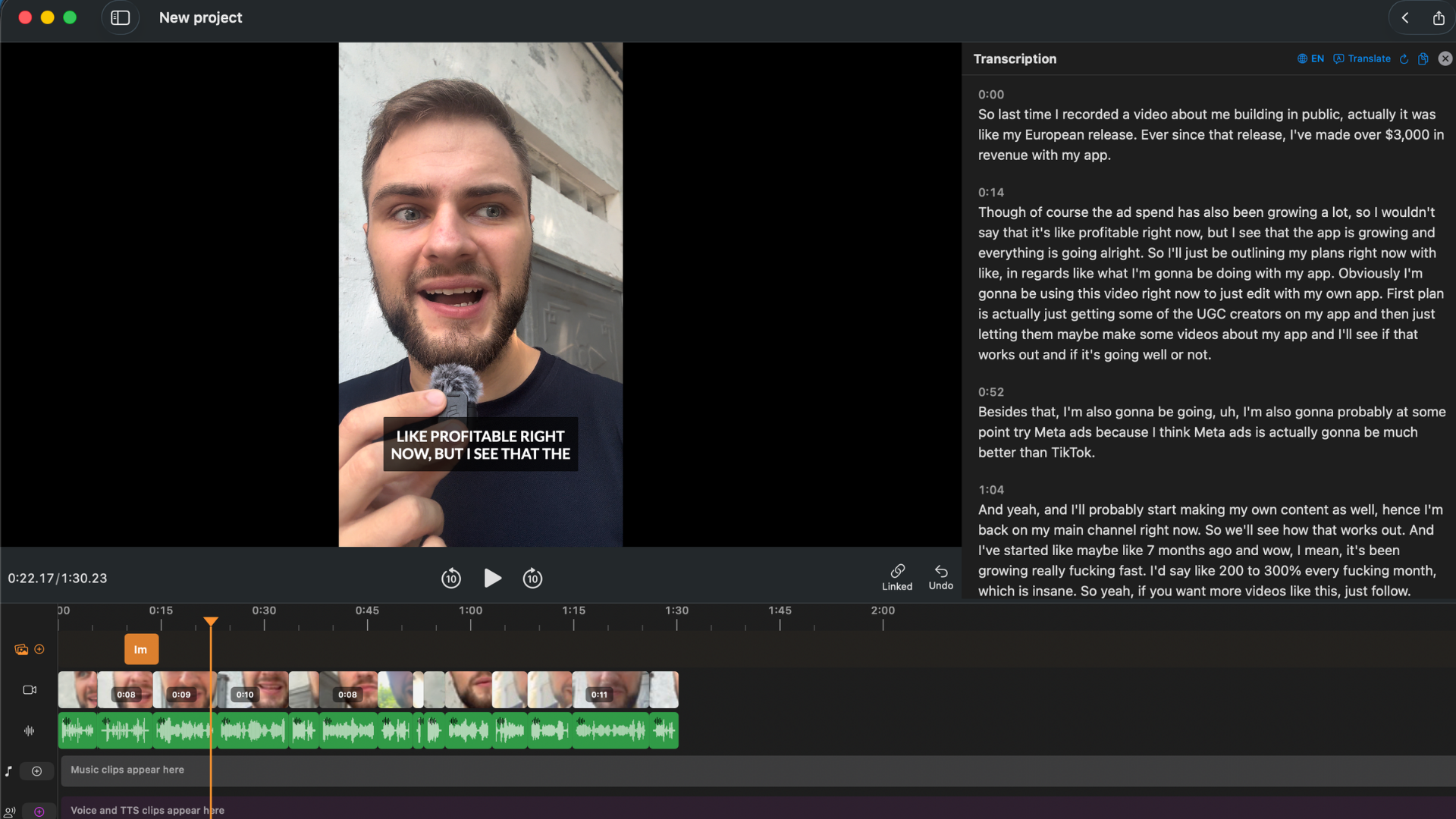
BlitzCut's transcript panel. Video stays on your Mac — no upload, no browser, no credit limits.
Direct Feature Comparison
| Feature | BlitzCut | Kapwing Free | Kapwing Pro ($16/mo) |
|---|---|---|---|
| Price | $69.99/yr or $129.99 lifetime | Free | $192/year |
| Silence removal | Yes — on-device, automatic | Yes (Smart Cut) | Yes (Smart Cut) |
| Auto captions | Yes — unlimited | Credit-limited (10/mo) | 1,000 AI credits/month |
| Karaoke captions | Yes | Yes | Yes |
| Text-based / transcript editing | Yes | No | No |
| Caption style presets | 3 core styles | 100+ presets | 100+ presets |
| Watermark | No (trial included) | Yes — all exports | No |
| Max export quality | 4K | 720p | 4K |
| Project storage | Permanent | 3 days | Permanent (while subscribed) |
| Upload to cloud required | No | Yes — mandatory | Yes — mandatory |
| Native Mac app | Yes | No | No |
| Offline capability | Silence removal works offline | None | None |
| Privacy | No raw video upload | Full upload + employee access | Full upload + employee access |
| Credit/usage limits | None | 10 AI credits | 1,000 AI credits/month |
| iOS app | Yes | Web only | Web only |
| AI caption translation | No | Limited | 50+ languages |
| Team collaboration | No | Yes | Yes |
| Eye contact correction | No | Yes (credit-limited) | Yes |
Workflow Comparison: 10-Minute Talking Head Video
Kapwing Pro
- Open browser, navigate to Kapwing, log in
- Upload 1GB video — wait 3–8 minutes for upload to complete
- Wait for cloud processing
- Apply Smart Cut to remove silences
- Review timeline, trim remaining issues
- Generate captions — AI credits decrease per video
- Style captions from preset library, correct errors manually
- Start export — wait for cloud render
- Wait for download to complete
Active time + wait time: 25–45 minutes total (upload and download not controllable).
BlitzCut
- Import video from local drive — silence removal starts immediately in background
- Transcript ready in 1–2 minutes, silences already removed
- Edit transcript to remove any unwanted sections
- Generate captions in one tap
- Export locally
Active time: 10–20 minutes. No upload wait. No download wait.
Caption Quality: Both Have Karaoke, Details Differ
Both Kapwing and BlitzCut generate karaoke-style word-by-word captions — this is not a feature gap.
Where they differ:
Kapwing has 100+ preset caption styles and a broader visual customization library — more fonts, effects, and animations. For creators who want heavy stylization on captions, Kapwing has more options.
BlitzCut's captions are generated from the edited transcript. Caption errors can be corrected before generation: edit the transcript word, generate captions with the correction already applied. In Kapwing, captions are generated from the source audio and errors are fixed after generation in a separate editing step.
Kapwing's claimed accuracy is 99% for clear English audio. User reviews suggest 90–92% in practice, with degradation for accents, background noise, or distance from mic.

Kapwing's caption correction happens after generation. BlitzCut lets you fix the transcript before captions are created.
Reliability and Billing Issues
Kapwing has documented billing and reliability problems that affect creators in material ways:
Data loss by design: Projects are deleted after 3 days on the free plan. Lapsed paid subscriptions lock content — multiple users report losing over a year of project work after a missed payment.
Billing disputes: Trustpilot documents multiple cases:
- A user charged £191 across two accounts that were on the free plan (Oct 2024–March 2025). Kapwing refunded only $23.
- A report of Kapwing auto-adding credits and charging $678 without confirmation.
- Refund policy is rigid — users report being denied refunds on clear billing errors.
Technical failures: Export failures on complex projects, editor glitches that lose unsaved work (the editor saves "every few minutes" — not after every action), browser crashes on longer recordings.
Customer support: Email only, response times in days with generic replies on billing issues.
Where Kapwing Has Advantages
Team collaboration. Kapwing's Business plan is designed for teams — shared workspaces, brand kits, multi-member access. BlitzCut is a single-user tool.
Caption style library. 100+ preset styles with advanced animations and effects. More visual flexibility for creators who want highly stylized social captions.
AI translation. Kapwing translates captions into 50+ languages. BlitzCut doesn't offer AI caption translation.
No software installation. For a creator who doesn't own a Mac or needs to edit across Windows, Mac, and mobile, Kapwing's browser-based approach is genuinely more flexible.
Eye contact correction. Added April 2025 — makes footage appear to look at camera even when looking at a script or notes. BlitzCut doesn't have this.
Who Should Use Kapwing
- Teams who need shared workspaces and brand kits across multiple members
- Creators who need caption translation into multiple languages
- Short clips where upload/download latency is minimal relative to the edit time
- Creators working across multiple platforms who aren't tied to Mac
- Occasional editors who prefer not to install software
Who Should Use BlitzCut
- Talking head creators on Mac who edit regularly — more than a few videos per week
- Creators where privacy matters — client footage, unreleased content, confidential interviews
- Creators frustrated by upload wait times or browser performance degradation on longer recordings
- Active creators who hit Kapwing's credit limits or need more than Kapwing's free tier allows
- Creators who want transcript-based editing — Kapwing has no equivalent feature
Pricing Comparison
| BlitzCut | Kapwing Pro | |
|---|---|---|
| Annual cost | $69.99/year | $192/year ($16/mo × 12) |
| Lifetime option | $129.99 | Not available |
| Credit limits | None — unlimited | 1,000 AI credits/month |
| Per-video cost (10/week) | ~$1.38/week | $4/week |
| Project storage | Permanent | Permanent (while subscribed) |
| Data if subscription lapses | Stays on your Mac | Locked until renewed |
At annual pricing, BlitzCut is 63% cheaper than Kapwing Pro. At the lifetime option, the difference is larger. No credit limits or per-video caps on either BlitzCut plan.
Frequently Asked Questions
Does Kapwing have a desktop app? No. Kapwing is browser-only and has been for its entire existence. The company has stated they hope to build one "in the future." BlitzCut is a native Mac app.
Is Kapwing safe to use for confidential footage? Kapwing's privacy policy states employees can access content for support and product improvement. All footage uploads to cloud servers. For confidential client footage or unreleased content, a tool that processes locally provides meaningfully better privacy protection.
What happens to my Kapwing projects if I cancel? On the free plan, projects delete after 3 days regardless of account activity. On paid plans, projects persist while the subscription is active. Lapsed subscriptions lock content until payment is renewed.
Does Kapwing have text-based editing? No. Kapwing uses timeline-based editing. There is no feature to edit video by editing a transcript. BlitzCut's transcript editing is a core workflow feature.
How accurate are Kapwing's auto captions? Kapwing claims 99% for clear audio. User reviews consistently report 90–92% in practice. Accuracy degrades with accents, background noise, or microphone distance.
Can I use Kapwing offline? No. Kapwing requires a constant internet connection for all operations including editing and saving. BlitzCut's silence removal works entirely offline.
Why does Kapwing's free tier seem so limited? Kapwing has progressively restricted the free tier over time — removing unwatermarked export limits, adding 3-day project deletion, and capping AI credits at 10. Multiple reviewers note the free plan is effectively a demo, not a working environment.
Does BlitzCut support team collaboration? No — BlitzCut is a single-user tool. For teams that need shared workspaces, Kapwing's Business plan covers this.
Related: BlitzCut vs Descript · Best Mac Apps for Silence Removal in 2026 · Auto Caption Generator for Mac 2026
Editing a talking-head video?
BlitzCut is available on Android, iPhone, iPad, and Mac. It is designed for recorded UGC-style videos, founder-led ads, tutorials, and testimonials and other talking-head content.
Try it for freeRelated Articles
Keep Reading

How to Add Music to a Video on iPhone: Soundtracks and Imports
Learn how to add music to a video on iPhone with soundtracks or imported audio, balance it beneath speech, and finish the edit in iMovie or BlitzCut.

How to Add Pictures to a Video: Clips, Cutaways, and Overlays
Learn how to add pictures to a video as clips, cutaways, or overlays in iMovie and BlitzCut, while keeping narration and image timing clear.

YouTube Studio Setup Under $200: A Home Studio for Content Creators (2026)
A YouTube studio setup under $200, built around your phone: two budget tiers, gear ranked by impact, and what to skip for YouTube, TikTok, and podcasts.