
Best Mac Apps for Silence Removal in 2026: Full Editors, Dedicated Tools, and Free Options Compared
Best Mac apps for silence removal in 2026 — Recut, Timebolt, BlitzCut, and Descript ranked by speed, accuracy, and price. Free options included.


Removing silence manually is one of the most time-consuming parts of video editing. Finding each pause, setting in and out points, deleting - on a 30-minute raw recording, this can take 45 minutes or more. Automatic silence removal compresses that into 2–5 minutes.
But the tools in 2026 are not equal. Some are dedicated silence-only apps. Others fold silence removal into a complete editing workflow with captions and transcript editing. Some require cloud uploads before processing even starts. Others run entirely on your Mac. The price range spans from free to $347 one-time or $660/year.
This guide covers every meaningful option - dedicated silence removal tools (Recut, Timebolt, Audacity), full video editors with silence removal (BlitzCut, Descript, CapCut, Adobe Premiere), and professional NLEs without it (Final Cut Pro, iMovie). What each does, what each costs, and which one fits your workflow.
Quick Rankings
| App | Type | On-Device | Speed | Captions | Price |
|---|---|---|---|---|---|
| BlitzCut | Full editor | Yes (AI) | ~90 sec / 10 min video | Yes + karaoke | $69.99/yr · $129.99 lifetime |
| Recut | Dedicated silence tool | Yes | ~2.5 min / 10 min video | No | $99 one-time |
| Timebolt | Dedicated silence tool | Yes | ~3.5 min / 10 min video | No | $347 one-time |
| Descript | Full editor | No (cloud) | 8–15 min incl. upload | Yes | $288/yr Creator |
| CapCut for Mac | Full editor | Yes | ~1–2 min | Yes | Free / $9.99/mo |
| Final Cut Pro | Professional NLE | - | None built-in | Manual only | $299 one-time |
| iMovie | Basic editor | - | None | None | Free |
| Adobe Premiere Pro | Professional NLE | Yes | Semi-manual | Plugin needed | $55/mo |
| Audacity | Audio editor | Yes | Manual | No | Free |
1. BlitzCut for Mac - Best Overall for Content Creators
Price: $16.99/month · $69.99/year · $6.99/week · $129.99 lifetime (limited time)* · 3-day free trial
Silence removal: On-device AI, instant
Captions: Yes - standard, bold, and word-by-word karaoke
Text-based editing: Yes
TTS / Voiceover: Yes
App size: About 100MB
*US prices. BlitzCut pricing varies by region; see the price in your country.
BlitzCut is a native Mac video editor where silence removal is the starting point, not the entire feature set. Import your video and processing begins immediately - no upload, no progress bar waiting for a server, no internet connection required for this step. For a 10-minute recording, silence is typically removed in 60–90 seconds. For a 30-minute podcast episode, expect 3–4 minutes, running in the background while you do something else.
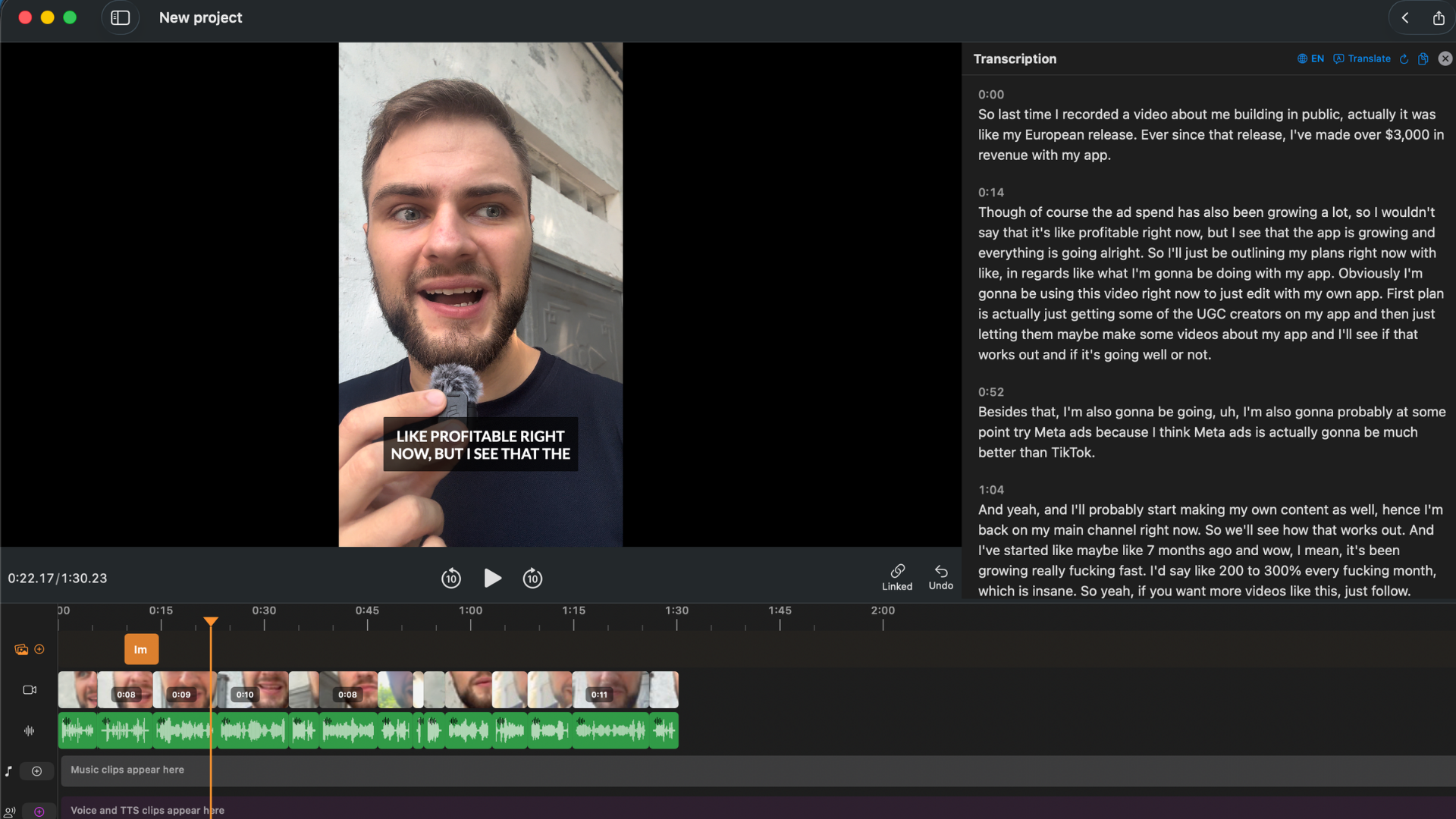
BlitzCut for Mac - transcript panel, video preview, and waveform in one native interface. No upload required.
How the AI silence removal differs from threshold detection: BlitzCut's silence removal uses an AI model trained on conversational speech. Instead of asking "is this audio below a volume level?", it asks "is this audio speech or non-speech?" This means trailing sentence endings are handled correctly, natural breathing pauses between sentences are distinguished from dead air, and content recorded in noisier environments produces cleaner results. For most creators, fewer accidental cuts into actual speech means less manual cleanup after the initial pass.
What separates BlitzCut from dedicated silence removal tools is everything that comes after:
Transcript editing. Once silence is removed, BlitzCut transcribes your video and presents every spoken word as editable text. Delete a sentence, cut a tangent, remove a stumbled take - and the corresponding video footage is removed automatically. For talking-head content, this is the fastest editing method available. No scrubbing a timeline; you read and delete.
AI captions. Captions generate from the transcript automatically. BlitzCut offers standard subtitle positioning, bold center captions for social, and word-by-word karaoke captions - where each word highlights as it's spoken. The karaoke style consistently drives higher engagement on TikTok and Reels than static captions, and BlitzCut generates them automatically with no manual timing.
TTS voiceover. Add AI-generated voiceover for intros, outros, or B-roll sections without re-recording. Or record audio directly in the app.
4K export in all aspect ratios. 9:16 for TikTok and Reels, 16:9 for YouTube, 1:1 for LinkedIn - in one session, no watermark.
Native Mac app, not Electron. BlitzCut is built as a real macOS application using platform-level APIs. It starts fast, uses less RAM than Electron editors, drains less battery, and behaves like a real Mac app - drag-and-drop from Finder, native file dialogs, Dark Mode support. The app is about 100MB installed. Descript's Electron app occupies 400–600MB before you've opened a single project.
iOS + Mac on one subscription. Film on iPhone, AirDrop to Mac, open in BlitzCut for Mac. One subscription covers iPhone, iPad, and Mac - you don't pay separately per platform.
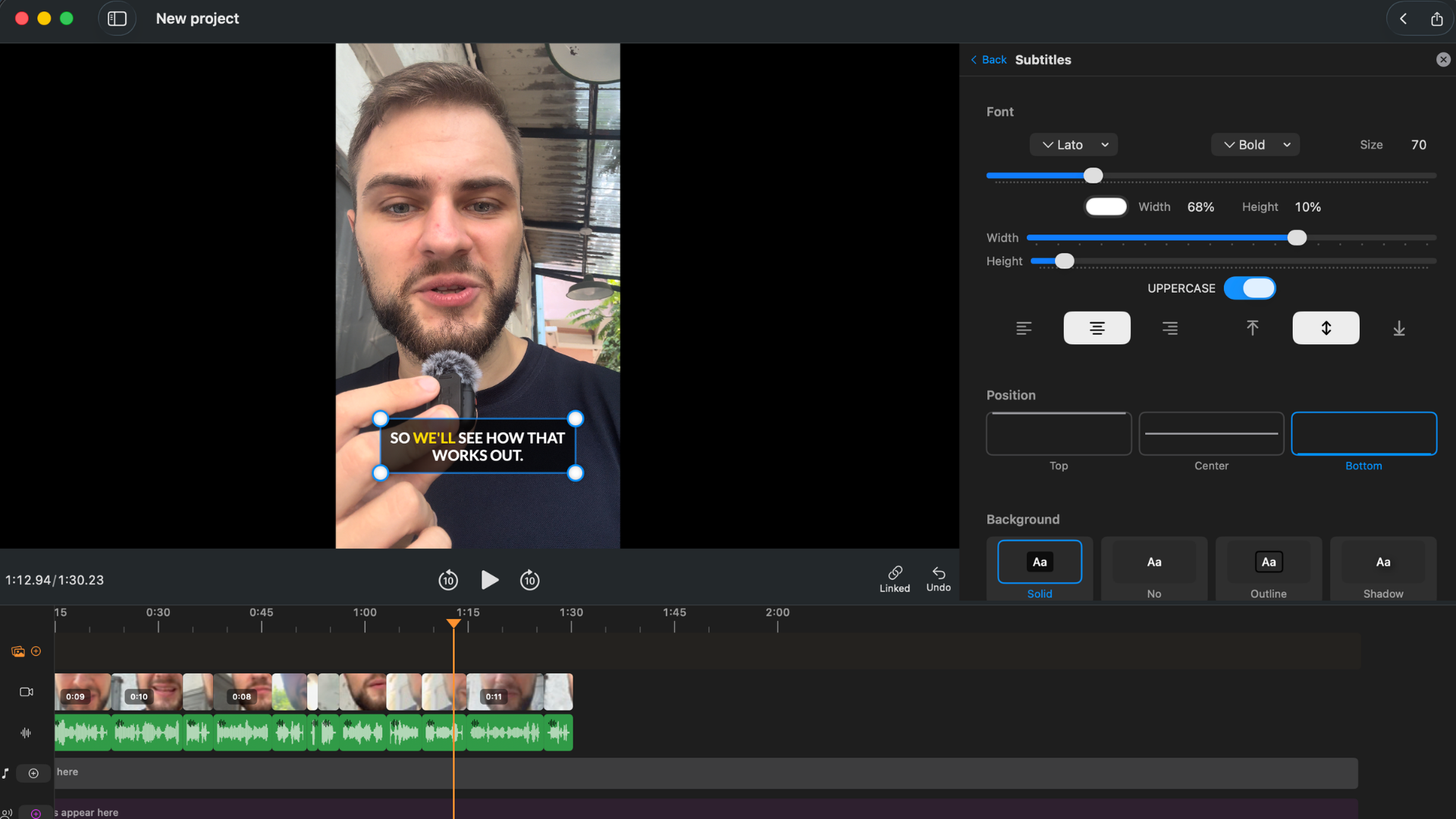
Word-by-word karaoke captions generated automatically from the transcript - no manual timing needed.
Simple pricing - no feature tiers. Every plan includes every feature. The difference between plans is billing frequency only.
| Plan | Price |
|---|---|
| Weekly | $6.99 |
| Monthly | $16.99 |
| Annual | $69.99/year (~$6/month) |
| Lifetime | $129.99 one-time (limited time) |
BlitzCut is best for: Content creators, podcasters, YouTubers, and course creators who want silence removal, captions, text-based editing, and export in one native Mac app - without paying Descript prices or juggling multiple tools.
Try BlitzCut free for 3 days →
2. Recut - Best Dedicated Silence Remover for Mac
Platform: Mac and Windows
Price: $99 one-time purchase
Silence removal: On-device, threshold-based
Speed: ~2.5 minutes for a 10-minute video
App size: ~50MB
Recut is the gold standard for single-purpose silence removal on Mac. Its design philosophy is minimalism: do one thing, do it well, stay out of the way.
The workflow is as simple as it gets:
- Import your video file (drag in or use the file picker)
- Adjust the silence threshold if needed (or leave it at the default)
- Preview the cuts before committing
- Export
Recut detects silence using volume amplitude analysis - it looks for audio that falls below a threshold you set, cuts those sections, and outputs a clean file. The preview mode shows you exactly what will be removed before export. If a cut looks wrong, you adjust the threshold and preview again.
What Recut does that most tools don't: Export an XML project file to Premiere Pro, Final Cut Pro, or DaVinci Resolve. This is significant for editors who want to continue in an NLE - Recut gives you a project file with all the edit points intact, so you can open it in Premiere or Final Cut and continue with color, graphics, and audio without relinking media from a rendered clip.
The r/finalcutpro community consistently recommends Recut for Mac editors. Recent updates added multi-track support (for cameras and microphones recorded on separate tracks), expanded file format support via ffmpeg (MKV, 10-bit 422, formats QuickTime couldn't handle), and Windows compatibility with a single license covering both platforms.
Where Recut has limits: No captions. No transcription. No TTS. No iOS app. Recut is silence removal and nothing else - by design. The threshold detection can also struggle on noisier recordings where background ambient sound sits near the silence level. If your office has air conditioning hum or traffic noise, you may need to fine-tune the threshold carefully or review results after the initial pass.
Recut is best for: Mac editors who need silence removal as a preprocessing step before an NLE workflow, prefer one-time payments, and already have a separate solution for captions. Also the right choice when XML export to Premiere, Final Cut, or DaVinci is a requirement.
3. Timebolt - Best for Professional Multi-Track NLE Workflows
Platform: Mac, Windows
Price: $347 one-time purchase
Silence removal: On-device, threshold + waveform analysis
Speed: ~3.5 minutes for a 10-minute video
Timebolt is the most feature-complete desktop silence remover. The Timebolt co-founder describes the feature set:
- NLE project file export - Premiere Pro, Final Cut Pro, and DaVinci Resolve as full editable project files, not just rendered clips
- Punch-in zoom effects - automatic dynamic zoom synchronized to speech activity, timed to highlight key moments
- Speed up silences - rather than cutting silence entirely, optionally compress it at a faster speed for a different visual pacing style
- Multi-track audio and video - multiple camera angles and audio tracks (mic + game audio, dual-speaker setups) processed simultaneously
- Native Adobe plugin - direct Premiere integration without the XML import step
- Quick keys for rapid timeline editing - keyboard-driven fine-tuning of cut points that goes faster than any NLE's manual tools
- Preview only the silences - play back just the sections being cut before committing, so you can catch edge cases before export
For professional video editors who use silence removal as one step in a complex multi-camera production, Timebolt has capabilities that Recut doesn't match.
The caveats: $347 is steep - significantly more than Recut's $99 for similar baseline silence removal accuracy. Community feedback in r/finalcutpro describes Timebolt as "clunky and not intuitive" compared to Recut's simpler approach. Support response times have also been cited as a friction point by some users. The additional features (zoom effects, multi-track) deliver real value primarily for professional productions - for a solo creator making social media content, they don't translate into practical time savings that justify the price difference over Recut.
Like Recut, Timebolt has no captions, no transcription, and no iOS app.
Timebolt is best for: Professional video editors doing multi-camera productions with multi-track audio who need silence removal integrated into a DaVinci, Premiere, or Final Cut workflow as an editable project file with zoom effects and granular controls.
4. Descript - Best for Podcast Teams, Worst for Solo Speed
Price: $24/month Creator · $16/month Hobbyist (billed annually)
Silence removal: Cloud-based - requires full video upload first
Captions: Yes, AI
Text-based editing: Yes
App size: 400–600MB (Electron)
Descript is the most established name in transcript-based video editing. It does a lot - silence removal, filler word removal, captions, multi-track audio, team collaboration, Studio Sound audio enhancement, and more. For organizations with complex audio production needs and multiple people reviewing the same project, Descript has genuine strengths.
But there's a growing chorus of creators who've found that Descript's expanding feature set has come at the cost of performance and simplicity.
From r/podcasting:
"At $40 a month I wonder every time I use it if I just need to cancel and look elsewhere. It's jam packed with so much AI that it's working against itself."
"It looks like a search engine with all of its AI integrations and popups. I got the job done, but I hated it."
"The UI is hopelessly confusing... I kept telling them to make the UI easy and like everything else and they replied insisting that 'you'll get used to it.' No I didn't."
From r/editors:
"They began to make absurd changes and like every week was a new overhaul, moving menu items around, etc. It's very clunky and not that intuitive now."
"I'm downright disgruntled that they removed the ability to work locally even with the desktop app."
The upload dependency is Descript's biggest friction point for solo creators. Every project begins with a mandatory upload to their cloud servers. On a 20-minute 1080p recording (~1.5–2.5GB), this can mean 5–12 minutes of waiting before you've made a single cut. On a slow connection, or working from a location without reliable Wi-Fi, this becomes a genuine blocker.
Descript is also an Electron app - not a native macOS application. Electron wraps a web app in a desktop window, which means higher memory usage (often 800MB–2GB for the app alone), UI lag with larger projects, and the kind of sluggishness that users in the r/podcasting thread describe as making it "unusable" on longer episodes.
Descript's pricing: $16/month Hobbyist (10 hours transcription/month), $24/month Creator (full AI tools, 4K export). That's $192–$288/year, compared to $69.99/year for BlitzCut - which includes the same core editing features plus karaoke captions and on-device silence removal.
Where Descript is genuinely stronger than BlitzCut:
- Multi-track audio. Two speakers on separate microphones with independent processing
- Studio Sound. One-click audio enhancement for noisy or low-quality recordings
- Team collaboration. Shared projects, comments, review workflows for multi-person teams
- Overdub. AI voice correction using a clone of your own voice
Descript is best for: Podcast production teams with complex audio needs, multi-speaker recording workflows, and team collaboration requirements. Not recommended for solo creators where upload wait time and cost are concerns.
5. CapCut for Mac - Silence Removal With Caveats
Price: Free / $9.99/month Pro
Silence removal: Yes (threshold-based)
Captions: Yes, AI
Text-based editing: No
CapCut has a Mac desktop app with a silence removal feature. The detection is threshold-based and produces reasonable results for most content recorded in quiet environments. The AI captions work. Export covers the main social media formats.
For free video editing on Mac with basic silence removal, CapCut is a functional option.
The caveat in 2026: CapCut's regulatory future in the US has been uncertain due to its ownership. Creators who've built their workflow around CapCut face the risk of the app becoming unavailable or having features restricted. For creators choosing a primary tool in 2026, that uncertainty is worth factoring in. CapCut also doesn't offer text-based editing, TTS voiceover, or karaoke captions in the same integrated form that BlitzCut does. The free tier includes watermarks on exports.
CapCut is best for: Creators already comfortable with the CapCut ecosystem who want a desktop version of the same tool and are comfortable with the platform uncertainty.
6. Final Cut Pro - No Silence Removal
Price: $299 one-time purchase
Silence removal: None built-in
Captions: Manual (or via third-party plugins)
Text-based editing: No
Final Cut Pro is the most capable professional video editor on Mac. It is not a silence removal tool and doesn't try to be.
There's no automatic silence detection in Final Cut Pro. Removing pauses means scrubbing the timeline manually, finding each gap, setting in and out points, and deleting. Professional editors who use Final Cut Pro for talking-head content typically add a dedicated silence removal tool as a preprocessing step - run Recut or Timebolt first to clean the silence, then import the cleaned file (or the XML project from Recut) into Final Cut for color, music, and final polish.
Final Cut Pro is best for: Professional editors doing multi-camera, color grading, and complex productions. Pair it with Recut or Timebolt for silence removal preprocessing.
7. iMovie - Free, No Silence Removal
Price: Free
Silence removal: None
Captions: None (manual text overlays only)
iMovie is free, native, and sufficient for basic video editing. It has no automatic silence removal feature whatsoever. Every pause has to be found and cut manually.
iMovie is best for: Occasional editors making simple videos who don't need silence removal or captions.
8. Adobe Premiere Pro - Silence Detection as a Side Feature
Price: $55/month (Creative Cloud subscription)
Silence removal: Semi-automatic via Essential Sound panel
Captions: Yes (AI, via Transcript panel)
Text-based editing: Basic
Adobe Premiere Pro has a silence removal tool buried in the Essential Sound panel. It works, but it's several menu levels deep, slower than any dedicated tool, and less accurate than BlitzCut or Recut for the specific task of cleaning talking-head content. Most editors who use Premiere for talking-head video still use a separate silence removal tool.
At $55/month ($660/year), Premiere is justified for professional productions but hard to justify if your primary need is silence removal and captions for social content.
Premiere is best for: Professional editors already on Creative Cloud who can live with Premiere's slower silence removal as a built-in convenience.
9. Audacity - Free, Audio Files Only
Platform: Mac, Windows, Linux
Price: Free (open source)
Works on video: No
Audacity is a free, professional-grade audio editor with a Truncate Silence feature - it finds audio below a threshold and removes or shortens it with full manual control over threshold level, minimum silence duration, and behavior.
The fundamental limitation: Audacity works on audio files only. If you have a video recording, you'd need to extract the audio, process it in Audacity, then sync it back to the video in a separate step. For most video creators, this workflow is more cumbersome than using any of the tools above.
Audacity is best for: Podcasters working in audio-only formats (MP3, WAV output) or audio engineers processing raw audio before video post. Not recommended for video creators who need a video file output.
Side-by-Side: Processing a 10-Minute Recording
| App | Processing time | Requires upload | Manual review needed | Captions | NLE XML export |
|---|---|---|---|---|---|
| BlitzCut | ~90 sec | No | Minimal | Yes + karaoke | No |
| Recut | ~2.5 min | No | Low | No | Yes |
| Timebolt | ~3.5 min | No | Low | No | Yes |
| Descript | 8–15 min (incl. upload) | Yes | Low | Yes | No |
| CapCut | ~1–2 min | No | Low | Yes | No |
| Premiere Pro | Manual | No | Full manual | Plugin needed | N/A |
| Audacity | Manual | No | Full manual | No | N/A |
Pricing Over Two Years
| App | Year 1 | Year 2 | 2-Year Total |
|---|---|---|---|
| BlitzCut Annual | $69.99 | $69.99 | $139.98 |
| BlitzCut Lifetime | $129.99 | $0 | $129.99 |
| Recut | $99 | $0 | $99 |
| Timebolt | $347 | $0 | $347 |
| Descript Creator | $288 | $288 | $576 |
| Descript Hobbyist | $192 | $192 | $384 |
| CapCut Pro | $119.88 | $119.88 | $239.76 |
| Final Cut Pro | $299 | $0 | $299 |
| Premiere Pro | $660 | $660 | $1,320 |
| Audacity | $0 | $0 | $0 |
BlitzCut's lifetime plan at $129.99 is more cost-effective than Descript Creator in fewer than 6 months. Over a 2-year horizon, BlitzCut Lifetime beats every paid option except Recut - and Recut doesn't include captions, transcription, or TTS.
What the Creator Community Says
Discussion in r/podcasting, r/finalcutpro, and r/editors surfaces consistent themes:
Recut earns consistent praise for its simplicity and reliability. Creators describe it as a "no-brainer" for threshold-based silence removal. The main complaint is that it's silence-only - creators who also need captions add a second tool. Recent updates (multi-track support, ffmpeg file formats, Windows support) have expanded its usefulness without changing its minimalist philosophy.
Timebolt is recommended for professional multi-track workflows but described by some users as "clunky and not intuitive" compared to Recut. Its price ($347) positions it as a serious investment - reasonable for a professional production workflow, harder to justify for solo content creators.
Descript recommendations have shifted in 2026. Users who recommended it heavily in 2022–2024 now frequently add qualifiers: good for teams and complex audio, but for solo creators the upload wait and Electron performance have become harder to justify as the subscription price has risen. Multiple threads describe long-time users actively looking for alternatives.
BlitzCut comes up as an alternative for creators who want the transcript-based editing Descript pioneered - without the upload dependency, on a native Mac app, at a significantly lower price.
Which Tool Should You Use?
I create talking-head content and want silence removal, captions, and text editing in one Mac app: → BlitzCut. $69.99/year or $129.99 lifetime. Silence removal, captions, transcript editing, TTS, 4K export.
I need silence removal only and want a one-time payment: → Recut ($99). Clean, fast, reliable. XML export for NLE integration. Mac and Windows.
I'm a professional editor using Premiere/Final Cut/DaVinci with multi-camera or multi-track audio: → Timebolt ($347). Strongest option for complex NLE workflows with multi-track audio and zoom effects.
I produce a professional podcast with multiple speakers, noisy audio, or team review workflows: → Descript ($288/year). Multi-track and Studio Sound features justify the cost for complex audio.
I need something free and don't post frequently: → BlitzCut's 3-day free trial, then evaluate. Audacity if you're working in audio-only format.
I'm already on Adobe Creative Cloud: → Premiere Pro's built-in silence detection for existing CC subscribers. Slower, but avoids adding a tool.
Frequently Asked Questions
What is the fastest silence remover for Mac in 2026? BlitzCut. On-device AI removes silence from a 10-minute recording in ~90 seconds with no upload wait. Recut is the fastest dedicated single-purpose tool at ~2.5 minutes.
What Mac video editor has the best automatic silence removal? BlitzCut has the fastest and most accurate silence removal of any full video editor on Mac in 2026 - on-device AI with no upload required, typically completing in under 90 seconds for a 10-minute recording.
Does any Mac silence remover work without internet? BlitzCut (silence removal only), Recut, Timebolt, and Audacity all process locally with no internet connection. Descript requires cloud upload and does not work offline.
Does Final Cut Pro remove silence automatically? No. Final Cut Pro has no automatic silence removal. You need to pair it with a dedicated tool like Recut or Timebolt, or switch to an editor that includes it (like BlitzCut).
What's the difference between threshold-based and AI-based silence removal? Threshold-based tools (Recut, Timebolt) cut audio that falls below a volume level you set. AI-based tools (BlitzCut) recognize speech vs. non-speech patterns regardless of exact volume - which handles trailing sentences, soft speech, and noisier recordings more gracefully. For clean recordings in quiet environments, both methods produce similar results.
Can I remove silence from video on Mac without uploading to the cloud? Yes. Recut and Timebolt process locally; BlitzCut removes silence locally and never uploads your video file, though its transcription and captions use cloud AI. Descript requires cloud upload before editing.
Is Descript worth it for Mac in 2026? For solo creators who primarily need silence removal and captions, Descript's upload requirement, Electron performance issues, and $24/month price make it hard to recommend when BlitzCut does the same core workflow faster, on-device, for $69.99/year. For podcast teams with multi-track audio and collaboration needs, Descript remains the strongest option.
What's the cheapest Mac app with silence removal and captions? BlitzCut - $69.99/year for full features, or $129.99 lifetime (limited time). Both plans include silence removal, AI captions, text-based editing, TTS, and 4K export with no watermark.
Does Recut work on Mac in 2026? Yes. Recut is available for Mac and remains one of the most recommended dedicated silence removal tools in the Mac creator community.
Related: BlitzCut for Mac: Everything You Need to Know · Recut vs BlitzCut for Mac · BlitzCut vs Descript
Editing a talking-head video?
BlitzCut is available on Android, iPhone, iPad, and Mac. It is designed for recorded UGC-style videos, founder-led ads, tutorials, and testimonials and other talking-head content.
Try it for freeRelated Articles
Keep Reading

Best AI Clipping Tools (2026): Klap, OpusClip, Vizard and More Compared
Find the right AI clipping tool for podcasts, streams, and webinars. Klap, OpusClip, Vizard, Quso, and BlitzReels compared on price per clip, credits, and editing.

Best AI Video Editor for iPhone (2026): 8 Apps Compared
The best AI video editor for iPhone depends on your footage. BlitzCut, CapCut, Edits, Captions, Premiere, OpusClip, VN, and InShot compared on AI features and price.

Best AI Video Editor for Mac (2026): 6 Apps Compared
The best AI video editor for Mac: BlitzCut, Descript, CapCut, Final Cut Pro, Premiere Pro, and DaVinci Resolve compared on AI features, what runs on your Mac, and price.