
How to Edit Podcasts on Mac Fast (Without Descript)
Edit podcast videos on Mac without Descript - cut silence, add captions, and export in under 10 minutes. Step-by-step guide for 2026, no $24/month subscription.


If you've spent any time in podcasting communities in 2026, you've seen the Descript frustration. The threads come up regularly - long-time users describing crashes on episodes over 60 minutes, upload wait times eating into their editing window, a UI that reorganizes itself with every update.
A creator on r/podcasting put it plainly:
"At $40 a month I wonder every time I use it if I just need to cancel and look elsewhere. It's jam packed with so much AI that it's working against itself."
Another described the learning curve:
"The UI is hopelessly confusing... I kept telling them to make the UI easy and like everything else and they replied insisting that 'you'll get used to it.' No I didn't."
And a professional editor on r/editors, who had used Descript for years, summarized the direction the tool has taken:
"They began to make absurd changes and like every week was a new overhaul, moving menu items around, etc. It's very clunky and not that intuitive now."
These aren't fringe complaints. They reflect a real tradeoff: Descript has expanded into a platform with AI features, collaboration tools, and capabilities that most solo podcasters never use - and the tool has become slower, more complex, and more expensive in the process.
There's a faster way to edit podcast videos on Mac. This guide walks through the complete workflow using BlitzCut for Mac, which handles silence removal, transcript editing, captions, and multi-format export in one native app - for a fraction of Descript's annual cost.
What Podcast Video Editing Actually Requires
Before comparing tools, it's worth being specific. "Editing a podcast" covers a wide range of workflows. For a solo creator making video clips for social media from a podcast recording, the core requirements are:
- Remove silence and dead air - the gaps between sentences, the "um" hesitations, the mid-thought pauses that kill pacing
- Trim the content - cut the pre-recording setup chatter, remove tangents, tighten the overall structure
- Add captions - for Reels, TikTok, YouTube Shorts, and accessibility
- Export at the right size - 9:16 for Reels and TikTok, 16:9 for YouTube, 1:1 for LinkedIn
That's the workflow. A tool that handles all four in one session - without requiring you to upload your footage or switch apps - saves real time across a week of regular production.
Where Descript genuinely excels: Multi-track audio editing for multiple speakers recorded on separate microphones, Studio Sound audio enhancement for low-quality recordings, and team collaboration for shows with multiple editors. If your podcast production involves these, Descript's strengths are real and worth paying for.
But for a solo podcaster making a clean single-microphone or stereo recording and producing video clips for social - Descript's strengths are mostly irrelevant, and its friction points are very real.
Why Descript Is Frustrating for Solo Podcasters
Let's be specific about what the frustrations are - not as a hit piece, but because understanding the problems helps you understand whether switching makes sense for you.
1. The mandatory upload
Before you can do anything in Descript - including opening a project, running silence removal, or making a single text edit - your video file uploads to Descript's servers. This isn't optional. Descript no longer supports local-only editing.
From r/editors:
"I'm downright disgruntled that they removed the ability to work locally even with the desktop app."
For a 20-minute 1080p podcast recording (~1.5–2GB), the upload typically takes 4–12 minutes on a home broadband connection. For a 60-minute 4K episode, you might be waiting 20–40 minutes before you've made a cut. That's a lot of time doing nothing.
2. Electron performance on longer episodes
Descript is not a native Mac app - it's built on Electron, a framework for packaging web apps as desktop software. Electron apps run a full browser engine in the background, which means higher RAM usage, more CPU consumption, and less efficient file handling than native apps.
On shorter projects this is manageable. On hour-long recordings, users consistently report lag, slow response, and crashes. Multiple threads on r/podcasting describe being unable to export an episode after hours of editing work, waiting on support to resolve the issue.
The original poster in one r/podcasting thread described their experience:
"Just editing a long video podcast episode and asking myself how much time I'm actually saving using this program with how much it lags and crashes. I feel like I'm contacting their team every other week with a new issue."
3. Feature bloat
Descript's 2025–2026 direction has been to add more AI features: AI video generation, Underlord AI editing assistant, 61-language caption translation, AI dubbing. These are capabilities that serve enterprise customers and specific professional use cases.
For a podcaster who needs to remove silence, add captions, and export - the growing feature set means more interface to navigate, more things that can break, and a higher subscription price to fund development of tools they'll never touch.
"It looks like a search engine with all of its AI integrations and popups." - r/podcasting
4. Pricing
Descript's free tier limits you to 60 media minutes per month with watermarked exports - most podcasters hit this ceiling in the first week. The Hobbyist plan ($16/month, billed annually) caps transcription at 10 hours per month. The Creator plan ($24/month annually) is where most video podcasters actually need to be. That's $288/year for a tool that requires cloud upload and runs on Electron.
BlitzCut costs $69.99/year. The lifetime plan is $129.99 - cheaper than 6 months of Descript Creator. All features included, no tiers.
The BlitzCut Workflow for Podcast Video Editing on Mac
BlitzCut for Mac handles the complete podcast video production workflow in a single native app. Here's the step-by-step process for a typical episode.
Step 1: Import Your Recording
Open BlitzCut for Mac and import your podcast recording. BlitzCut accepts standard video formats - MP4, MOV, and other common outputs from recording software like Riverside, SquadCast, Zoom, or a local recording setup.
Importing uses the native macOS file picker. Drag the file in from Finder or use Command+O. The file stays on your machine - nothing is uploaded.
Time: under 30 seconds.
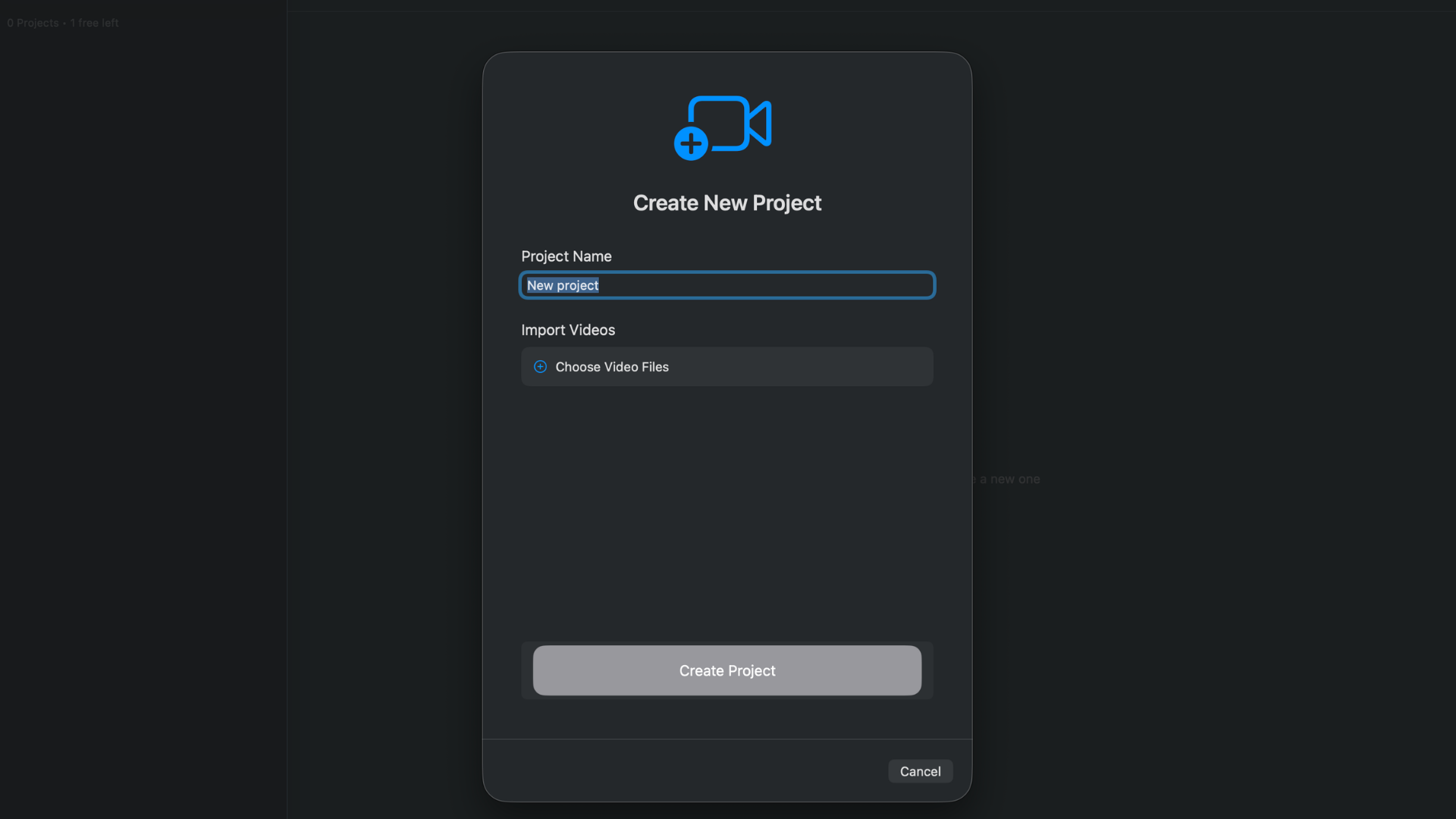
Import via drag-and-drop or Command+O. File stays on your machine - nothing is uploaded.
Step 2: Silence Removal Runs Automatically
BlitzCut's silence removal begins processing as soon as you import. The AI analyzes your audio on-device - using the Apple Silicon chip in your Mac - and marks all the gaps, pauses, and dead air in your recording.
For most podcast recordings, processing completes in:
- 5-minute clip: ~30 seconds
- 20-minute episode: ~2 minutes
- 60-minute recording: ~5–6 minutes
This runs in the background. You don't need to watch it. Set it going, go make coffee, come back to a cleaned file.
Important: BlitzCut's silence removal uses AI detection, not simple volume threshold. It understands the difference between a natural sentence-ending pause and genuine dead air. This means fewer accidental cuts into actual speech - and less manual review work afterward.
Time: 1–6 minutes, unattended.
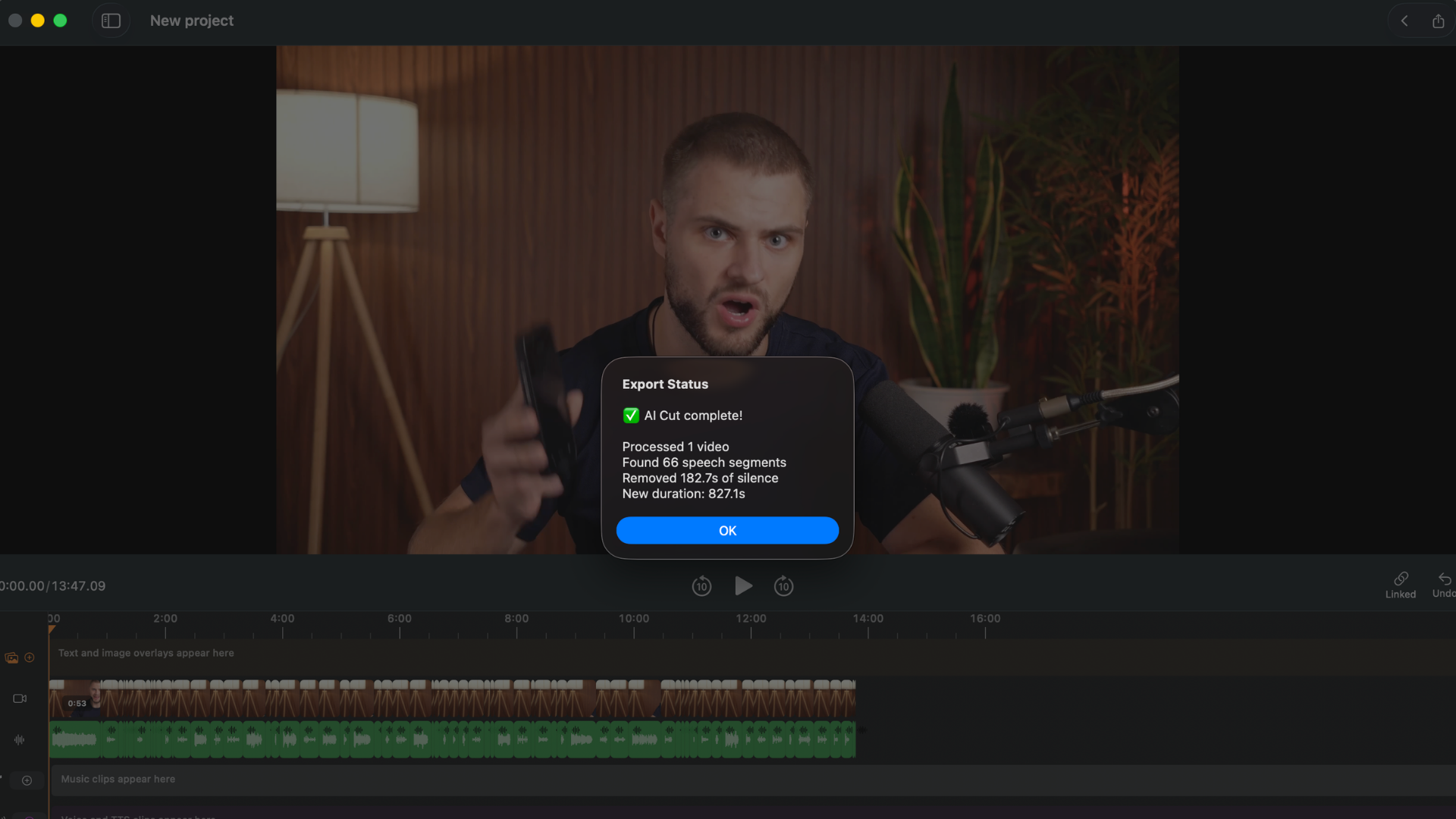
Silence removed on-device in 1–6 minutes depending on length. No upload, no wait - runs in the background.
Step 3: Review and Transcript Edit
Once silence is removed, BlitzCut transcribes your podcast automatically. The full spoken content appears as text in the transcript panel alongside your video.
This is where the majority of editing happens - and it's significantly faster than timeline scrubbing:
- Cut the pre-recording setup: Find the "okay we're recording" moment in the transcript, select everything before it, delete
- Remove tangents and mistakes: Highlight the paragraph you want to cut, delete it. The footage goes with it.
- Fix stumbled sections: Find the bad take in the transcript, select it along with the retry, keep the version you want
- Tighten pacing: Remove long digressions by selecting and deleting in the transcript
Every deletion in the transcript removes the corresponding video footage. You're editing video at the speed of reading text. For a well-organized podcast where you mostly need to clean the top and tail and remove a few off-topic moments, this step can take as little as 5 minutes.
Time: 5–20 minutes depending on how much structural editing the episode needs.
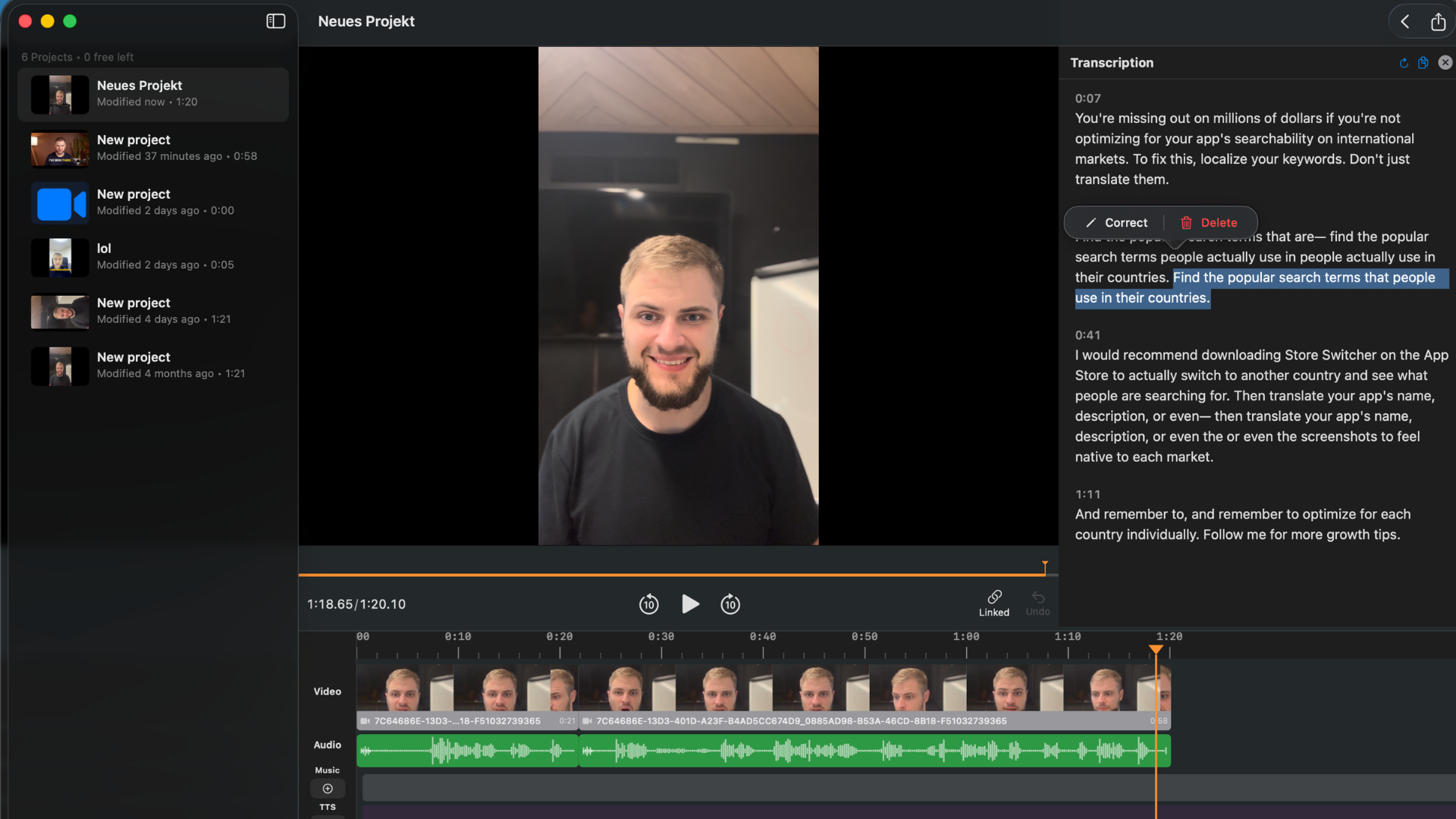
Every spoken word appears as editable text. Delete a sentence and the footage cuts with it - no timeline scrubbing.
Step 4: Add Captions
BlitzCut generates captions from the transcript in one tap. Because the transcript already exists, caption generation is fast - the text is already there, it just needs to be timed and styled.
Caption style options:
- Standard subtitles - clean, bottom-of-frame positioning for YouTube
- Bold center captions - large, centered text for short-form social
- Word-by-word karaoke - each word highlights as it's spoken, the style that performs best on TikTok and Reels
For podcast clips going to Reels or TikTok, karaoke captions consistently outperform static subtitles on completion rate and engagement. BlitzCut times them automatically from the transcript - no manual timing adjustment required.
Customize the font, size, color, and position after choosing a preset. What you see in the preview is what you get in the export.
Time: 1–3 minutes to choose style and make any customizations.
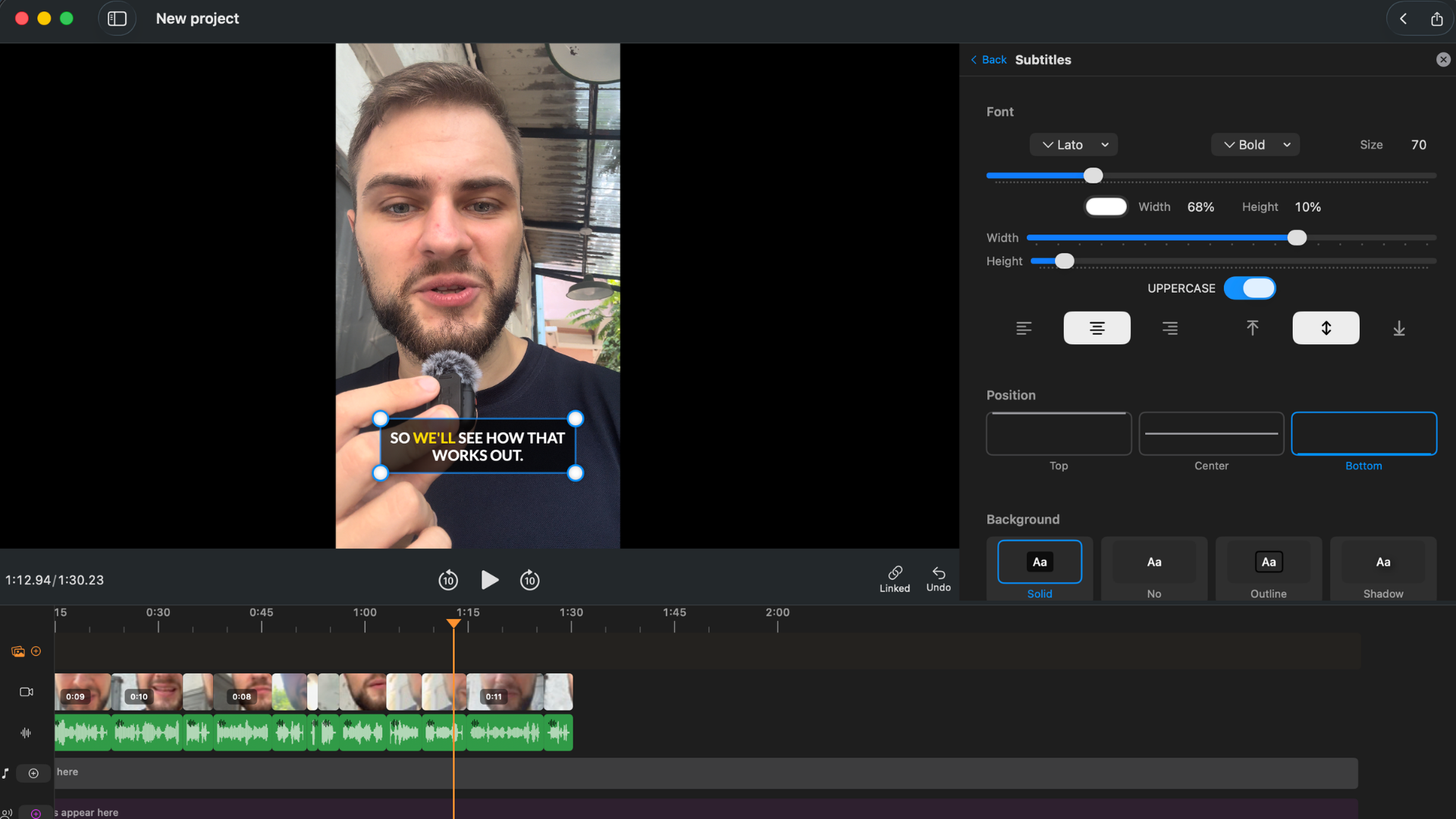
Karaoke captions timed automatically from the transcript. No manual timing - choose a style and export.
Step 5: Export
Choose your aspect ratio and resolution:
- 9:16 for TikTok, Instagram Reels, YouTube Shorts
- 16:9 for YouTube long-form
- 1:1 for LinkedIn, Twitter/X
Export at up to 4K. No watermark. BlitzCut writes the file to wherever you point the native macOS save dialog - your Desktop, a specific project folder, external drive, or iCloud.
Time: 1 min active work, 2–5 minutes encoding in the background.
Total Active Time: 10–15 Minutes
| Step | Active time | Background wait |
|---|---|---|
| Import | 30 sec | - |
| Silence removal | 0 (runs unattended) | 1–6 min |
| Transcript editing | 5–20 min | - |
| Captions | 1–3 min | - |
| Export | 1 min | 2–5 min |
The silence removal and export both run in the background. Active editing time for a 20–30 minute podcast episode is typically 10–15 minutes. Compare that to waiting 5–12 minutes just for Descript's upload to complete before you've done anything.
BlitzCut vs Descript for Podcast Video - Direct Comparison
| BlitzCut for Mac | Descript Creator | |
|---|---|---|
| Annual price | $69.99/year | $288/year |
| Lifetime option | $129.99 | No |
| Upload required before editing | No | Yes |
| Time before first edit | Instant | 5–15 min upload wait |
| Silence removal | On-device AI | Cloud-based |
| Transcript editing | Yes | Yes |
| AI captions | Yes | Yes |
| Karaoke captions | Yes | No |
| TTS voiceover | Yes (general TTS) | No (Overdub = voice cloning only) |
| Multi-track audio | No | Yes |
| Studio Sound | No | Yes |
| Native Mac app | Yes | No (Electron) |
| App size | About 100MB | 400–600MB |
| iOS companion | Full-featured | Limited |
| Works without Wi-Fi | Silence removal only | No |
Savings switching from Descript Creator to BlitzCut Annual: $216/year. Savings over 2 years vs Descript with BlitzCut Lifetime: $446.
When to Keep Descript
There are genuine use cases where Descript remains the better tool:
Multi-speaker, multi-track recordings. If you record two hosts on separate microphones and need to process each track independently - applying different noise reduction, different EQ, editing each speaker's audio without affecting the other - Descript's multi-track editing handles this better than BlitzCut currently does.
Low-quality audio that needs Studio Sound. Descript's Studio Sound AI applies noise reduction, room correction, and EQ in one click, significantly improving recordings made with consumer microphones or in acoustic environments. If your audio consistently needs remediation, Studio Sound is worth considering.
Team production with multiple editors. If an assistant producer makes first cuts that you then review and refine - or if a client needs to review cuts and leave comments - Descript's shared workspace and comment system serves this workflow. BlitzCut is a solo creator tool.
If none of those apply to your situation, BlitzCut does everything else faster, for less money, on a more nimble native Mac app.
Other Alternatives Worth Mentioning
GarageBand / Logic Pro: Audio mastering tools, not video editors. Excellent for cleaning audio before or after video editing, but they don't handle video files, generate captions, or export social media formats. Logic Pro costs $199.
Final Cut Pro: Professional NLE with no automatic silence removal. Pair it with Recut for silence preprocessing if you're committed to Final Cut as your primary editor.
Recut: Dedicated silence remover for Mac. Fast, accurate, $99 one-time. No captions, no transcription, no iOS app. If you need NLE XML export and silence removal only, Recut is worth considering alongside BlitzCut.
DaVinci Resolve: Free, extremely capable NLE with text-based editing in the paid Studio version ($295 one-time). Overkill for podcast clips, but legitimate for long-form content that needs professional color and audio. Silence removal is not a built-in feature.
Pricing: The Real Numbers
| Monthly | Annual | Lifetime | |
|---|---|---|---|
| BlitzCut | $16.99/mo* | $69.99/yr | $129.99 |
| Descript Hobbyist | $24/mo | $192/yr | - |
| Descript Creator | $35/mo | $288/yr | - |
| Recut | - | - | $99 |
| Final Cut Pro | - | - | $299 |
*US prices. BlitzCut pricing varies by region; see the price in your country.
Try BlitzCut for Mac free for 3 days →
The 3-day free trial gives you access to every feature - silence removal, transcript editing, karaoke captions, 4K export, no watermark. Enough time to edit a real episode and decide if the workflow fits.
Frequently Asked Questions
Can you edit a podcast on Mac without Descript? Yes. BlitzCut for Mac handles the complete podcast video editing workflow - on-device silence removal, transcript editing, AI captions, and multi-format 4K export - without a Descript subscription. The annual plan is $69.99, and a lifetime license is available for $129.99.
Does BlitzCut upload my podcast recording to the cloud? Silence removal processes entirely on-device - no upload required, works without Wi-Fi. AI caption generation and transcription use AI processing but do not require uploading your raw video file to an external server.
How long does it take to edit a 30-minute podcast episode in BlitzCut? Active editing time is approximately 10–15 minutes for a 30-minute recording. Silence removal runs unattended in 3–5 minutes. Transcript editing is the main time variable depending on how much structural cutting the content needs.
Does BlitzCut do multi-track podcast editing? BlitzCut handles single-track or stereo mixed recordings. If you record two speakers on separate microphone tracks that need individual processing, Descript or a DAW like Logic Pro handles that specific step better.
Is BlitzCut a native Mac app? Yes. BlitzCut for Mac is a native macOS application - not Electron. It's About 100MB installed, starts quickly, uses less RAM than Electron editors, and integrates with macOS conventions (drag-and-drop, native file dialogs, Dark Mode, keyboard shortcuts).
What's the cheapest way to edit podcast videos on Mac with captions? BlitzCut's annual plan at $69.99/year includes silence removal, AI captions (including karaoke), transcript editing, TTS, and 4K export with no watermark. The lifetime plan at $129.99 is cheaper over any multi-year horizon. Both are significantly less than Descript's pricing.
Related: BlitzCut for Mac: Everything You Need to Know · BlitzCut vs Descript · Best Mac Apps for Silence Removal in 2026
Editing a talking-head video?
BlitzCut is available on Android, iPhone, iPad, and Mac. It is designed for recorded UGC-style videos, founder-led ads, tutorials, and testimonials and other talking-head content.
Try it for freeRelated Articles
Keep Reading

Best AI Clipping Tools (2026): Klap, OpusClip, Vizard and More Compared
Find the right AI clipping tool for podcasts, streams, and webinars. Klap, OpusClip, Vizard, Quso, and BlitzReels compared on price per clip, credits, and editing.

Best AI Video Editor for iPhone (2026): 8 Apps Compared
The best AI video editor for iPhone depends on your footage. BlitzCut, CapCut, Edits, Captions, Premiere, OpusClip, VN, and InShot compared on AI features and price.

Best AI Video Editor for Mac (2026): 6 Apps Compared
The best AI video editor for Mac: BlitzCut, Descript, CapCut, Final Cut Pro, Premiere Pro, and DaVinci Resolve compared on AI features, what runs on your Mac, and price.