
Best Descript Alternatives for Mac With Text-Based Editing in 2026
Best Descript alternatives for Mac text-based video editing in 2026. Native apps, lower-cost options, and offline-friendly tools compared for solo creators.


The best Descript alternatives for Mac with text-based editing are BlitzCut for solo creators, Adobe Premiere for professional editors, and Builder NLE for Final Cut Pro users. Descript made text-based video editing mainstream: transcribe the video, edit the words, and the timeline follows. For podcasts, interviews, tutorials, and talking-head videos, that is much faster than scrubbing a waveform.
But Descript is not the only way to edit video from a transcript on Mac in 2026. If you want a native Mac workflow, lower pricing, less cloud dependency, or a simpler tool for solo creators, there are better fits.
This guide compares the strongest Mac options for creators who specifically want transcript-driven video editing, not just a traditional timeline.
Quick Answer
| Tool | Best For | Text-Based Editing | Mac App | Pricing Style |
|---|---|---|---|---|
| BlitzCut for Mac | Solo creators, podcasts, clips, courses | Yes | Native Mac app | Free trial, subscription, lifetime offers |
| Adobe Premiere | Professional editors already in Adobe | Yes | Native desktop app | Subscription |
| Builder NLE | Final Cut Pro transcript workflows | Yes | Native Mac app | One-time purchase |
| Descript | Teams and complex podcast production | Yes | Electron desktop app | Subscription |
| Final Cut Pro + helpers | Pro finishing after a transcript rough cut | Partial via add-ons | Native Mac app | One-time plus add-ons |
Best overall Descript alternative for Mac creators: BlitzCut for Mac. It gives you text-based editing, on-device silence removal, AI captions, karaoke captions, TTS, and 4K export in one focused Mac app.
What Counts as a Real Descript Alternative?
For this comparison, a real Descript alternative needs more than automatic captions. It should let you edit spoken video by working with text.
That means:
- The app transcribes the video
- The transcript stays linked to the video
- Deleting words or sentences cuts the matching footage
- The workflow is faster than timeline scrubbing
- Captions can be generated from the transcript
A silence remover like Recut or TimeBolt is useful, but it is not a full Descript alternative by itself. A traditional editor like Final Cut Pro is powerful, but it is not transcript-first unless you add another workflow around it.
1. BlitzCut for Mac - Best Descript Alternative for Solo Creators
Best for: YouTubers, podcasters, course creators, coaches, educators, and short-form creators
Mac app: Native macOS
Text-based editing: Yes
Silence removal: On-device AI
Captions: Yes, including word-by-word karaoke captions
Pricing: Free trial, weekly, monthly, annual, and limited lifetime offers through the App Store
BlitzCut for Mac is the closest Descript alternative for creators who want the transcript editing workflow without Descript's complexity.
The workflow is simple:
- Import a video
- BlitzCut removes silence
- BlitzCut transcribes the video
- You delete words, sentences, or sections from the transcript
- The video cuts automatically
- Add captions and export
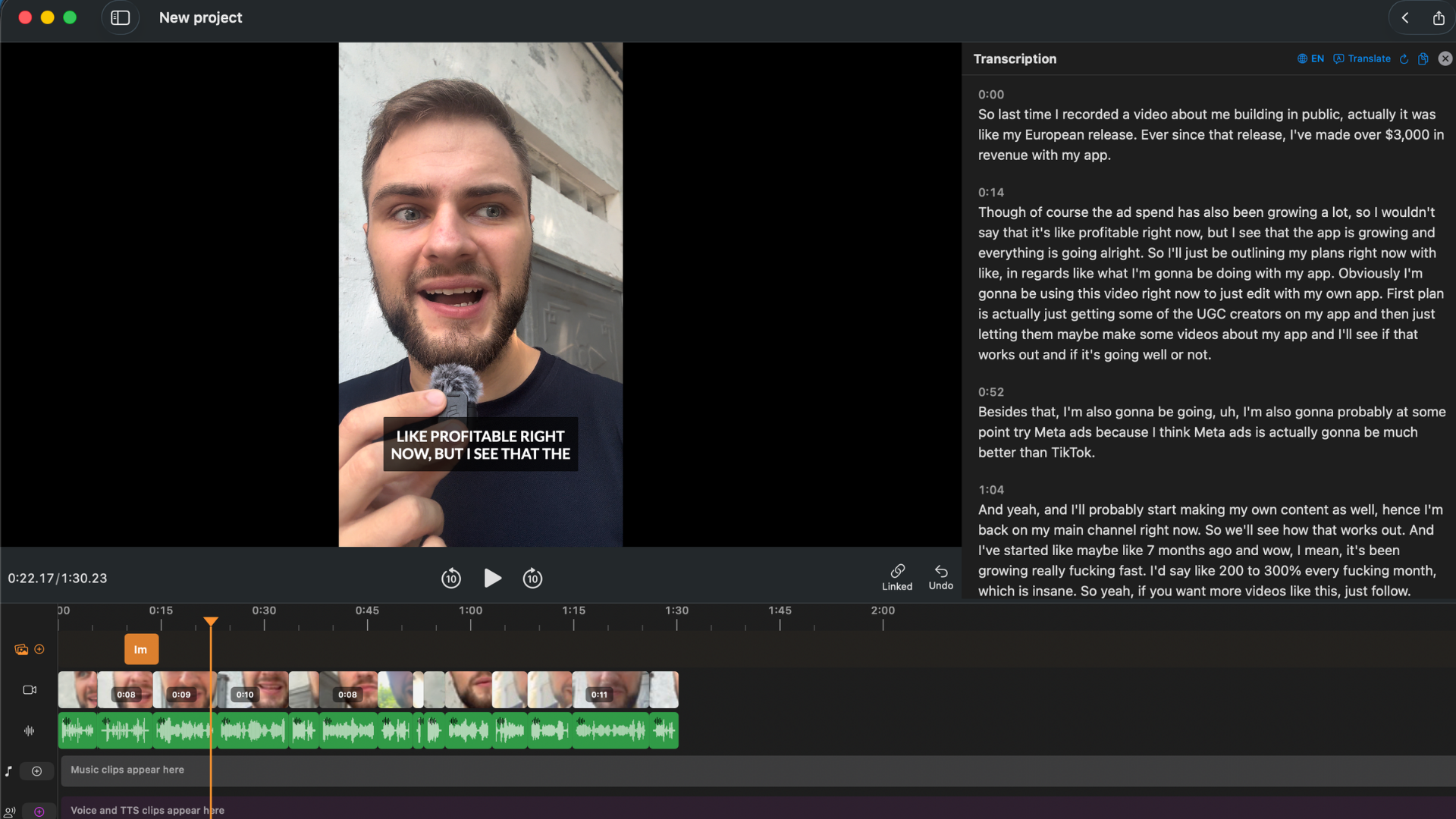
BlitzCut for Mac keeps the transcript, preview, and waveform in one focused editing interface.
The important difference from Descript is focus. BlitzCut is not trying to become a full media production platform with avatars, team workspaces, and a growing menu of AI tools. It is built around the jobs most talking-video creators repeat every week:
- Remove dead air
- Cut mistakes from the transcript
- Add captions
- Export for YouTube, TikTok, Reels, Shorts, courses, or podcasts
BlitzCut is also a native Mac app. That matters if you edit on a MacBook, because native apps generally feel lighter than Electron apps when opening files, scrolling transcripts, and exporting video.
Where BlitzCut is better than Descript for solo creators:
- Cleaner workflow for talking-head video
- Native Mac app instead of Electron
- On-device silence removal
- Full iPhone, iPad, and Mac coverage under one app ecosystem
- Karaoke captions built into the same workflow
- Lower-cost plans than Descript Creator
Where Descript is still stronger:
- Multi-track podcast production
- Studio Sound
- Team review workflows
- Brand and enterprise collaboration
Use BlitzCut if: you want Descript-style transcript editing for videos where speech is the content, but you do not need a full team podcast production suite.
2. Adobe Premiere - Best for Professional Editors Already Paying Adobe
Best for: Professional editors, agencies, client work, complex timelines
Mac app: Native desktop app
Text-based editing: Yes
Pricing: Subscription
Adobe Premiere has strong text-based editing. It can transcribe source footage, let you build a rough cut from the transcript, remove repeated words and pauses, and generate captions from the edited sequence.
If you already know Premiere, this is powerful. You can do the transcript rough cut, then continue with color, audio, graphics, multicam, effects, and delivery inside the same professional NLE.
The tradeoff is complexity and price. Premiere is a full professional editor. For a solo creator who just wants to cut a talking-head video and add captions, opening Premiere can feel like using a film studio tool for a creator workflow.
Use Premiere if: you already pay for Adobe, edit client work, or need a professional timeline after the transcript rough cut.
Skip Premiere if: your main job is publishing talking videos quickly and you do not want a full NLE subscription.
3. Builder NLE - Best Text-Based Companion for Final Cut Pro
Best for: Final Cut Pro editors who want transcript-driven story building
Mac app: Yes
Text-based editing: Yes
Pricing: One-time purchase
Builder NLE is a Mac app built around text-based editing for Final Cut Pro workflows. It is not trying to replace Final Cut. It is designed to help you build stories from transcripts, then send the result into Final Cut for finishing.
That makes it a good fit for documentary, interview, and narrative projects where the editor wants to assemble a story from spoken material before moving into a traditional NLE.
For solo social creators, it may be more tool than you need. It is strongest when Final Cut Pro is already your finishing environment.
Use Builder NLE if: you live in Final Cut Pro and want a transcript-first story-building layer.
Skip it if: you want one app for silence removal, transcript editing, captions, and export.
4. Descript - Still Best for Teams and Podcast Production
Descript is still a serious tool. It is popular because the core idea works: editing audio and video like a document is genuinely faster for spoken content.
Descript is strongest when you need:
- Multi-track podcast editing
- Studio Sound
- Speaker labels across long episodes
- Team comments and review
- Shared projects
- Cloud-backed collaboration
- AI tools beyond basic editing
The problem is that many solo creators do not need most of that. If you are making TikToks, Reels, YouTube Shorts, course modules, product explainers, or single-speaker videos, Descript can feel heavier and more expensive than the job requires.
Use Descript if: you run a team podcast or need its audio cleanup and collaboration features.
Use a Descript alternative if: you mostly need transcript cuts, captions, and export.
Tools That Are Useful but Not True Text-Based Editors
Some Mac tools are worth knowing, but they are not direct Descript replacements.
Recut: Excellent automatic silence remover for Mac. Useful before Premiere, Final Cut, or DaVinci. Not a transcript editor.
TimeBolt: Strong desktop silence remover with NLE export. Useful for pro workflows. Not a simple transcript-first video editor.
Final Cut Pro: Powerful native Mac editor. Great for finishing. It does not provide a simple Descript-style transcript editing workflow by itself.
iMovie: Free and native, but there is no automatic transcript editing.
Pricing Comparison
| Tool | Typical 2026 Cost | Best Value If |
|---|---|---|
| BlitzCut | Free trial, then App Store plans | You want the fastest creator workflow |
| Descript Creator | $24/month billed annually or $35 month-to-month | You need Descript's full AI suite |
| Adobe Premiere | From $22.99/month annual plan | You already need a pro NLE |
| Builder NLE | One-time Mac App Store purchase | You edit stories for Final Cut Pro |
| Final Cut Pro | $299.99 one-time | You need professional finishing |
The cheapest tool is not always the cheapest workflow. If a tool forces you to use three apps, manually add captions, or export twice, it costs time even when the sticker price is lower.
For most solo creators, the best value is the tool that gets a talking video from raw recording to captioned export in the fewest steps.
Which Descript Alternative Should You Choose?
Choose BlitzCut if you want a creator-focused Mac app. It is the best fit for talking videos, podcast clips, YouTube videos, course content, and social clips where transcript editing and captions are the main workflow.
Choose Premiere if you already edit professionally. Premiere's text-based editing is powerful, but the app is built for broader production work.
Choose Builder NLE if Final Cut Pro is your home base. It makes sense when transcript story building feeds into a Final Cut finishing workflow.
Stay with Descript if your production is team-based. Descript earns its price when collaboration, Studio Sound, multitrack editing, and shared review matter.
Frequently Asked Questions
What is the best Descript alternative for Mac with text-based editing? BlitzCut for Mac is the best fit for solo creators who want transcript-driven editing, silence removal, captions, and export in one native Mac workflow.
Is there a fully offline Descript alternative for Mac? Some Mac tools process video locally, but full transcript generation often requires AI processing. BlitzCut's silence removal runs on-device; transcription and AI features may require an internet connection.
Can I edit video by deleting text in BlitzCut? Yes. BlitzCut transcribes the video, shows the transcript, and lets you delete words or sections so the matching video cuts automatically.
Is Premiere a good Descript alternative? Yes, if you already use Adobe tools or need a professional timeline. For simple creator workflows, it is more complex and more expensive than necessary.
Does Recut replace Descript? No. Recut is a strong silence remover, but it does not give you transcript-based video editing, captions, or a full publishing workflow.
Related: BlitzCut for Mac: Everything You Need to Know · How to Edit Podcasts on Mac Without Descript · BlitzCut vs Descript
Editing a talking-head video?
BlitzCut is available on Android, iPhone, iPad, and Mac. It is designed for recorded UGC-style videos, founder-led ads, tutorials, and testimonials and other talking-head content.
Try it for freeRelated Articles
Keep Reading

Best Auto Caption App for iPhone (2026): 8 Apps Compared
The best auto caption app for iPhone: BlitzCut, CapCut, Captions, Edits, InShot, VN, KineMaster, and Premiere compared on caption styles, editing, SRT export, and price.

Best CapCut Alternatives (2026): 10 Apps Like CapCut for iPhone, Android and PC
The best CapCut alternatives for iPhone, Android, Mac, and PC: free and paid apps like CapCut, compared on silence removal, captions, templates, watermarks, and price.

Best Free Video Editing App for iPhone (2026): 8 Apps, Most With No Watermark
The best free video editing app for iPhone: iMovie, Premiere mobile, Edits, VN, YouTube Create, CapCut, InShot, and KineMaster compared on watermarks, captions, 4K export, and what's actually free.