
Descript Pricing 2026: Every Plan, Real Cost per Hour, and the Limits Nobody Mentions
Hobbyist $16, Creator $24, Business $50/mo billed yearly. But uploads burn media hours even if you cut them, and Hobbyist can't top up. Every plan compared.


Descript costs $16/month for Hobbyist, $24/month for Creator, and $50/month for Business when billed annually, or $24, $35, and $65 billed monthly. Prices are per editor seat. There is a free plan with 60 media minutes a month and watermarked exports, and Enterprise is custom-priced. Per included media hour, Creator is the best value at $0.80.
Prices verified against descript.com/pricing on September 25, 2026.
The monthly price is only half the story. Descript meters usage in media hours, and how those hours get used up matters more than which plan you pick. That part is covered below the table.
Descript Pricing at a Glance
| Plan | Annual billing | Monthly billing | Media hours/month | AI credits/month | Max export |
|---|---|---|---|---|---|
| Free | $0 | $0 | 1 hour | 100 (one-time) | 1080p, watermarked |
| Hobbyist | $16/mo | $24/mo | 10 hours | 400 | 1080p |
| Creator | $24/mo | $35/mo | 30 hours | 800 | 4K |
| Business | $50/mo | $65/mo | 40 hours | 1,500 | 4K |
| Enterprise | Custom | Custom | Custom | Custom | Custom |
All prices are per person, per month. A three-person team on Creator annual pays $864/year.
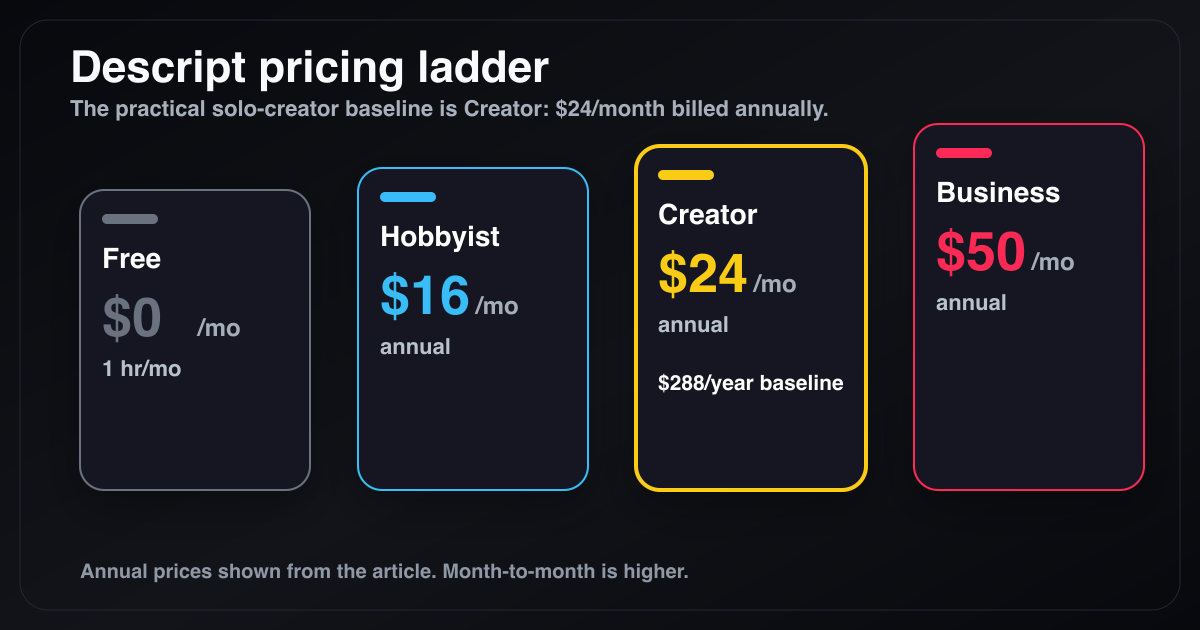
Descript's plan ladder. Creator at $24/month billed annually ($288/year) is where most regular video creators end up.
What Descript Actually Costs per Media Hour
Divide each plan's price by its included media hours and the ranking changes:
| Plan | Annual price | Monthly price | Media hours | $/hour (annual) | $/hour (monthly) |
|---|---|---|---|---|---|
| Hobbyist | $16 | $24 | 10 | $1.60 | $2.40 |
| Creator | $24 | $35 | 30 | $0.80 | $1.17 |
| Business | $50 | $65 | 40 | $1.25 | $1.63 |
Creator is the cheapest per hour on either billing cycle. Business costs about 56% more per hour than Creator. You pay for team features, not more hours. Hobbyist is the most expensive way to buy Descript time.
The Hidden Costs of Descript
Descript's pricing page doesn't hide these, but most pricing summaries leave them out.
1. Media hours count what you import, not what you keep
Descript defines media hours as the minutes of "imported or recorded media processed" on your plan. If you upload a 2-hour raw recording to cut a 10-minute video, you've used 2 hours, not 10 minutes. On Hobbyist, five raw recordings of that length use up the whole month.
Multitrack recordings count each track separately, so a 60-minute two-person podcast recorded on separate tracks uses 2 hours. The full breakdown is in Descript transcription hours explained.
2. Hobbyist can't buy more hours
Top-ups for extra media hours and AI credits are only available on Creator and Business. On Hobbyist, running out means you wait for the next billing cycle or upgrade to Creator. For a Hobbyist user, the real price ceiling is $24/month billed annually, not $16.
3. Hobbyist and Free stop at 1080p
4K export starts at Creator. Free exports are 1080p with a watermark. If you shoot in 4K for YouTube, Hobbyist isn't a real option.
4. Business is worse value per hour than Creator
Business adds 10 media hours over Creator for $26 more per month billed annually. That works out to $1.25/hour against Creator's $0.80. It only makes sense if you need the Business collaboration and admin features.
5. Hours don't roll over
Media hours reset every billing cycle. If you skip a month, those hours are lost.
Discounts most people don't know about
Descript offers discounts for students, educators, and nonprofits. You apply through a form linked in the FAQ on its pricing page. The discount isn't listed next to the plans, so most people never see it.
Descript Free Plan: What You Get
The free plan includes 60 media minutes per month, a one-time allowance of 100 AI credits, and 1080p exports with a Descript watermark. It works for trying the transcript editor on one or two short recordings. Once you remove the watermark or edit anything longer than an hour a month, you're paying.
Descript Hobbyist ($16/month): What It Limits
Hobbyist is $16/month billed annually ($192/year) or $24 month-to-month. You get:
- 10 media hours per month
- 400 AI credits per month
- 1080p export, no watermark
- No top-ups: when hours run out, you wait or upgrade
Hobbyist suits someone who edits a short weekly video from short recordings. It doesn't suit anyone who imports long raw footage, shoots in 4K, or publishes more than a few times a week.
Descript Creator ($24/month): The Real Baseline
Creator is $24/month billed annually ($288/year) or $35 month-to-month ($420/year). It includes:
- 30 media hours per month
- 800 AI credits per month
- 4K export
- Access to top-ups for extra hours and AI credits
Creator is the plan most YouTubers, podcasters, and educators end up on. It's also the cheapest plan per media hour.
Descript Business and Enterprise Pricing
Business is $50/month billed annually or $65 month-to-month, per seat. It includes 40 media hours, 1,500 AI credits, 4K export, and top-ups, along with team and workspace features.
Enterprise has custom pricing. You get custom media hours and AI credits, SSO, SCIM, audit logs, custom contract and billing terms, and AI data controls such as opting out of training and custom retention. You have to contact Descript's sales team for a quote.
Does Descript Have a Lifetime Deal?
No. Descript is subscription-only. There is no one-time purchase. Over five years, one Creator seat billed annually costs $1,440. Pages that advertise a "Descript lifetime deal" are usually affiliate pages or listings for other products. Full answer here.
If paying once is what you want, some text-based editors do offer it. BlitzCut has a $129.99 lifetime purchase (US price), and DaVinci Resolve Studio is $295 once.
When Descript Is Worth the Price
Descript is worth it if you use its team and audio production features:
- You run a podcast with multiple speakers and need multitrack editing
- You rely on Studio Sound
- You work with editors, producers, or clients in shared projects
- You use Descript's AI tools beyond basic cuts and captions
- Your raw recordings fit comfortably inside your plan's media hours
In that case, Creator or Business is a reasonable production expense.
When Descript Isn't Worth It
It's harder to justify if your workflow is:
- Record a talking video
- Remove silences
- Delete mistakes from the transcript
- Add captions
- Export for YouTube, TikTok, Reels, or Shorts
That workflow doesn't need a production suite, and metered hours penalize you for importing long raw takes, which is how most talking videos start.
A Cheaper Mac Alternative Without Hour Limits: BlitzCut
BlitzCut is a native Mac, iPhone, and iPad editor built for exactly that five-step workflow:
- On-device silence removal
- Transcript-based editing
- AI captions, including word-by-word karaoke style
- TTS voiceover and voice-over recording
- 4K export in 9:16, 16:9, and 1:1
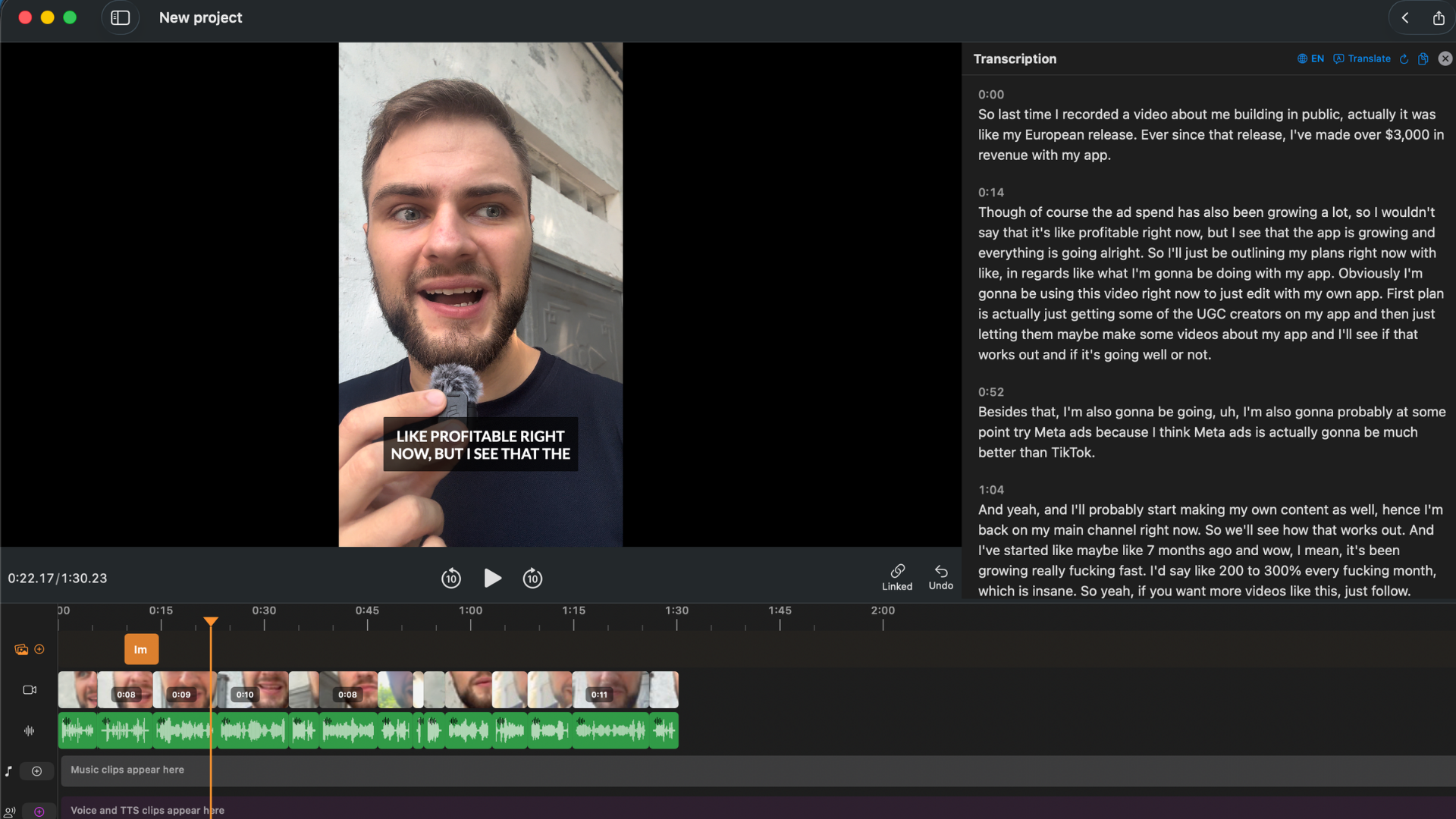
BlitzCut focuses on the transcript editing and caption workflow most solo creators need.
BlitzCut pricing: $16.99/month, $69.99/year, or $129.99 once*. There's a 3-day free trial. It's a flat price with no media-hour meter, so importing a 2-hour raw recording costs the same as importing a 2-minute one. One subscription covers Mac, iPhone, and iPad.
*US prices. BlitzCut pricing varies by region; see the price in your country.
Descript is a broad production platform, and BlitzCut is a focused talking-video editor. For team podcast production, Descript is the better choice. For fast solo editing on Mac, BlitzCut usually is.
Descript vs BlitzCut: Two-Year Cost
| Tool | Year 1 | Year 2 | Two-year total | Hour limit |
|---|---|---|---|---|
| Descript Hobbyist (annual) | $192 | $192 | $384 | 10 hrs/month, no top-ups |
| Descript Creator (annual) | $288 | $288 | $576 | 30 hrs/month |
| Descript Business (annual) | $600 | $600 | $1,200 | 40 hrs/month |
| Premiere single-app (annual) | $275.88 | $275.88 | $551.76 | None |
| BlitzCut (annual) | $69.99 | $69.99 | $139.98 | None |
| BlitzCut (lifetime) | $129.99 | $0 | $129.99 | None |
Descript prices are per seat. For a team, multiply by the number of editors.
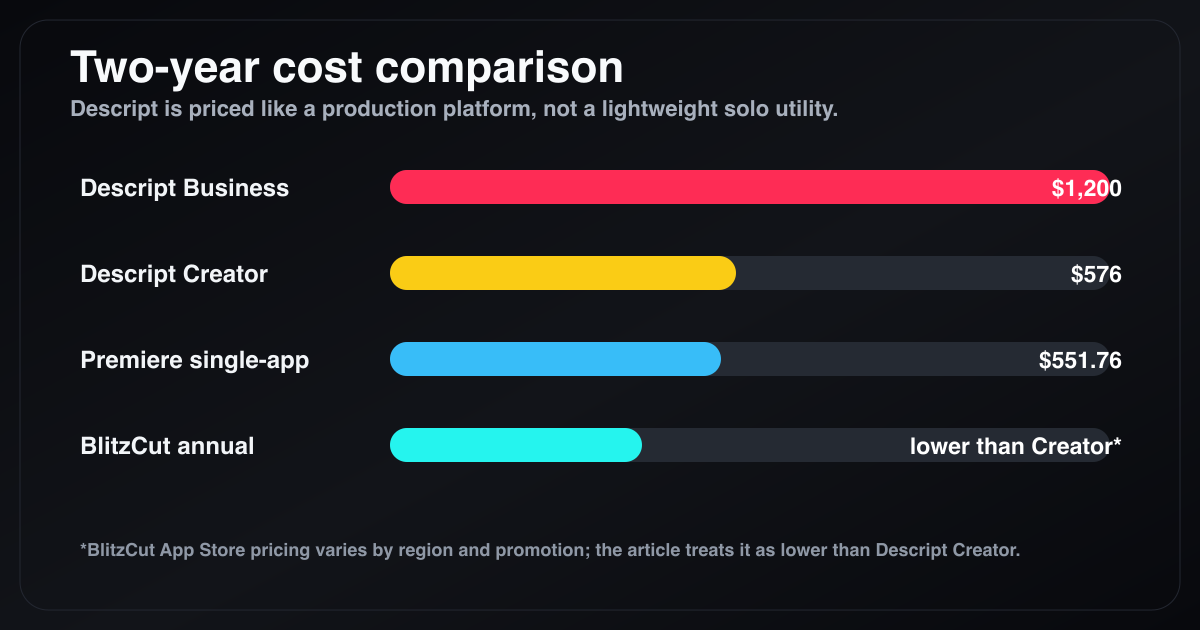
Over two years, Descript Creator reaches $576 and Business $1,200 per editor seat.
The Bottom Line
Descript's headline prices are $16, $24, and $50/month billed annually. What you actually pay depends on media hours. Creator is the best value per hour. Hobbyist is the most restrictive, with no top-ups, a 1080p cap, and hours used up by raw uploads. Business is only worth it for the team features.
If you use Descript's full production stack, Creator is fair value. If you mainly need transcript editing, silence removal, and captions on Mac, you're paying for hours and features you won't use.
Try BlitzCut for Mac free for 3 days
Frequently Asked Questions
How much does Descript cost in 2026? Hobbyist is $16/month billed annually or $24 monthly. Creator is $24/month annually or $35 monthly. Business is $50/month annually or $65 monthly. Enterprise is custom. All prices are per editor seat.
How much is Descript per month? Billed month-to-month, Descript costs $24 (Hobbyist), $35 (Creator), or $65 (Business) per seat. Annual billing lowers those to $16, $24, and $50 per month.
Is Descript free? There's a free plan with 60 media minutes a month, 100 one-time AI credits, and 1080p exports with a watermark. It's enough to test the editor, not to publish regularly.
What are Descript media hours? Media hours are the minutes of imported or recorded media Descript processes on your plan. They count the full length of what you upload, not the length of your final edit, and they reset each billing cycle without rolling over.
Can I buy more media hours on Descript? Only on Creator and Business, which can buy top-ups for extra media hours and AI credits. Free and Hobbyist can't. To get more hours, you have to upgrade.
Does Descript have a student discount? Yes. Descript offers discounts for students, educators, and nonprofits through an application form linked from the FAQ on its pricing page.
Does Descript have a lifetime deal? No. Descript is subscription-only. If you want to pay once, BlitzCut ($129.99 in the US) and DaVinci Resolve Studio ($295) offer one-time purchases.
What does Descript Enterprise cost? Enterprise pricing is custom and quoted by Descript's sales team. It adds custom media hours, SSO, SCIM, audit logs, custom contract and billing terms, and AI data controls.
Which Descript plan is best for video creators? Creator. It's the cheapest plan per media hour ($0.80 billed annually), the first plan with 4K export, and the first where you can buy top-ups.
What is the best cheaper Descript alternative for Mac? For solo creators who need transcript editing, silence removal, and captions, BlitzCut is $69.99/year or $129.99 once, with no media-hour limit.
Related: Descript Transcription Hours Explained · Does Descript Have a Lifetime Deal? · Text-Based Video Editing Pricing 2026 · Best Descript Alternatives for Mac · How to Edit Podcasts on Mac Without Descript
Editing a talking-head video?
BlitzCut is available on Android, iPhone, iPad, and Mac. It is designed for recorded UGC-style videos, founder-led ads, tutorials, and testimonials and other talking-head content.
Try it for freeRelated Articles
Keep Reading

Best Auto Caption App for iPhone (2026): 8 Apps Compared
The best auto caption app for iPhone: BlitzCut, CapCut, Captions, Edits, InShot, VN, KineMaster, and Premiere compared on caption styles, editing, SRT export, and price.

Best CapCut Alternatives (2026): 10 Apps Like CapCut for iPhone, Android and PC
The best CapCut alternatives for iPhone, Android, Mac, and PC: free and paid apps like CapCut, compared on silence removal, captions, templates, watermarks, and price.

Best Free Video Editing App for iPhone (2026): 8 Apps, Most With No Watermark
The best free video editing app for iPhone: iMovie, Premiere mobile, Edits, VN, YouTube Create, CapCut, InShot, and KineMaster compared on watermarks, captions, 4K export, and what's actually free.