
BlitzCut vs iMovie: When Free Isn't Fast Enough
iMovie is free on every Mac but has zero automation — no silence removal, no AI captions, no transcript editing. BlitzCut vs iMovie comparison for 2026.


iMovie comes free on every Mac. It works. Millions of creators shot their first YouTube videos in it, and many still do. The question isn't whether iMovie is a bad editor — it isn't. The question is whether it's the right editor for a creator who produces talking head video regularly and wants to stop spending an hour on a 10-minute edit.
In 2026, the answer for most content creators is no. iMovie hasn't added meaningful automation since 2022. It still has no silence removal, no AI captions, no transcript-based editing. The features that make talking head editing fast — the ones that cut editing time from an hour to fifteen minutes — simply don't exist in iMovie.
This comparison looks at both tools honestly. iMovie has real strengths worth acknowledging. BlitzCut doesn't do everything iMovie does. But for the specific workflow of talking head, podcast, or social content, the gap has become significant.
What iMovie Is
iMovie is Apple's free video editing app for Mac, iPhone, and iPad. It ships pre-installed on every Apple device and covers the fundamentals of timeline-based video editing: trim clips, arrange footage, add music, apply basic color adjustments, and export.
Price: Free — no subscription, no watermark, no hidden tiers.
What iMovie does well:
- Clean, straightforward timeline editing
- Deep Apple ecosystem integration — start a project on iPhone, finish on Mac
- Basic color corrections (brightness, contrast, saturation, presets)
- Green screen / chroma key compositing
- Speed ramping
- Fast export on Apple Silicon (improved in iMovie 10.4, November 2024)
- Reliable stability for simple projects
- Zero learning curve — beginners produce a watchable first edit quickly

iMovie's timeline view. Every edit — including removing silence — requires manual scrubbing and cutting.
What iMovie Is Missing for Talking Head Creators
iMovie's last substantive AI/automation update was April 2022, adding Magic Movie and Storyboards — both iOS/iPad-only features for assembling montage clips, not editing talking head content. The November 2024 update (iMovie 10.4) added faster HEVC export on Apple Silicon. No new AI editing features were added.
In 2026, every major creator tool has added automation for talking head editing. iMovie has not.
Silence removal: Not available. Dead air, long pauses, and awkward gaps must be cut manually — every time, every video.
Auto captions: Not available. iMovie has no speech-to-text transcription, no automatic subtitle generation, and no SRT import. Captions require manually typing text into the titles tool, word by word.
Text-based editing: Not available. You cannot edit your video by editing a transcript. Timeline scrubbing only.
Filler word removal: Not available. Every "um," "uh," and false start must be located and cut manually.
Audio cleanup: No noise reduction, no EQ, no vocal isolation. iMovie offers volume adjustment only.
Video track limit: Two tracks maximum — one primary, one overlay. You cannot layer overlays on top of overlays. The workaround is to export a composite and re-import it as a flat file.
Plugin support: None. iMovie accepts no third-party plugins, effects packs, or LUTs.
For a creator recording twice a week and shooting 15–20 minute raw takes, this adds up to several hours of manual editing that automation could eliminate.

iMovie's captions are manual titles. Every line typed by hand — no speech-to-text, no SRT import, no auto-timing.
What BlitzCut Is
BlitzCut is a native macOS video editor built for talking head content. The workflow runs: import → automatic silence removal → AI transcription → transcript-based editing → caption generation → export.
Price: $16.99/month · $69.99/year · $129.99 lifetime* · 3-day free trial (no watermark, all features).
*US prices. BlitzCut pricing varies by region; see the price in your country.
Core features:
- On-device silence removal — removes dead air and gaps automatically on import, no internet required
- AI transcription — full spoken content appears as editable text; requires internet, no raw video upload
- Transcript-based editing — delete text, footage cuts with it
- Auto caption generation — standard, bold center, or word-by-word karaoke style
- AI TTS voiceover — generate or replace narration from text
- Multi-format export — 9:16, 16:9, 1:1 at up to 4K
BlitzCut is a native Mac app — not Electron, not a browser tab. It uses Apple Silicon's Neural Engine and GPU directly, which means faster rendering and no memory constraints from a browser sandbox.
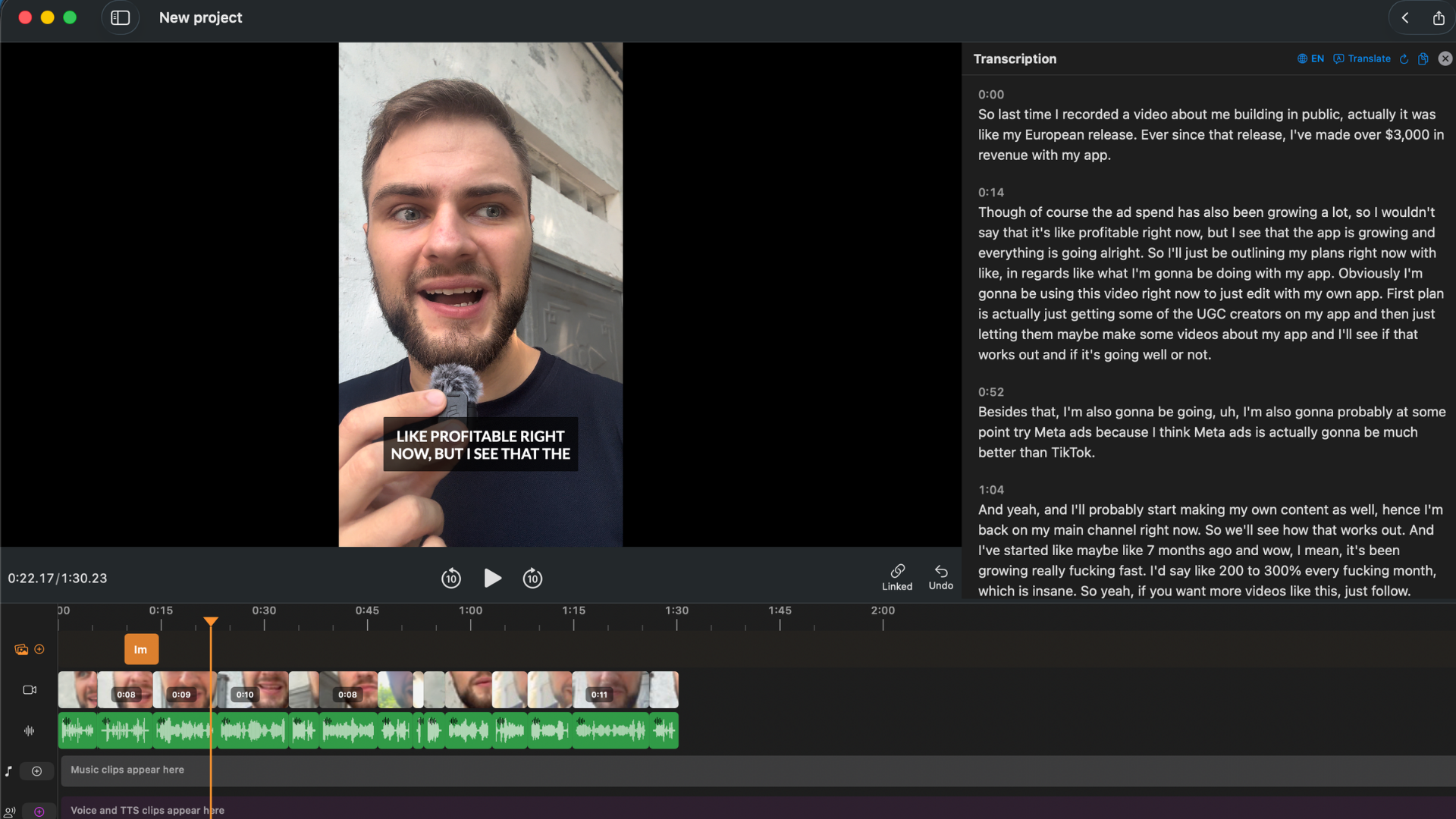
BlitzCut's transcript panel. Every word is editable — delete a sentence, the footage cuts automatically.
Direct Feature Comparison
| Feature | BlitzCut | iMovie |
|---|---|---|
| Price | $69.99/yr or $129.99 lifetime | Free |
| Automatic silence removal | Yes — on-device | No |
| Auto caption generation | Yes — 3 styles incl. karaoke | No (manual titles only) |
| Text-based / transcript editing | Yes | No |
| Filler word removal | Yes (via transcript) | No |
| AI transcription | Yes | No |
| Audio cleanup (noise reduction) | Basic | None |
| Color grading | Basic | Basic |
| Green screen / chroma key | No | Yes |
| Multi-camera editing | No | No |
| Video track limit | Single workflow | 2 tracks |
| Plugin support | No | No |
| Native macOS app | Yes | Yes |
| iOS app included | Yes | Yes (separate free app) |
| Export aspect ratios | 9:16, 16:9, 1:1 | 16:9 standard |
| 4K export | Yes | Yes (with limitations) |
| Direct social publishing | No | No |
Workflow Comparison: 10-Minute Talking Head Video
iMovie
- Import footage — some MP4s require reformatting before iMovie accepts them
- Scrub the timeline to identify good takes
- Manually cut every silent gap — one cut at a time
- Manually remove filler words ("um," "uh") — one cut at a time
- Apply basic color adjustments
- Open titles tool, type captions manually — word by word, line by line
- Add background music
- Export to disk
- Upload separately to YouTube/TikTok
Active editing time for a 10-minute talking head video: 45–90 minutes, depending on how much dead air and how many filler words are present.
BlitzCut
- Import footage — silence removal begins automatically in background
- Transcript ready in 1–2 minutes, silences already removed
- Read transcript, delete any sections you don't want — footage cuts with it
- Generate captions in one tap — karaoke, bold center, or standard
- Export in your target aspect ratio
Active editing time for a 10-minute talking head video: 10–20 minutes.
The difference is automation. iMovie requires a human hand on every silence cut, every filler word, every caption line. BlitzCut automates the repetitive work and focuses human attention on content decisions.
Where iMovie Is Better
It's free. This isn't a minor point. For a creator who is just starting out, iMovie has zero financial commitment and zero risk. Learning video editing on iMovie is a legitimate path before investing in paid tools.
Green screen / chroma key. iMovie has built-in chroma key compositing — remove a green background and replace it with anything. BlitzCut doesn't have this feature.
Simple interface for basic edits. For a creator who doesn't need silence removal or auto-captions — someone editing a short scripted promo or a clean-take interview with no dead air — iMovie's simple timeline can be faster than learning any new tool.
iOS/Mac continuity. Start a project on your iPhone, continue on your Mac. Apple's Handoff integration is genuinely useful for creators who shoot and do rough cuts on their phone before finishing on desktop.
Where BlitzCut Is Better
Silence removal. A 20-minute raw talking head recording can easily have 3–5 minutes of dead air. Finding and cutting each pause manually in iMovie takes 20–40 minutes. BlitzCut removes all of it automatically, in the background, in under 10 minutes.
Auto captions. For TikTok, Reels, and YouTube Shorts, captions are no longer optional — they're expected. iMovie requires typing every caption word by word. BlitzCut generates them from the transcript in one tap with accurate word-level timing.
Karaoke captions. Word-by-word animated captions — the format that consistently outperforms static captions on completion rate and engagement — cannot be produced in iMovie without animating every word manually. BlitzCut generates them automatically.
Transcript editing. iMovie has no concept of text-based editing. BlitzCut lets you review your recording as a document and delete what you don't want. This changes the edit from "scrub and cut" to "read and decide."
Time per video. For a creator producing regular content, the time difference compounds. An hour saved per video across three videos per week is 12+ hours saved per month.
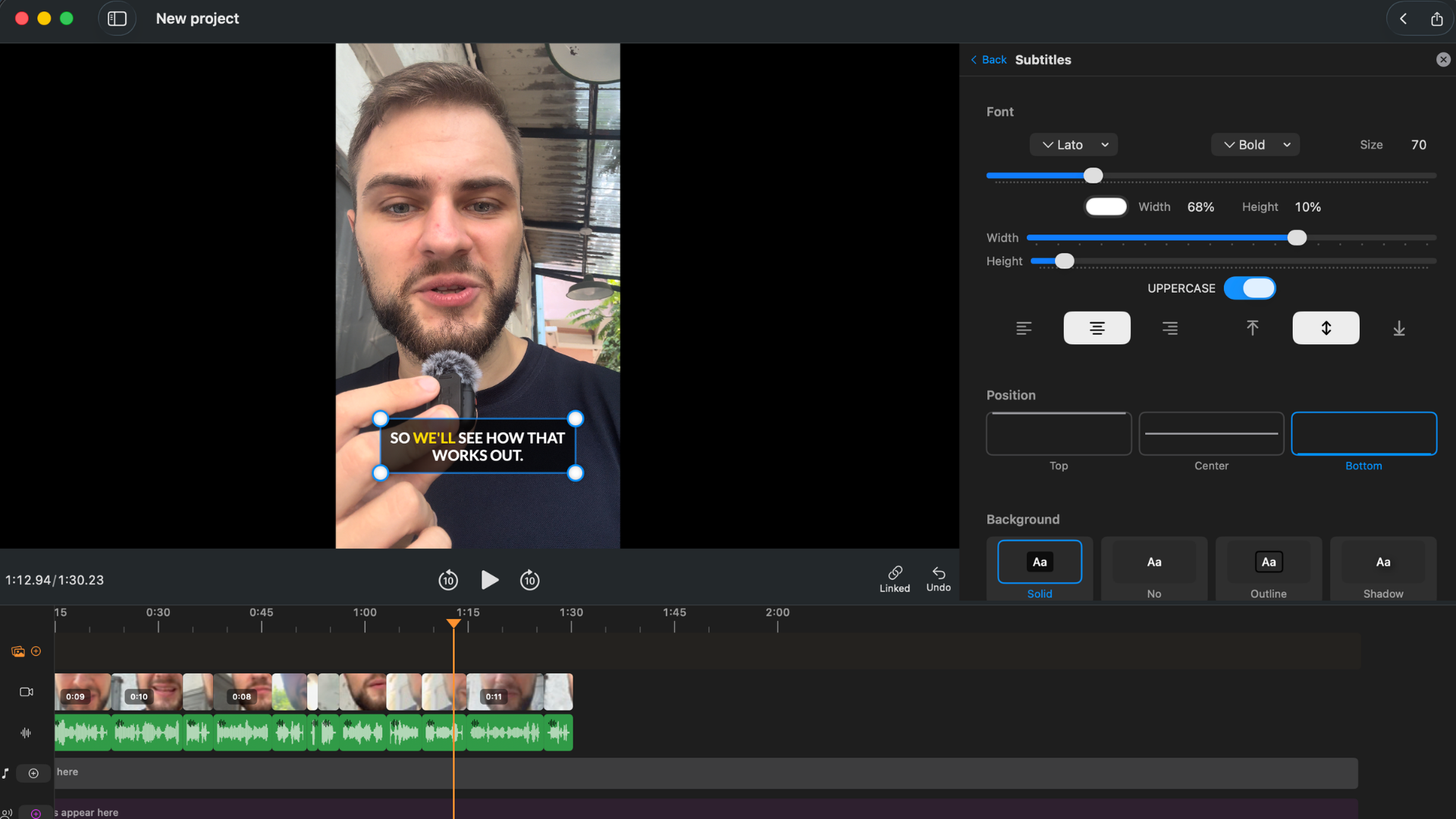
Karaoke captions generated automatically in BlitzCut. Not achievable in iMovie without manually animating every word.
The "Ceiling" Problem
The creator community describes iMovie consistently as "where you start, not where you stay." This framing comes up repeatedly across Capterra reviews, Quora threads, and creator forums:
- "Great beginning app to learn with before upgrading to new and improved software."
- "Hit the ceiling relatively quickly."
- "iMovie is too limited in terms of features and functionality, especially for more complex video projects."
- "Limited advanced editing features — lack of multi-camera editing options." (Capterra)
- "iMovie is very slow at times and tends to lag quite a bit." (G2)
The ceiling isn't about output quality. iMovie can produce polished-looking videos. The ceiling is about speed and automation. The features that make modern talking head editing sustainable — silence removal, auto-captions, transcript editing — simply aren't in iMovie and haven't been added.
Who Should Use iMovie
- You're new to video editing and learning the fundamentals
- Your videos are short, scripted, and don't have significant dead air
- Budget is the primary constraint and free is required
- You need green screen compositing for your content
- You're editing non-talking-head content: travel videos, event footage, family clips
Who Should Use BlitzCut
- You produce talking head content regularly — YouTube, TikTok, Reels, podcast clips, courses
- Silence removal is part of every edit — you record natural speech with pauses
- Auto-captions are required for your social platforms
- You want transcript-based editing — review your recording as text, delete what you don't want
- You want karaoke-style captions that perform better on completion metrics
- You've hit iMovie's ceiling and want a tool designed for the workflow you actually have
Pricing Reality
iMovie is free. BlitzCut is not.
The honest framing: if you're producing two or more videos per week and your editing time per video is 60+ minutes in iMovie, BlitzCut's automation can recover 30–45 minutes per video. At two videos per week, that's 4–6 hours per month of saved editing time.
At $69.99/year, that's under $6/month. Time has value — especially for a creator who earns from their content or is trying to build posting consistency.
If you're an occasional creator who posts once a month and doesn't need captions, iMovie's free price is hard to argue with. For regular creators, the math looks different.
Frequently Asked Questions
Is iMovie good enough for YouTube in 2026? For simple, scripted videos without heavy dead air, yes. For regular talking head content where silence removal, auto-captions, and editing speed matter, iMovie's lack of automation becomes a significant time burden at volume.
Does iMovie have auto captions? No. iMovie has no speech recognition, no transcription, and no auto-subtitle feature. Captions must be added manually using the titles tool — typing every word individually.
Does iMovie have silence removal? No. iMovie has no automatic silence detection or removal. Every silent gap must be found and cut manually on the timeline.
Is BlitzCut better than iMovie? For talking head, podcast, and social content: yes, on workflow speed, silence removal, and caption generation. For simple edits or green screen work on a zero budget: iMovie remains a valid choice.
Can I use BlitzCut and iMovie together? There's no practical reason to — BlitzCut handles the full talking head workflow from import to export. iMovie covers green screen and basic linear edits — they address different use cases.
Does iMovie work on iPhone? Yes — iMovie for iPhone is a free separate app. BlitzCut also has an iPhone and iPad app included on the same subscription as the Mac version.
What do creators switch to after iMovie? Most Mac creators upgrade to Final Cut Pro ($299 one-time) for professional complex productions, or to tools purpose-built for talking head and social content — Descript, CapCut, or BlitzCut — for the automation those workflows require.
Why hasn't Apple added silence removal to iMovie? Apple hasn't commented on the roadmap. iMovie 10.4 (November 2024) only added faster export on Apple Silicon. The conventional interpretation: Apple positions iMovie as a beginner tool and reserves AI editing features for Final Cut Pro, which received "Transcribe to Captions" in FCP 12 (January 2026).
Related: BlitzCut vs Final Cut Pro · Best Mac Apps for Silence Removal in 2026 · How to Auto-Transcribe a Video on Mac for Free
Editing a talking-head video?
BlitzCut is available on Android, iPhone, iPad, and Mac. It is designed for recorded UGC-style videos, founder-led ads, tutorials, and testimonials and other talking-head content.
Try it for freeRelated Articles
Keep Reading

How to Add Music to a Video on iPhone: Soundtracks and Imports
Learn how to add music to a video on iPhone with soundtracks or imported audio, balance it beneath speech, and finish the edit in iMovie or BlitzCut.

How to Add Pictures to a Video: Clips, Cutaways, and Overlays
Learn how to add pictures to a video as clips, cutaways, or overlays in iMovie and BlitzCut, while keeping narration and image timing clear.

YouTube Studio Setup Under $200: A Home Studio for Content Creators (2026)
A YouTube studio setup under $200, built around your phone: two budget tiers, gear ranked by impact, and what to skip for YouTube, TikTok, and podcasts.