
How to Auto-Transcribe a Video on Mac for Free
Transcribe any video on Mac for free in 2026 — on-device with Whisper, or BlitzCut's 3-day trial. Step-by-step guide.


Paying per minute to transcribe video is a 2020 problem. In 2026, you can transcribe a 60-minute recording on your Mac for free — accurately, without uploading your footage to any server, and in some cases without an internet connection at all.
This guide covers two free approaches to auto-transcribing video on Mac: the fully local method using OpenAI's Whisper model, and BlitzCut's 3-day free trial for creators who want transcription integrated with editing and caption generation. Both work well. Which one fits depends on what you need from the transcript.
Option 1: MacWhisper — Free Native Mac App, On-Device
Cost: Free (basic tier)
Internet required: No
Upload required: No
Export: TXT, SRT, VTT
MacWhisper is a native Mac app built on OpenAI's open-source Whisper model. The free tier downloads a Whisper model to your Mac and runs transcription entirely locally — no account, no upload, no usage limits, no internet connection after the model download.
How to Transcribe a Video with MacWhisper (Free)
Step 1: Download MacWhisper
Get MacWhisper from goodsnooze.gumroad.com. The basic version is free. The Pro version ($29 one-time) unlocks larger, more accurate models — but the free tier is a solid starting point.
Step 2: Download a Whisper model
On first launch, MacWhisper prompts you to download a model. Options range from tiny (fast, less accurate, small download) to large (slower, most accurate, ~3GB download). For talking-head video content with clear audio, the medium or base model gives a good accuracy-to-speed balance on the free tier.
Step 3: Import your video
Drag your video file into MacWhisper. Accepted formats include MP4, MOV, M4A, MP3, and most standard video and audio formats. MacWhisper extracts the audio from the video and feeds it to the Whisper model locally.
Step 4: Wait for transcription
On an M-series Mac (M1, M2, M3, M4), the medium model transcribes at roughly 10–20x real time — a 30-minute recording finishes in 2–3 minutes. On older Intel Macs, expect 4–8 minutes for the same recording.
Step 5: Export
MacWhisper outputs:
- TXT — plain transcript with speaker turns (if diarization is enabled)
- SRT — subtitle file with timestamps for each line
- VTT — web caption format
- JSON — full word-level timestamp data
The free tier includes TXT and SRT export. For VTT and JSON, you need Pro.
MacWhisper accuracy: For clear English audio with a single speaker, accuracy with the medium model is typically 92–96%. With the large model (Pro), it matches or exceeds paid cloud services. The transcript is not editable in the app — it's a static export. Correct errors in a text editor afterward.
Option 2: Whisper CLI — Free, Unlimited, Command-Line
Cost: Free (open source)
Internet required: No (after model download)
Upload required: No
Export: TXT, SRT, VTT, JSON, TSV
For developers and technically comfortable users, OpenAI's Whisper CLI is the most powerful free transcription option available on Mac. No GUI, no subscription, no usage cap — just run it on any file.
How to Transcribe a Video with Whisper CLI
Step 1: Install Whisper
You need Python 3.8+ and pip. In Terminal:
pip install openai-whisper
This also installs ffmpeg as a dependency for audio extraction from video files.
Step 2: Run transcription
whisper your-video.mp4 --model medium --output_format srt
Replace medium with tiny, base, small, large-v2, or large-v3 depending on the accuracy-speed tradeoff you want. large-v3 is the most accurate; tiny is the fastest.
Output flags:
--output_format srt— subtitle file--output_format txt— plain text--output_format vtt— web captions--output_format json— full data including word-level timestamps
Step 3: Speed up transcription on Apple Silicon
The default Whisper CLI is optimized for NVIDIA GPUs. On M-series Macs, use mlx-whisper for Metal acceleration:
pip install mlx-whisper
mlx_whisper your-video.mp4 --model mlx-community/whisper-large-v3-mlx
This runs 10–15x faster than the default Whisper CLI on Apple Silicon hardware.
Whisper CLI accuracy: With large-v3, accuracy is the highest available from any free model. For standard English talking-head content, 96–98% on clean audio is typical. Whisper handles 100 languages — useful for non-English content that cloud services handle poorly.
Option 3: BlitzCut Free Trial — Transcription + Editing + Captions
Cost: Free for 3 days (all features, no watermark)
Internet required: Yes for transcription; No for silence removal
Upload required: No (video stays on Mac)
Export: Captioned video (MP4/MOV); transcript viewable in-app
If you need more than a transcript file — if you want to edit the content, remove silences, and export a captioned video — BlitzCut's 3-day free trial covers the full workflow at no cost.
BlitzCut is a different tool from MacWhisper. It's not a transcription export utility. It's an integrated Mac video editor where transcription drives editing and caption generation.
How the BlitzCut Free Trial Works
Step 1: Download BlitzCut from the App Store
Install and open. The 3-day trial starts when you open the app. No credit card required to start. All features — silence removal, transcription, captions including karaoke style, export up to 4K — are available during the trial with no watermark.
Step 2: Import your video
Drag your video into BlitzCut or use Command+O. BlitzCut accepts MP4, MOV, and other standard formats. Your file stays on your Mac — nothing uploads.
Step 3: Silence removal runs automatically
BlitzCut analyzes your audio on-device and removes dead air, gaps, and long pauses. This runs in the background. For a 10-minute recording, it typically takes 60–90 seconds. No internet required for this step.
Step 4: Transcription and editing
BlitzCut transcribes your video using AI processing. The full spoken content appears as editable text in the transcript panel. You can:
- Read the transcript to find moments you want to keep
- Delete sections from the transcript (footage cuts automatically)
- Correct transcription errors before generating captions
This is the step that MacWhisper and Whisper CLI don't have — the transcript is connected to the footage and edits propagate bidirectionally.
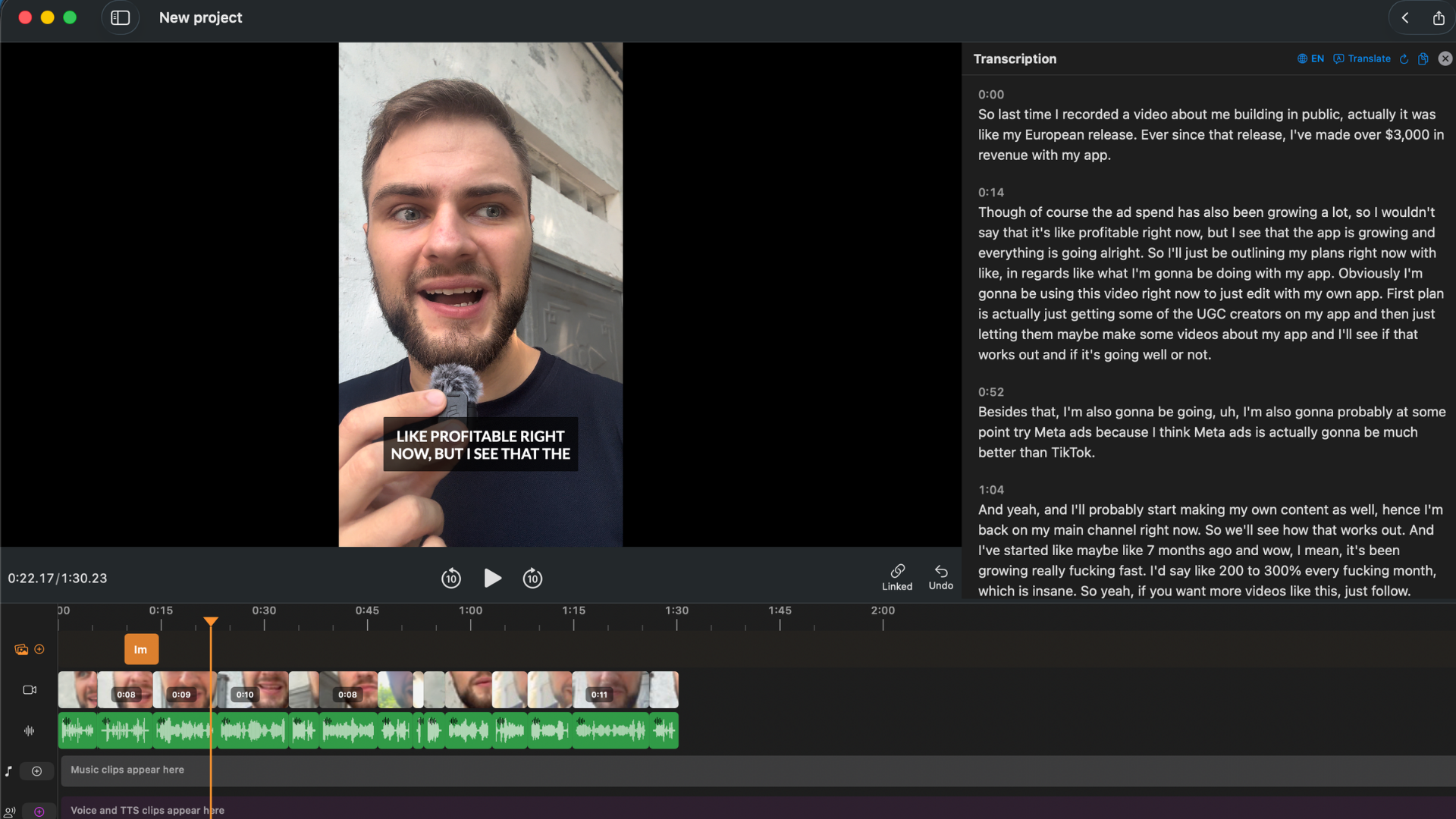
Transcript appears as editable text. Cut a sentence — the footage cuts with it. No timeline scrubbing needed.
Step 5: Generate captions (optional)
From the transcript, generate captions in one tap — standard, bold center, or word-by-word karaoke style. This step is optional if you only need the transcript; export the video without captions if you just want a silence-removed, edited recording.
Step 6: Export
Export at up to 4K in any aspect ratio. No watermark on trial exports. The captioned video is written to your Mac via the native macOS save dialog.
After the trial: BlitzCut costs $69.99/year or $129.99 lifetime. If you only need one-time transcription, the 3-day trial is enough. For ongoing use, the annual or lifetime plan is more cost-effective than most per-minute services.
Which Free Option Should You Use?
| Use case | Best free option |
|---|---|
| Just need a transcript file (TXT or SRT) | MacWhisper free or Whisper CLI |
| Need it to work offline, no internet | MacWhisper free or Whisper CLI |
| Non-English language, unusual accent | Whisper CLI with large-v3 |
| Want to edit content and export captioned video | BlitzCut 3-day trial |
| Developer comfortable with Terminal | Whisper CLI |
| Need captions burned into video for social | BlitzCut 3-day trial |
| Processing many files unattended | Whisper CLI (scriptable) |
Accuracy of Free Transcription on Mac
For clear, single-speaker English recordings with a decent microphone:
| Method | Model | Expected accuracy |
|---|---|---|
| MacWhisper free | medium | 92–96% |
| Whisper CLI | large-v3 | 96–98% |
| BlitzCut trial | Cloud AI | 95%+ |
All three are more than accurate enough for typical creator content. Errors are more common with:
- Background noise (HVAC, traffic, coffee shop ambient)
- Heavy accents on a low-quality microphone
- Technical jargon, product names, or proper nouns
- Multiple speakers talking simultaneously
With MacWhisper and Whisper CLI, correct errors in the exported transcript using a text editor. With BlitzCut, correct errors in the editable transcript before generating captions — the fix carries through automatically.
Frequently Asked Questions
Can I transcribe video on Mac without an internet connection? Yes. MacWhisper and Whisper CLI both run entirely on your Mac after the initial model download. No internet required for transcription. BlitzCut's silence removal is offline; transcription requires an internet connection but doesn't upload your video file.
Is MacWhisper actually free? The basic tier is free. It includes transcription using smaller Whisper models and TXT/SRT export. The Pro version ($29 one-time) unlocks larger models (higher accuracy), more export formats, and faster batch processing.
How long does free transcription take on Mac? On Apple Silicon (M1–M4): MacWhisper medium model transcribes a 30-minute video in 2–3 minutes. Whisper CLI with mlx-whisper on large-v3 takes 3–5 minutes for the same file. On Intel Macs, expect 4–10 minutes depending on the model size.
Does the BlitzCut free trial require a credit card? No credit card required to start the 3-day free trial. You'd need to add payment to continue after the trial period.
Is Whisper CLI really as accurate as paid services? With the large-v3 model, yes — for English-language content with clean audio, Whisper large-v3 matches or exceeds paid services including Descript and Otter. The accuracy gap shows with noisy audio, heavy accents, or rare languages, where larger paid models may have more specialized training data.
What's the difference between MacWhisper and Whisper CLI? Same underlying model, different interface. MacWhisper is a native Mac GUI app — drag, drop, export. Whisper CLI is a command-line tool — more control, scriptable, runs batch jobs, no GUI. If you don't want to use Terminal, MacWhisper is the better choice.
Related: Best Video Transcription Apps for Mac 2026 · Podcast Transcription on Mac: Fastest Method 2026 · How to Add Subtitles to a Video on Mac Automatically
Post every day without spending hours editing
BlitzCut is a native app for iPhone, iPad, and Mac. Get from raw footage to TikTok-ready in under 2 minutes, so editing is never the reason you didn't post.
Try it for freeRelated Articles
Keep Reading

What Font Does TikTok Use? (2026 Answer)
TikTok uses TikTok Sans, open-sourced in July 2025 and free to download. Before that, Proxima Nova — still the app's Classic text option. History and license.

What Makes a Reel Hook Go Viral? (2026 Breakdown)
Viral Reel hooks are a mechanism, not clever writing. What Instagram measures in the first three seconds, and what every hook that travels has in common.

YouTube Shorts Length Limits (2026): Maximum Length and What Counts as a Short
YouTube Shorts can be up to 3 minutes long in 2026. What qualifies as a Short, the aspect ratio rule, and why longer Shorts don't always perform better.