
Best Video Transcription Apps for Mac 2026
Ranked: best Mac apps to transcribe video automatically in 2026. On-device vs cloud, accuracy tests, export formats — for creators and podcasters.


Video transcription on Mac in 2026 means different things to different people. A podcaster extracting a clip wants fast, editable text they can cut from. A journalist needs an accurate record of a 90-minute interview. A course creator wants captions burned into a video without managing an SRT file. A developer wants a local Whisper setup that costs nothing per minute.
These use cases don't have the same best tool. This guide covers every meaningful option for video transcription on Mac in 2026 — ranked by what actually matters: accuracy, whether your video uploads to a server, export format flexibility, and cost over time.
Quick Rankings
| App | On-device | Export formats | Karaoke captions | Price |
|---|---|---|---|---|
| BlitzCut | Partial | Burned-in captions, SRT, VTT | Yes | $69.99/yr · $129.99 lifetime |
| MacWhisper | Full | TXT, SRT, VTT, JSON | No | Free / $29 one-time |
| Descript | No | SRT, VTT, TXT | No | $288/yr Creator |
| Otter.ai | No | TXT, DOCX, SRT | No | Free–$20/mo |
| Whisper CLI | Full | TXT, SRT, VTT, JSON | No | Free (open source) |
| Rev | No | SRT, VTT, DOCX | No | $0.25/min AI · $1.50/min human |
| Premiere Pro | No | SRT, SCC, CEA-608 | No | $660/yr |
| Trint | No | DOCX, SRT, XML | No | $60–$120/mo |
1. BlitzCut — Best for Creators Who Edit and Publish
Price: $16.99/month · $69.99/year · $6.99/week · $129.99 lifetime (limited time) · 3-day free trial
On-device: Silence removal only; transcription uses AI processing without uploading raw video
Export: Burned-in captions in MP4/MOV; transcript viewable and editable
Styles: Standard, bold center, word-by-word karaoke
App type: Native macOS
BlitzCut approaches transcription differently from every other tool on this list. Transcription isn't the final deliverable — it's an intermediate step in an editing workflow that ends with a captioned, exported video ready to upload to any platform.
The workflow: Import video → silence removal (on-device) → AI transcription → transcript editing → caption generation → export. The transcript is editable at step 4. Correct an error, delete a section, remove a stumbled take. The edit propagates to the footage and to the final captions automatically.
No raw video upload. Transcription uses AI processing but your video file stays on your Mac. This is the critical difference from Descript, Otter, Rev, and every web-based tool — all of which require uploading the full file before processing begins.
Where BlitzCut doesn't fit: If you need a standalone transcript file (DOCX, SRT, TXT) rather than a captioned video, BlitzCut isn't the right tool. The output is a finished video, not a document. For transcript-as-deliverable use cases — journalism, research, legal — tools like MacWhisper, Otter, or Rev are more appropriate.
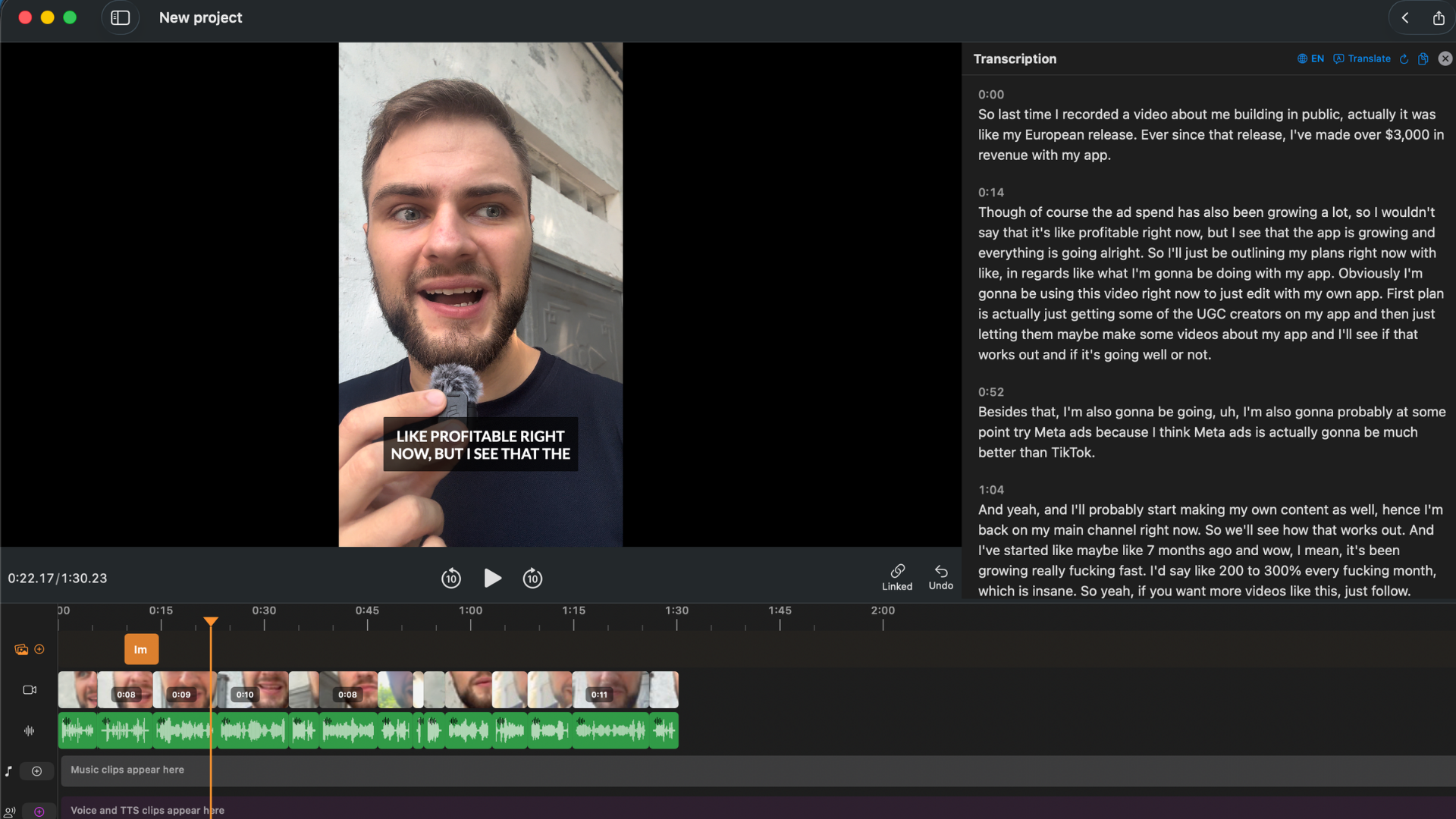
Transcription appears as editable text alongside the video. Edit the transcript — footage and captions update automatically.
BlitzCut is best for: Video creators, podcasters, and content marketers who want transcription integrated with editing and caption generation in one native Mac app.
Try BlitzCut free for 3 days →
2. MacWhisper — Best On-Device Transcription for Mac
Price: Free (basic) / $29 one-time Pro
On-device: Yes — fully local, no internet required
Export: TXT, SRT, VTT, JSON, CSV
App type: Native macOS
MacWhisper is a native Mac app built around OpenAI's Whisper model. It downloads the model locally and runs transcription entirely on your machine — no internet connection, no account, no upload, no cost per minute.
The accuracy story: Whisper large-v3 (available in MacWhisper Pro) is one of the most accurate speech recognition models available. For English-language content with clear audio, it matches or exceeds cloud-based services including Otter and Descript. For non-English content, Whisper's multilingual capability is genuinely strong — it handles accents and less common languages better than most cloud services.
Speed: Transcription speed depends on your Mac's hardware. On an M3 chip, Whisper large transcribes at approximately 5–8x real time — a 30-minute recording finishes in 4–6 minutes. The tiny model (lower accuracy but smaller download) runs at 30–40x real time. On Intel Macs, expect slower performance.
Export formats: MacWhisper exports TXT (plain transcript), SRT (subtitles with timestamps), VTT (web captions), JSON (full data with word-level timestamps), and CSV. For any workflow that needs an SRT file or raw transcript, MacWhisper covers it.
What MacWhisper doesn't do: Editing. You get a transcript file — no way to edit it and have footage update, no caption styling, no export-to-video. It's a transcription tool, not a video editor. For creators who need captions on the video itself, pair MacWhisper's SRT output with a video editor, or switch to BlitzCut for an integrated workflow.
MacWhisper is best for: Creators or professionals who want accurate, private, on-device transcription with flexible export formats — especially in non-English languages or for offline use.
3. Descript — Best Transcript Editing for Professional Productions
Price: $24/month Creator ($288/year) · $16/month Hobbyist ($192/year)
On-device: No — full video upload before any processing
Export: SRT, VTT, TXT, DOCX; video with burned-in captions
App type: Electron (not native macOS)
Descript's transcript editing is its core feature: once your video uploads and transcribes, you edit the text document and the footage responds. Cut a paragraph of text, and the corresponding video section disappears. This is the same approach as BlitzCut, but Descript requires a cloud upload first.
Where Descript leads: Multi-track speaker separation. For a two-person interview recorded on separate tracks, Descript can label and separate the speakers. BlitzCut handles mixed stereo well but doesn't separate individual speaker tracks. For professional interview workflows with separate audio tracks, Descript handles this better.
61-language translation. Descript can generate captions and transcripts in languages other than the source language. No other tool on this list currently offers this at the same quality level.
The friction: Upload is mandatory. A 30-minute 1080p recording (~1.5–2GB) typically takes 8–15 minutes to upload and process before you can touch the transcript. On a slow connection, this is a 30–45 minute wait for a 30-minute recording. Descript is also Electron, not a native Mac app — RAM usage is higher and performance on long recordings can lag.
Descript is best for: Professional productions with multi-speaker tracks, international audiences needing translated captions, or team workflows requiring SRT export and cloud collaboration.
4. Otter.ai — Best for Meeting and Interview Transcription
Price: Free (600 min/month) / $10/month Pro (6,000 min/month) / $20/month Business
On-device: No — cloud upload
Export: TXT, DOCX, SRT, PDF
App type: Web and Mac desktop app (Electron)
Otter is purpose-built for meeting and interview transcription. Its standout feature is speaker diarization — it identifies and labels different speakers automatically, which is useful for multi-person interviews, panel discussions, and any recording where "who said what" matters.
Otter's real-time transcription: Otter can transcribe audio live as it's recorded, not just from uploaded files. For journalists, researchers, or coaches who want a transcript appearing in real time during an interview, Otter handles this better than any other tool on this list.
The accuracy gap: For talking-head video content — a single speaker, clear audio, standard English — Otter's accuracy is competitive but generally slightly below Descript and MacWhisper's large model. For multi-speaker, overlapping, or accented speech, Otter's diarization accuracy varies significantly by recording quality.
Free tier limits: 600 minutes per month on the free plan is enough for casual use. Regular podcasters or researchers processing multiple hours weekly will need the Pro plan at $10/month.
Otter is best for: Journalists, researchers, coaches, and anyone who transcribes meetings or interviews where identifying speakers in the transcript is important.
5. Whisper CLI — Free, Fully Local, No GUI
Price: Free (open source)
On-device: Yes — runs entirely locally
Export: TXT, SRT, VTT, JSON, TSV
App type: Command-line tool
OpenAI's Whisper model is available as an open-source command-line tool. Install via pip, run it on any video file, get a transcript. No subscription, no account, no usage limits, no upload, no internet required after the initial model download.
pip install openai-whisper
whisper interview.mp4 --model large-v3 --output_format srt
Accuracy with the large-v3 model is excellent — comparable to paid cloud services for English content. Whisper supports 100 languages.
The tradeoff: There's no GUI. If you're comfortable with Terminal, it's straightforward. If you're not a developer, MacWhisper provides the same Whisper model in a native Mac app with a drag-and-drop interface for $29 one-time.
Speed on Apple Silicon: Whisper CLI is optimized for CUDA (NVIDIA GPU) by default. On Apple Silicon Macs, use whisper.cpp or the mlx-whisper package for faster local transcription using the Metal GPU. The default Python package works but runs slower on M-series chips without Metal acceleration.
Whisper CLI is best for: Developers and technically comfortable users who want free, unlimited, private transcription with no GUI overhead.
6. Rev — Human Accuracy When AI Isn't Enough
Price: $0.25/minute AI · $1.50/minute human · $29.99/month unlimited AI
On-device: No — upload required
Export: SRT, VTT, DOCX, TXT
App type: Web service
Rev is a professional transcription service. The AI option ($0.25/min) is fast and reasonably accurate. The human option ($1.50/min) is slow (typically 24–48 hours) but highly accurate — reviewers verify and correct AI output by hand.
For most video creator use cases, AI transcription in BlitzCut, MacWhisper, or Descript is fast and accurate enough. Rev's human option is the right choice when: a transcript is a legal deliverable, accuracy errors would have professional consequences, or the recording quality is poor enough that AI transcription produces too many errors to correct efficiently.
A 45-minute podcast episode with human transcription from Rev costs $67.50. This price is appropriate for high-stakes content; it's not appropriate for regular social clip workflows.
Rev is best for: Legal, medical, research, or compliance contexts where human-verified accuracy is required and an SRT or DOCX file is the deliverable.
7. Adobe Premiere Pro — Transcript Built Into the Editor
Price: $55/month ($660/year)
On-device: No (AI processing requires internet)
Export: SRT, SCC, CEA-608, TTML
App type: Desktop (not native macOS)
Premiere's Transcript panel auto-generates captions from video audio with competitive accuracy. The integration into the timeline is smooth — corrections in the transcript propagate to the caption track. For editors already on Creative Cloud, it's a built-in option that avoids adding another tool.
As a standalone transcription tool, $660/year is hard to justify. The only reason to use Premiere specifically for transcription is if you're already paying for Creative Cloud and don't want to add another subscription.
Premiere is best for: Creative Cloud subscribers who want to keep transcription inside their existing Premiere workflow.
On-Device vs Cloud: The Key Decision
| Factor | On-device (MacWhisper, Whisper CLI) | Cloud AI (BlitzCut, Descript, Otter) |
|---|---|---|
| Privacy | Video never leaves Mac | Varies — BlitzCut: no raw upload; others: full upload |
| Internet required | No | Yes |
| Cost per minute | $0 (hardware cost only) | Subscription or per-minute |
| Speed | Slower on Intel, fast on M-series | Fast (cloud hardware) |
| Accuracy ceiling | Whisper large = very high | Comparable for English |
| Editing integration | None (export only) | Varies — BlitzCut: full; others: limited |
For creators who value editing integration and fast workflow over pure transcript output, BlitzCut's hybrid approach — local silence removal, no-upload AI transcription, integrated editing — is the best balance. For pure transcription with maximum privacy, MacWhisper or Whisper CLI are the right tools.
Accuracy Comparison
All AI-based transcription tools use models derived from or competing with Whisper. Accuracy for clear, single-speaker English is similar across tools — typically 95%+ with a good microphone in a quiet room.
Where they diverge:
| Factor | Best performer |
|---|---|
| Non-English languages | MacWhisper / Whisper (multilingual model) |
| Multi-speaker diarization | Otter, Descript |
| Low-quality audio | Rev human (any AI degrades equally) |
| Technical jargon | All tools struggle; editing transcript fixes it |
| Speed for long recordings | Cloud tools (unlimited compute); on-device varies |
Frequently Asked Questions
What is the best video transcription app for Mac in 2026? Depends on use case. BlitzCut for creator workflows where transcription leads to edited, captioned video. MacWhisper for private, on-device transcription with SRT/TXT export. Descript for professional productions with multi-speaker tracks. Otter for meeting and interview transcription.
Can Mac transcribe video locally without uploading? Yes. MacWhisper and Whisper CLI run entirely on-device — no upload, no internet required. BlitzCut transcribes without uploading your raw video file, though it requires an internet connection for AI processing.
What is the most accurate video transcription app for Mac? For English content with clear audio, MacWhisper with the large-v3 model and Descript both produce very high accuracy. BlitzCut is comparable for standard talking-head content. For non-English, MacWhisper's Whisper model handles more languages.
Does transcription work offline on Mac? MacWhisper and Whisper CLI work fully offline. BlitzCut's silence removal works offline; transcription requires internet. Descript, Otter, Rev, and Premiere require internet for all processing.
What's the cheapest way to transcribe video on Mac? Whisper CLI is free and runs locally. MacWhisper's free tier covers basic transcription. BlitzCut's 3-day trial covers full transcription with editing and captions. Paid, BlitzCut at $69.99/year is the best value if you need editing integration and karaoke captions alongside transcription.
Can I export a transcript as an SRT file on Mac? MacWhisper, Whisper CLI, Descript, Otter, Premiere, and Rev all export SRT files. BlitzCut exports burned-in captions in the video file, not standalone SRT. If you need SRT specifically, use one of the others.
Related: How to Auto-Transcribe a Video on Mac for Free · Podcast Transcription on Mac: Fastest Method 2026 · Best Subtitle Generator for Mac 2026
Post every day without spending hours editing
BlitzCut is a native app for iPhone, iPad, and Mac. Get from raw footage to TikTok-ready in under 2 minutes, so editing is never the reason you didn't post.
Try it for freeRelated Articles
Keep Reading

What Font Does TikTok Use? (2026 Answer)
TikTok uses TikTok Sans, open-sourced in July 2025 and free to download. Before that, Proxima Nova — still the app's Classic text option. History and license.

What Makes a Reel Hook Go Viral? (2026 Breakdown)
Viral Reel hooks are a mechanism, not clever writing. What Instagram measures in the first three seconds, and what every hook that travels has in common.

YouTube Shorts Length Limits (2026): Maximum Length and What Counts as a Short
YouTube Shorts can be up to 3 minutes long in 2026. What qualifies as a Short, the aspect ratio rule, and why longer Shorts don't always perform better.