
Podcast Transcription on Mac: Fastest Method 2026
Fastest way to transcribe a podcast on Mac in 2026 — on-device AI, no cloud upload. Export as text, SRT, or captioned video. Full guide.


Podcast transcription on Mac has two different meanings in practice. The first is extraction — turning a long recording into a text document you can search, quote, or repurpose as written content. The second is distribution — turning a recording into a clip with captions that performs on TikTok, Reels, and Shorts.
These use cases are different enough that they don't have the same best tool. This guide covers both: the fastest method for each, the accuracy you can expect, and which tools are worth the cost versus which ones you can skip.
The Two Podcast Transcription Use Cases
Use case 1: Document output. You want a text file — full transcript of the episode, searchable, quotable, formatted with speaker names. Useful for show notes, blog repurposing, newsletter content, research, SEO-indexed episode pages.
Best tools: MacWhisper, Whisper CLI, Descript, Otter.ai.
Use case 2: Clip output. You want a 60–90 second highlight from the episode, with captions burned in, in 9:16 format for social distribution. The transcript is a step toward a published video, not the deliverable itself.
Best tool: BlitzCut.
Most guides conflate these. They're not the same workflow. Pick based on what you actually need out the other end.
Fastest Method for Document Transcription: MacWhisper
For a plain text or SRT transcript of a podcast episode, MacWhisper is the fastest no-friction path on Mac in 2026.
Step 1: Open MacWhisper and Import
Drag your podcast audio or video file into MacWhisper. It accepts MP3, M4A, MP4, MOV, and most standard formats. For mixed podcast files (stereo, one speaker per channel), import the mixed stereo output — MacWhisper handles this cleanly.
Step 2: Select Model and Transcribe
For podcast content — typically clear audio with one or two alternating speakers — the medium model balances speed and accuracy well. On M-series Macs:
- 30-minute episode: ~2–3 minutes
- 60-minute episode: ~4–6 minutes
- Full 90-minute episode: ~6–10 minutes
For maximum accuracy (technical topics, heavy accents, complex vocabulary), use the large model. On M-series hardware, a 60-minute episode takes ~8–12 minutes with large.
Step 3: Export
MacWhisper exports:
- TXT — plain transcript with optional speaker labels
- SRT — timed subtitle file, importable into YouTube or Vimeo for closed captions
- VTT — web captions format
For show notes and blog repurposing, TXT with speaker labels is most useful. For YouTube episode pages where you want the transcript indexed by search (caption track = SEO), export SRT and upload it to YouTube directly.
MacWhisper is fully on-device. No upload, no account, no internet after model download. The podcast recording stays on your Mac.
Fastest Method for Clip Transcription: BlitzCut
For a captioned social clip from a podcast episode, BlitzCut is the fastest integrated workflow on Mac in 2026.
The process: import the full recording → silence removal (automatic, on-device) → AI transcription → transcript scanning to find the clip → delete everything outside the clip → generate karaoke captions → export 9:16.
Step 1: Import the Recording
Open BlitzCut for Mac and import your podcast recording. Drag from Finder or use Command+O. BlitzCut accepts MP4, MOV, MP3, and other standard formats. Compatible with output from Riverside, SquadCast, Zoom, Ecamm, and direct recording setups.
Your file stays on your Mac — nothing uploads.
Step 2: Silence Removal (Automatic)
BlitzCut removes silence from the recording on-device as soon as you import. Dead air, gaps between sentences, and long pauses are marked and removed. For podcast content, this typically cuts 10–20% of recording length.
Processing time: approximately 90 seconds per 10 minutes of audio, running in the background.
Why this matters for clip extraction: A silence-removed recording is faster to scan. When you're looking for the best 90-second moment in a 45-minute episode, reviewing a tighter version of the transcript is meaningfully faster than reviewing the raw text with all the pauses and dead air still in it.
Step 3: Scan the Transcript for the Clip
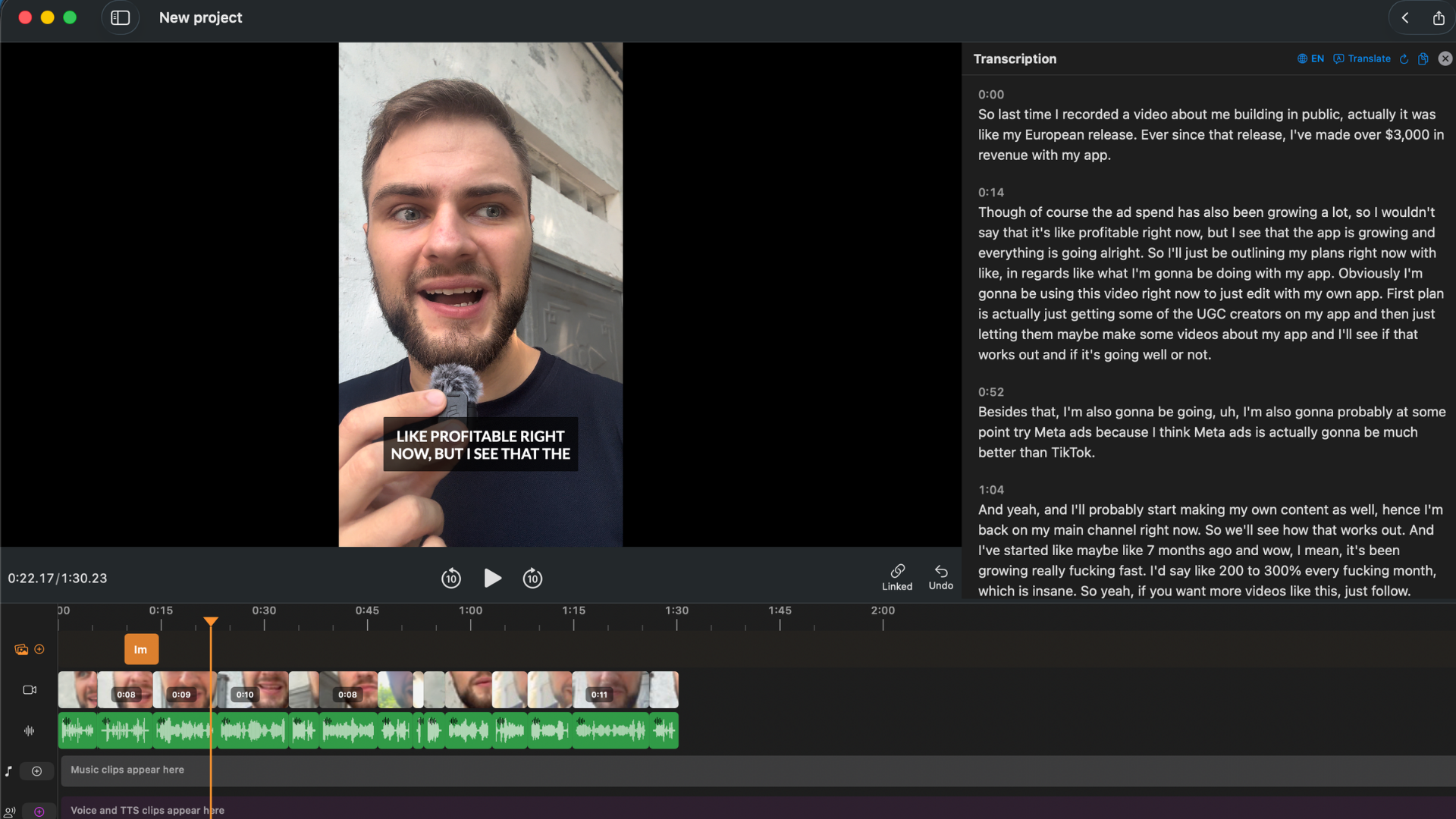
After silence removal, BlitzCut transcribes the recording. The full spoken content appears as editable text in the transcript panel alongside the video preview.
For clip extraction, this is the fastest method available: read the transcript to find the moment you want. A strong opinion, a surprising stat, a quotable line. Reading a transcript is 5–8x faster than scrubbing a video timeline to find the same moment.
Once you find the clip:
- Select everything before it in the transcript and delete it
- Select everything after it and delete it
- Clean any stumbles, false starts, or weak endings within the clip
The footage updates automatically with every deletion.
Step 4: Generate Captions
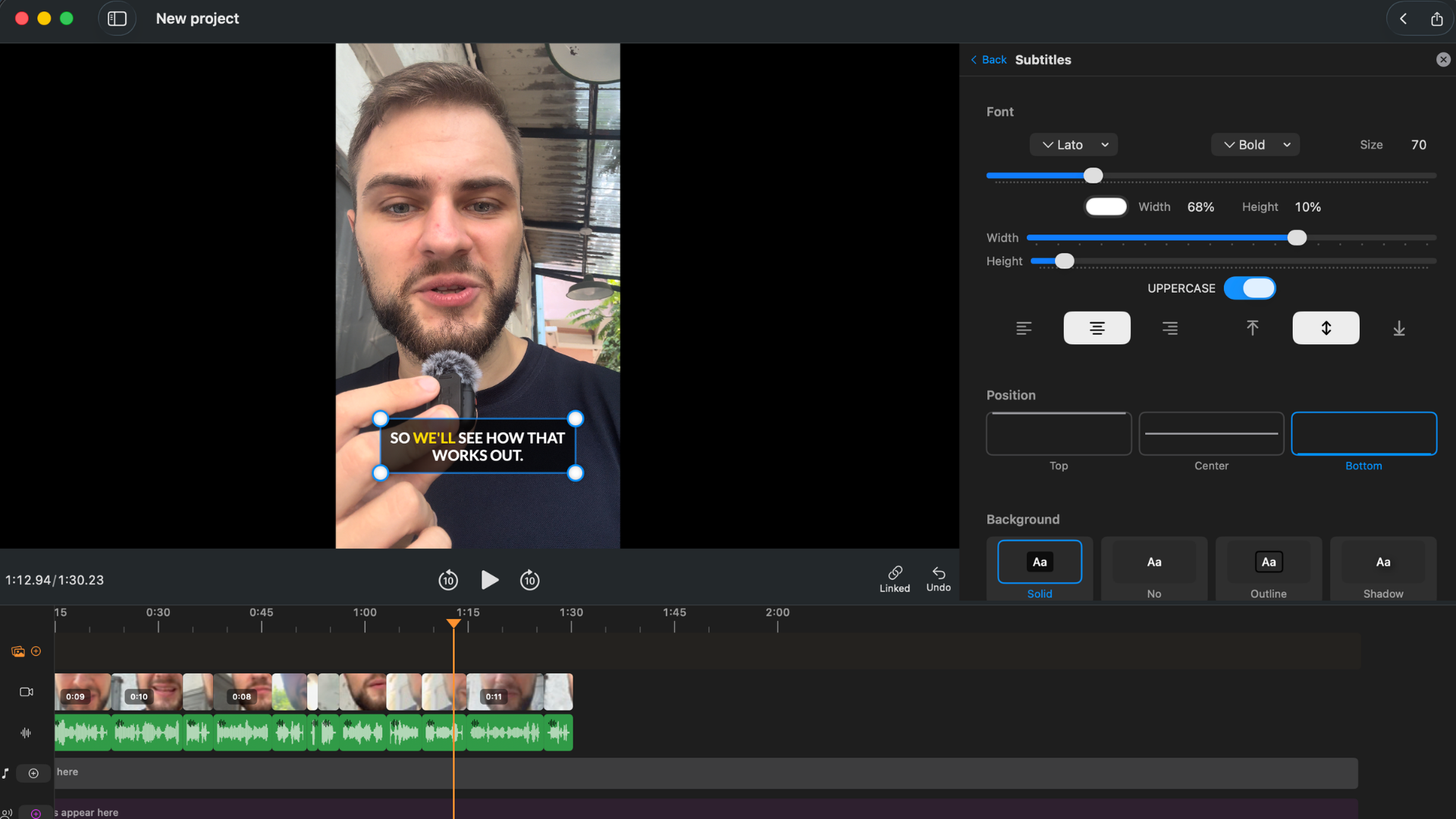
With the clip isolated, generate captions in one tap. For social clips, karaoke style — word-by-word highlighting — consistently outperforms static subtitles on TikTok, Reels, and Shorts. The timing is automatic from the transcript.
Adjust font, color, and positioning. Preview in real time.
Step 5: Export
Select 9:16 for TikTok/Reels/Shorts, 16:9 for YouTube, or 1:1 for LinkedIn. Export at up to 4K. No watermark.
Total active time for a 60-minute episode: 10–20 minutes. Silence removal and export run unattended. The active work is scanning the transcript, isolating the clip, and styling captions.
Try BlitzCut free for 3 days →
Full-Episode Transcription for Show Notes and SEO
Beyond social clips, podcast transcription supports two other distribution workflows:
Show notes. A cleaned-up excerpt of the transcript on the episode page gives readers context and helps with search indexing. MacWhisper's TXT export is the fastest path — copy, edit for readability, publish.
Full-episode transcript page. Some podcasts publish a full, formatted transcript for each episode as a dedicated page. This serves accessibility (deaf and hard-of-hearing listeners) and SEO (transcript text is indexed by search engines). For a 60-minute episode, MacWhisper produces the raw transcript in under 10 minutes. Clean-up and formatting for publication takes 20–45 minutes of manual editing depending on accuracy.
YouTube captions. Upload the MacWhisper SRT export to YouTube as a caption track. YouTube indexes the caption text for search, which improves the episode's discoverability on YouTube search. This is a straightforward SEO step that most podcasters skip — don't skip it.
Accuracy for Podcast Audio
Podcast recordings vary more than single-speaker talking-head video. Variables that affect accuracy:
| Factor | Impact |
|---|---|
| Single vs dual microphone | High — dedicated mic per speaker is cleanest |
| USB vs XLR mic quality | Moderate — XLR with interface is cleaner |
| Two speakers alternating vs overlapping | High — overlapping speech degrades all AI tools |
| Room acoustics / reverb | Moderate — treated rooms improve accuracy |
| Technical vocabulary | Moderate — domain jargon often misheard |
| Recording platform | Low — Riverside, Zoom, Ecamm all produce usable audio |
For a standard two-host podcast recorded remotely on Riverside with USB mics, accuracy in BlitzCut, MacWhisper, and Descript is typically 94–97% for the cleaner speaker. A few errors per page of transcript. The editable transcript in BlitzCut means those errors are correctable before captions are generated.
For a heavily overlapping panel discussion with poor microphone placement, accuracy drops across all AI tools. In those cases, Rev's human transcription ($1.50/min) is the reliable option — slow and expensive, but correct.
Descript for Podcasts: When It's Worth It
Descript handles one podcast-specific scenario better than other tools: multi-track recordings where each speaker is on a separate audio file.
If you record with Riverside or SquadCast in multi-track mode (separate local recordings per participant), Descript can import separate tracks, label speakers per track, and generate a transcript with speaker names already correct. This is a meaningful time-saver for interview shows.
For mixed-down stereo output (the standard output from Zoom, most recording setups, and any exported-from-Riverside mixed file), BlitzCut and MacWhisper handle it as well as Descript — without the mandatory upload and without the Electron overhead.
Descript is worth the cost ($288/year) for podcast workflows when:
- Multi-track speaker separation is needed
- International audience needs translated captions (61-language support)
- SRT export for YouTube is required and you want it integrated with editing
BlitzCut ($69.99/year) is better when:
- Social clip extraction is the primary workflow
- No video upload is a priority
- Karaoke captions for Reels/TikTok are needed
Podcast Transcription Speed Comparison
For a 45-minute podcast episode on an M2 MacBook Pro:
| Tool | Processing time | Active work | Total to export |
|---|---|---|---|
| MacWhisper (medium model) | 4–5 min unattended | 0 (export only) | ~5 min |
| Whisper CLI (large-v3, mlx) | 6–8 min unattended | 0 | ~8 min |
| BlitzCut (full clip workflow) | 6–8 min unattended | 10–20 min active | ~25 min |
| Descript | 8–15 min upload + process | 10–20 min active | ~30 min |
| Rev AI | 10–20 min processing | 0 | ~20 min |
For pure transcription output, MacWhisper is the fastest. For a finished, captioned social clip, BlitzCut's total active time is comparable to Descript's — but with no upload wait and a better social caption output.
Frequently Asked Questions
What is the fastest way to transcribe a podcast on Mac? MacWhisper with the medium model. A 60-minute episode transcribes in 4–6 minutes on M-series hardware, entirely on-device, no upload. For clip extraction with captions, BlitzCut is faster than any workflow that combines a separate transcription tool with a separate video editor.
Can I transcribe a podcast on Mac without uploading it? Yes. MacWhisper and Whisper CLI run entirely locally. BlitzCut transcribes without uploading the raw video file (uses AI processing via internet, but the file stays on your Mac).
Does podcast transcription work with multi-speaker recordings? All tools handle alternating speakers in a single mixed audio file. For separate speaker tracks (multi-track recordings from Riverside, SquadCast), Descript handles speaker labeling best. MacWhisper Pro and Whisper CLI also have diarization options for mixed files.
Can I use a podcast transcript for SEO? Yes. Two approaches: publish a full transcript page per episode (Google indexes it), or upload the SRT file to YouTube as a caption track (YouTube indexes caption text for search). Both drive discoverability. MacWhisper exports the SRT directly; upload it to YouTube in one step.
How accurate is podcast transcription on Mac? For clean two-speaker podcast audio with dedicated mics: 94–97% across BlitzCut, MacWhisper, and Descript. For noisy or overlapping audio, accuracy drops and manual correction or Rev's human transcription becomes necessary.
What's the cheapest podcast transcription tool for Mac? MacWhisper free tier covers basic transcription and SRT export. Whisper CLI is free and unlimited. BlitzCut's 3-day trial covers clip extraction and caption generation at no cost; the annual plan is $69.99.
Related: Best Video Transcription Apps for Mac 2026 · How to Add Captions to a Podcast Video on Mac · Word-by-Word Karaoke Captions on Mac
Post every day without spending hours editing
BlitzCut is a native app for iPhone, iPad, and Mac. Get from raw footage to TikTok-ready in under 2 minutes, so editing is never the reason you didn't post.
Try it for freeRelated Articles
Keep Reading

What Font Does TikTok Use? (2026 Answer)
TikTok uses TikTok Sans, open-sourced in July 2025 and free to download. Before that, Proxima Nova — still the app's Classic text option. History and license.

What Makes a Reel Hook Go Viral? (2026 Breakdown)
Viral Reel hooks are a mechanism, not clever writing. What Instagram measures in the first three seconds, and what every hook that travels has in common.

YouTube Shorts Length Limits (2026): Maximum Length and What Counts as a Short
YouTube Shorts can be up to 3 minutes long in 2026. What qualifies as a Short, the aspect ratio rule, and why longer Shorts don't always perform better.