
How to Add Music to a Video on iPhone: Soundtracks and Imports
Learn how to add music to a video on iPhone with soundtracks or imported audio, balance it beneath speech, and finish the edit in iMovie or BlitzCut.


How to add music to a video on iPhone: create an iMovie Movie project, add a soundtrack or audio file, adjust its volume beneath any speech, and export the finished video.
The important choice is where the music comes from. An iMovie soundtrack, a licensed file in Files, and an Apple Music subscription download are different sources with different availability and usage terms. For a spoken tutorial, the other priority is keeping every word understandable.
How to add music to a video on iPhone with iMovie
Start with a built-in soundtrack
- Open iMovie and choose Start New Project → Movie.
- Select the video and tap Create Movie.
- In the timeline, tap Add Media, then Audio → Soundtracks.
- Tap a track to preview it. Download it first if needed.
- Tap Add Audio beside your choice.
iMovie places a built-in soundtrack at the beginning and fits it to the project length. You can change its length afterward. Apple documents these steps in its soundtrack instructions.
Choose music against a representative section of the video, not just the opening. A track that works beneath a title card might become distracting when the presenter starts explaining something.
Add your own music from Files
Save a music file you have permission to use somewhere you can find it in Files. Then:
- Open the movie timeline.
- For an audio file shorter than a minute, position the playhead where it should begin.
- Tap Add Media → Files.
- Browse to the file and tap it to add it.
Apple lists formats including MP3, M4A, WAV, and AIFF for this iMovie workflow. Files longer than a minute behave as songs; shorter files enter at the playhead. Protected music is unavailable, and purchasing a song does not itself grant permission to use it in a video. See Apple's audio-file import and availability notes.
Built-in soundtrack permissions apply within their stated usage scope. An Apple Music streaming subscription is a separate service; do not treat it as a video soundtrack license. For commissioned work, retain the license for the particular music file you choose.
Balance music against the original sound
For a talking-head video, establish the voice first. Listen without music and decide whether the original recording should remain, be reduced, or be replaced by a separate voiceover.
In iMovie, select the music clip, open the Audio controls, and adjust the volume slider. For a softer entrance or ending, select the audio clip, choose Audio → Fade, and drag the fade handles. Apple's audio adjustment guide also explains its background-music ducking behavior.
There is no universal percentage that makes every track sit correctly. A dense song with vocals can compete with speech even at a low setting. Start quietly, then listen to the softest spoken sentence. If you need to concentrate to understand it, reduce the music or choose a sparser track.
Listen once on headphones and once through the phone speaker. Also check transitions between speech and silent demonstrations: the apparent music level can change sharply when the voice stops.
Use BlitzCut when the spoken edit comes first
BlitzCut fits videos where the presenter carries the story: advice, product explanations, lessons, or a narrated review. Finish the speaking edit before timing music to the final sequence. Removing pauses afterward can change where musical accents meet the visuals.
BlitzCut's official App Store description confirms importing your own tracks and layering audio. Its Mac timeline below shows separate video audio, music, and voice/TTS lanes, plus Sounds and Record controls.
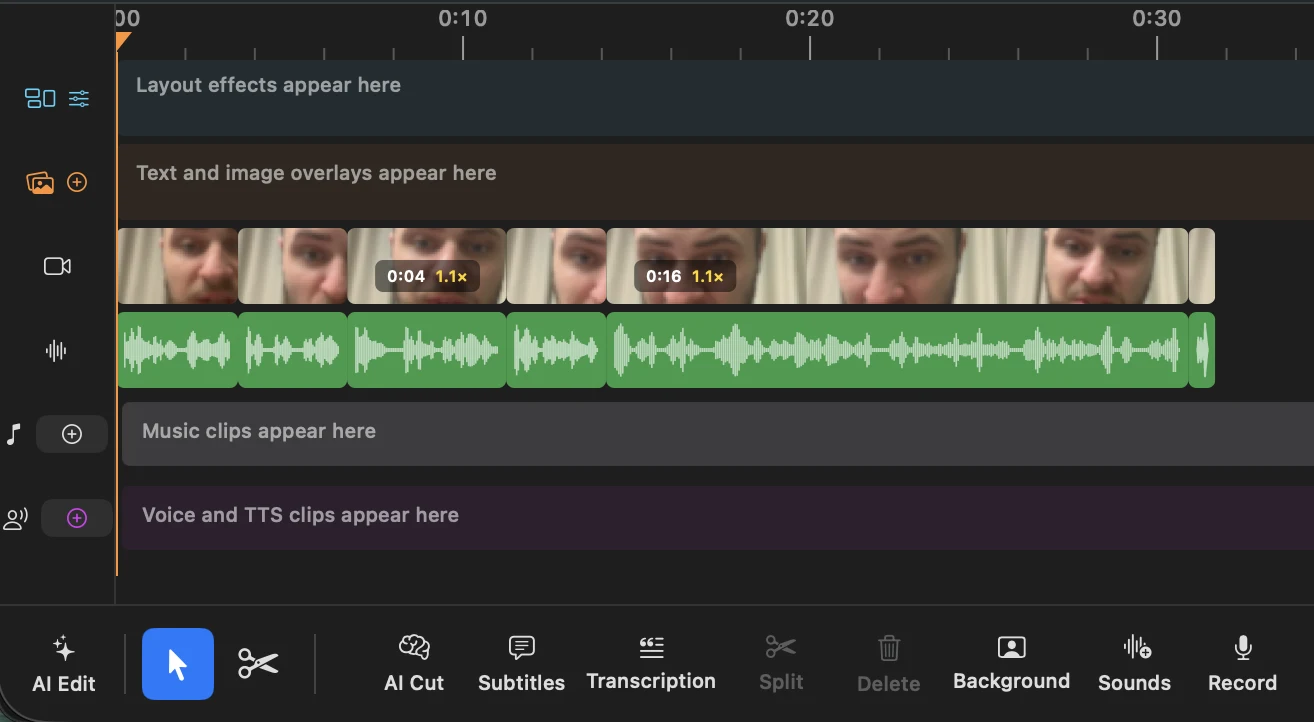
A practical sequence is to import the talking-head footage, review the speaking cuts, add your music, and check the combined audio before export. BlitzCut's transcript editing, silence removal, and captions are useful when adding music is one part of a larger spoken-video edit. Our talking-head editing workflow covers that earlier stage.
Export a video file and check the ending
In iMovie, return to the project details, choose Share → Share Video, review Options, then choose Save Video for the photo library or Save to Files. Apple distinguishes these video-file options in its sharing guide.
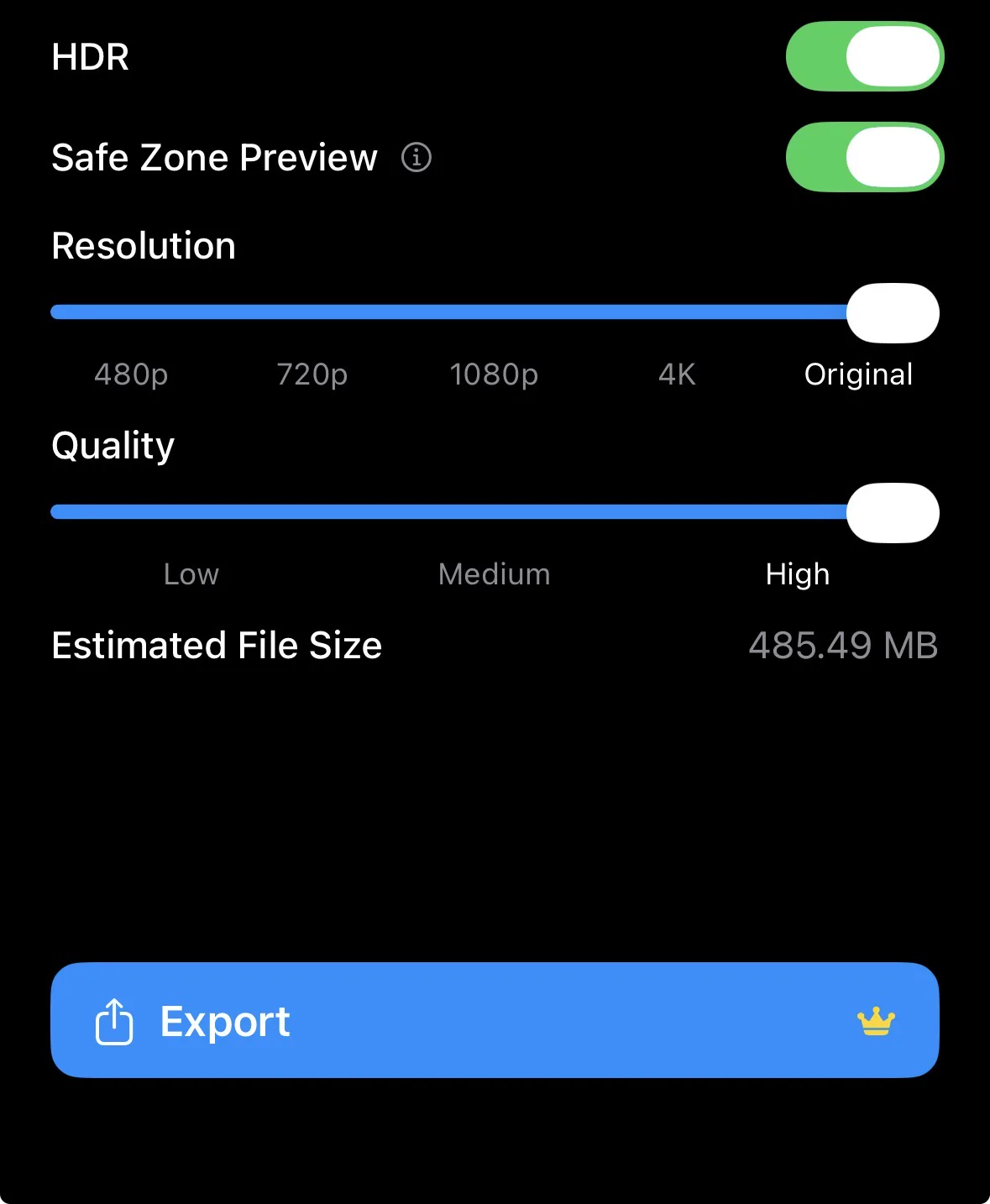
In BlitzCut, the export screen provides resolution, quality, and an estimated file size. Choose settings appropriate to the footage and destination; raising resolution does not repair a soft source clip.
Play the saved file through its last frame. Check that the final word is intact, the music finishes deliberately, and you are uploading the new export rather than the original recording.
Troubleshooting music imports and mixes
The song is unavailable. Check whether you have a usable audio file rather than a protected subscription download. If a file is stored in the cloud, make sure it has downloaded before trying again.
The music starts at the wrong place. Check the imported file's length. iMovie treats short audio clips differently from longer songs, so review the timeline after insertion.
Speech sounds muddy. Lower the music first. A louder voice over an already crowded mix can still be difficult to understand. Try an instrumental track with fewer competing sounds.
The ending sounds cut off. Recheck the music's end against the final spoken line. A short fade often works better than ending in the middle of a sustained note.
Frequently Asked Questions
Can I add music without removing the original audio?
Yes. Keep the video's sound and add music as another layer. Adjust the balance so the original speech remains clear.
Can I use a downloaded Apple Music song?
A subscription download is not the same as an unrestricted audio file. Protected tracks are unavailable in iMovie, and download access does not grant soundtrack rights.
Can I use an MP3 saved in Files?
Yes, iMovie supports MP3 imports through Add Media → Files. Use a file you have permission to include in the finished video.
Should I add music before or after cutting a talking-head video?
Usually after the spoken edit. Establish the message and pacing, then fit the music around the finished sequence. For a montage driven by musical beats, starting with the music can be more useful.
Related Guides
Editing a talking-head video?
BlitzCut is available on Windows, Android, iPhone, iPad, and Mac. It is designed for recorded UGC-style videos, founder-led ads, tutorials, and testimonials and other talking-head content.
Download BlitzCutRelated Articles
Keep Reading

Black Friday 2026 Video Editing Software Deals: CapCut, DaVinci, Final Cut, Descript and More
Every Black Friday 2026 video editing software deal we could verify: DaVinci Resolve, CapCut, Final Cut Pro, Adobe, Descript, Filmora, BlitzCut, plus what each did last year.

BlitzCut vs Kapwing: App and Browser Editing Compared
Compare BlitzCut and Kapwing for talking-head ads, tutorials, and team content, including Smart Cut, transcript editing, captions, and usage limits.

BlitzCut AI vs KineMaster: Captions and Editing (2026)
Compare KineMaster’s free on-device captions and layered editing with BlitzCut’s recorded talking-head workflow, including export and pricing checks.