
VN Video Editor Auto Captions: Honest Review 2026
VN's auto caption feature tested — accuracy, speed, style options. How it compares to dedicated caption tools on iPhone and Mac in 2026.


Yes, VN Video Editor has auto captions. The feature lives under Text → Auto Captions, works on iOS, iPad, Android, and Mac, and core caption generation is available on the free tier with no watermark. You pick between two transcription modes — Tiny (faster, less accurate) and Base (slower, more precise) — and VN drops the result onto the timeline as individual editable text layers. The catch is what happens after: you're reformatting and restyling those layers by hand on every video.
VN Video Editor is one of the most downloaded free video editing apps on iPhone and Mac. It's capable, fast, and genuinely free — no watermark on exports, no subscription required for core editing features. Enough creators use it as their primary mobile and desktop editor that the auto caption feature gets real-world testing at scale across every device and content type.
This is an honest look at VN's auto caption feature in 2026: what it does well, where it falls short, how accurate it actually is, and whether it's worth using over dedicated caption tools for creators who care about performance on TikTok and Reels.
VN Video Editor: What It Is
VN (VlogNow) is a multi-track timeline editor developed by the same company behind VivaVideo. It's available on iOS, iPad, Android, and Mac (via the Mac App Store). Notably, there is no native Windows app — Windows users must rely on emulators, which is a genuine limitation for Windows-based creators.
The app's core value proposition is capability without cost: multi-track timeline editing, keyframe animation, chroma key (green screen), filters, transitions, text overlays, speed ramping, and auto captions — all available on the free tier with no watermark on exports.
VN Pro ($7.99/month or $69.99/year) unlocks advanced effects, higher-resolution export options, exclusive filters, and advanced audio editing. The auto caption feature occupies a gray area — some sources report basic captions are free-tier accessible; others indicate advanced AI caption features require Pro. The free tier covers core caption generation; advanced AI enhancements are likely Pro-gated.
What VN's Auto Caption Feature Does
VN added auto caption generation as part of its AI feature expansion. The workflow: import a video, navigate to "Text," select "Auto Captions," and VN transcribes the audio and places caption text on the timeline as individual, editable text layers.
Two transcription modes: VN offers two accuracy settings:
- Tiny — faster processing, lower accuracy. Best for quick caption drafts where you plan to review manually.
- Base — slower processing, more precise. Better starting point for content that will be published without extensive review.
This speed-accuracy tradeoff is a useful design choice — not all creators need the same thing.
Transcription approach: VN uses on-device speech recognition for caption generation — not cloud-based processing. Your video does not upload to a server. On-device processing means no internet connection is required for caption generation once the model is downloaded, and your footage stays private.
Output: Standard subtitle-style captions placed on the video timeline. Each caption segment is editable as a text layer. Timing can be adjusted manually by dragging segment handles on the timeline.
Platform availability: iOS, iPad, Android, Mac. The auto caption feature is available across platforms. Mac version has feature parity with the mobile version, though processing speed varies by hardware.
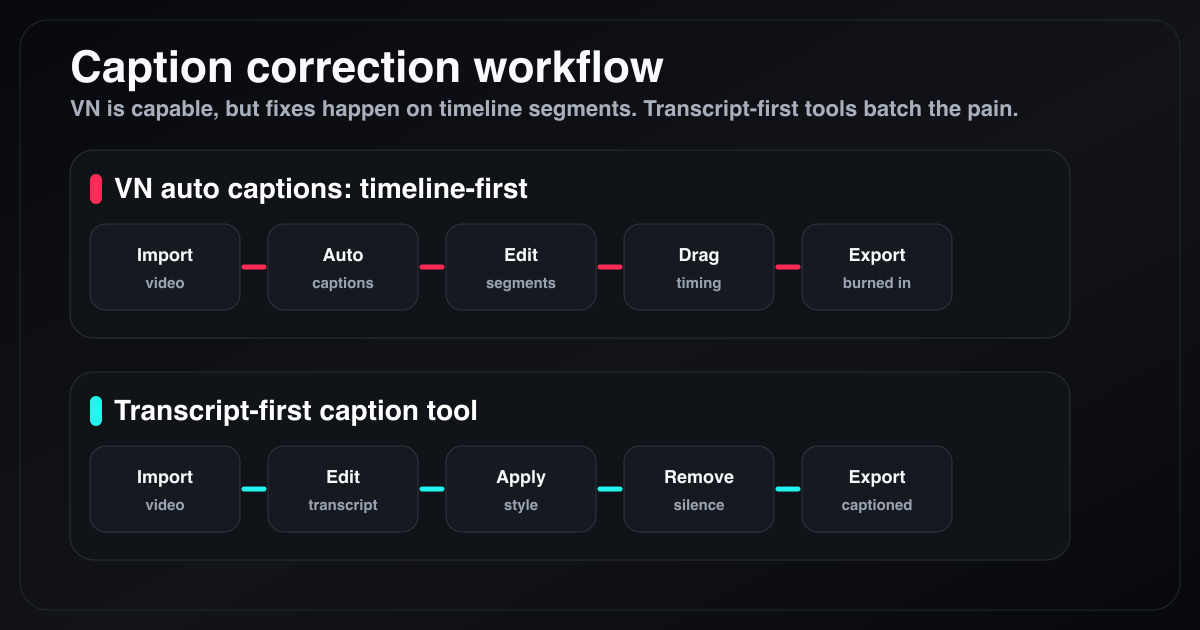
VN's caption workflow is timeline-first: corrections happen segment by segment. Transcript-first caption tools move most correction work into one text-editing pass.
What VN Auto Captions Gets Right
It's Free, Genuinely
The most important thing VN gets right on captions: no paywall on the core feature. No subscription, no credit card, no watermark on exports. For a creator who wants basic auto-generated captions without spending anything, VN delivers.
The free tier combination — capable editing, auto captions, watermark-free export — is essentially unmatched for zero cost. CapCut's free tier adds watermarks. Submagic is $20/month minimum. Veed watermarks free exports. VN doesn't.
On-Device Processing — Privacy by Default
VN processes captions on-device using local speech recognition models. Your video doesn't upload to a server before transcription begins. This matters for creators with sensitive footage — coaching clients, confidential interviews, unreleased product demos, legal recordings — and for anyone working on a slow internet connection.
This is a meaningful technical differentiator from web-based tools (Veed, Submagic, Captions.ai) and from Descript, all of which require cloud upload before any processing.
Two-Mode Accuracy Tradeoff
The Tiny vs. Base model choice is genuinely useful. Not all content needs maximum accuracy — a rough caption draft for internal review has different requirements than a clip you're posting to 500,000 TikTok followers. Having a fast mode and an accurate mode available in one app is a practical design decision that most competitors don't offer at this level.
Style Customization Per Segment
VN lets you edit each caption segment's font, color, size, and position individually on the timeline. You can change the style of specific words for emphasis, adjust the background, and reposition the text block per segment. This is granular control — more than many competitors offer.
The downside of this per-segment approach: consistency requires manual work. To apply a uniform style across all captions, you set it on the first segment and copy the style forward. VN doesn't apply a global caption style in one action the way dedicated caption tools do. For a 90-second clip with 30–40 caption segments, this is manageable. For longer content, it's tedious.
Cross-Platform Consistency
For creators who edit on both iPhone and Mac, VN's consistent interface across platforms is a real advantage. The project file format is the same across devices. Start a clip on iPhone on a commute, finish it on Mac at home — VN handles it. This cross-platform consistency is more complete than many competitors.
Animated Subtitle Support
VN added animated subtitle options in recent versions. This allows some level of entrance and exit animation on caption segments — more visual interest than flat static text. This doesn't reach word-by-word karaoke timing, but it's more than pure static subtitles.
Where VN Auto Captions Falls Short
No Karaoke / Word-by-Word Style
VN generates static subtitles only. There is no word-by-word highlight — the caption text appears as a block for the duration of the segment. There is no option to highlight each word as it's spoken.
In 2026, karaoke-style captions — where each word highlights as spoken — consistently outperform static captions on TikTok, Reels, and Shorts. Higher completion rates, higher engagement rates, higher share rates. The mechanism is well-documented: karaoke captions reduce cognitive effort for muted-playback viewing, which reduces early drop-off, which feeds algorithmic distribution. This isn't a minor style preference — it's a measurable performance difference.
VN cannot generate this style natively. For creators whose primary distribution is TikTok and Reels, this is the most significant limitation.
Accuracy on Non-Standard Speech
AI auto-caption accuracy industry-wide runs 60–80% on average for non-studio audio. VN's Base model performs better than average for clear English — typically 90–94% for single-speaker content with a decent microphone in a quiet environment. But accuracy degrades with:
- Accented speech: Indian English accents specifically have been called out in user reviews as inconsistently handled.
- Multiple speakers talking simultaneously or interrupting.
- Technical vocabulary and product names not in the training data.
- Noisy audio: background noise, HVAC, outdoor recording.
On noisy audio or accented speech, accuracy drops to the 80–88% range — enough errors that manual correction on the timeline becomes more work than the auto-caption feature saved.
Manual Correction Is Slow
When VN gets a transcription wrong, fixing it requires finding the caption segment on the timeline, tapping or clicking into it, and editing the text inline. On mobile, this is a slow, error-prone process for anything beyond a few corrections. On Mac, it's faster but still segment-by-segment.
Dedicated caption tools that generate from an editable transcript (BlitzCut, Descript) let you make all corrections in a text document before captions are applied. Fix one word and all downstream timing adjusts automatically. In VN, every correction is a separate timeline interaction.
No SRT Export
VN outputs captions burned into the exported video. There is no standalone SRT or VTT export. If you need a separate caption file for YouTube closed captions, accessibility compliance, or platform-side caption upload, VN can't produce it.
Instability on Complex Projects
User reviews note crashes and instability on long or complex projects — multi-hour recordings, wedding videos, projects with many tracks. For short social clips (under 5 minutes), VN is generally stable. For longer sessions, this is a real risk.
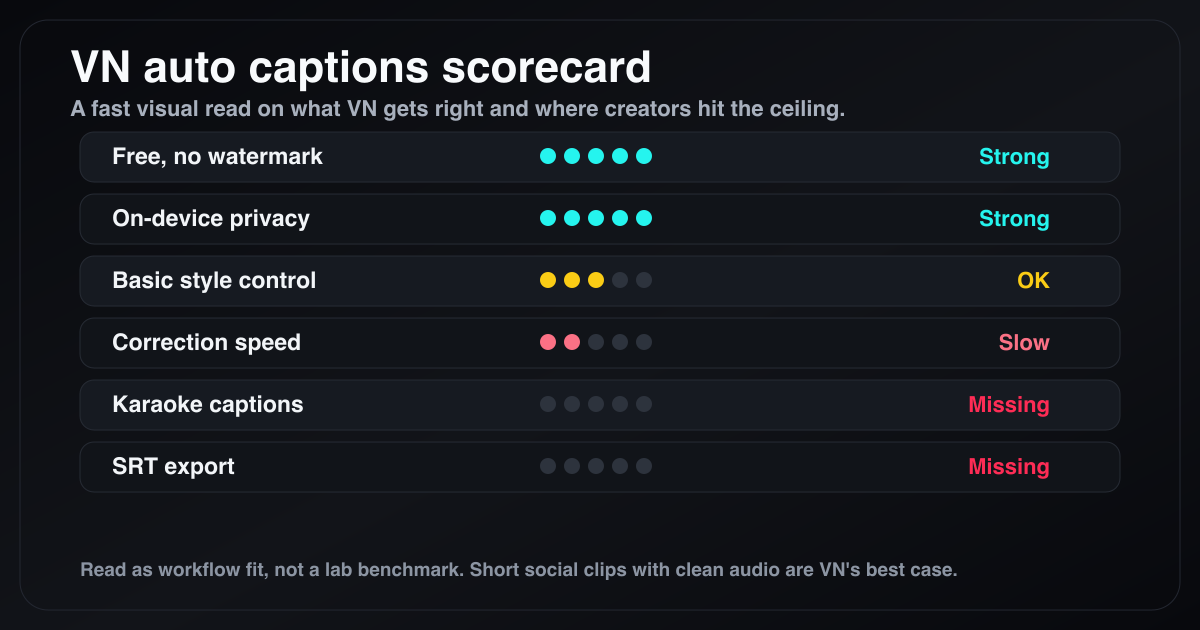
VN is strongest for free, private, short-form caption drafts. The ceiling shows up when you need karaoke captions, faster correction, or standalone subtitle files.
VN vs Dedicated Caption Tools: Direct Comparison
| Feature | VN (free) | VN Pro ($69.99/yr) | BlitzCut ($69.99/yr) | Descript ($288/yr) |
|---|---|---|---|---|
| Auto caption generation | Yes | Yes | Yes | Yes |
| Karaoke word-by-word style | No | No | Yes | No |
| Editable transcript before captions | No | No | Yes | Yes |
| On-device processing | Yes | Yes | Partial (silence removal) | No |
| Video upload required | No | No | No (TTS uses internet) | Yes |
| SRT export | No | No | No | Yes |
| Mac native app | No (not native) | No (not native) | Yes | No (Electron) |
| Animated captions | Basic | Advanced | No (karaoke only) | No |
| Silence removal | No | No | Yes — on-device | No |
| Price | Free | $69.99/yr | $69.99/yr | $288/yr |
VN wins decisively on price, especially at the free tier. BlitzCut wins on karaoke caption style, transcript-based correction, and silence removal. Descript wins on SRT export and multi-track speaker handling. For creators comparing VN Pro at $69.99/year to BlitzCut at $69.99/year — the price is nearly identical, and BlitzCut covers silence removal, transcript editing, and karaoke captions that VN Pro doesn't offer.
Who Should Use VN for Captions
Use VN free tier if:
- You need auto-captions at zero cost
- Standard static subtitle style is sufficient for your content
- Privacy matters — you want on-device processing, no video upload
- You're already editing in VN and don't want to switch apps
- Your content is short-form with clean audio
Consider VN Pro ($69.99/yr) if:
- The above applies AND you want more visual effects and styles
- Note: at this price point, BlitzCut offers silence removal + transcript editing + karaoke captions for $2/year more
Switch to BlitzCut ($69.99/yr) if:
- You want karaoke word-by-word captions for TikTok/Reels/Shorts performance
- Transcript editing before caption generation would save correction time
- You want silence removal integrated in the same workflow
- You want to edit talking-head content at the clip level
Switch to Descript ($288/yr) if:
- You need SRT file output for YouTube accessibility
- You record with separate speaker tracks (multi-track podcast setup)
- Team collaboration is required
VN Auto Captions: Verdict
VN's auto caption feature is the best option at its price point (free). On-device processing, watermark-free exports, and cross-platform support are genuinely strong advantages that no other free tool matches completely.
The ceiling is real, though. No karaoke style, no transcript-based correction workflow, no SRT export, and accuracy drops enough on imperfect audio that VN isn't a replacement for dedicated caption tools for creators publishing at scale.
For a creator just starting out — or for someone who needs basic captions as a secondary concern — VN's free captions are the right default. For a creator who measures caption performance on TikTok and Reels and wants the best output for the least friction, VN is where you start before you outgrow it.
Frequently Asked Questions
Does VN Video Editor have auto captions? Yes. VN's auto caption feature uses on-device speech recognition to transcribe audio and place caption segments on the timeline. Available on iOS, Android, and Mac, free tier, no watermark.
How accurate are VN's auto captions? VN offers two modes — Tiny (faster, lower accuracy) and Base (slower, more precise). Base model: approximately 90–94% for clear, single-speaker English with a good microphone. Noisy audio or accented speech drops accuracy to 80–88%.
Does VN upload my video to generate captions? No. VN's caption generation uses on-device speech recognition. Your video does not upload to a server. This is a privacy advantage over web-based tools like Veed, Submagic, and Descript.
Can VN generate karaoke word-by-word captions? No. VN generates static subtitle captions only, with optional basic entrance/exit animations. For word-by-word karaoke captions, BlitzCut is the native Mac and iOS option.
Is VN Video Editor free for auto captions? Yes. Core auto caption generation is available on VN's free tier with no watermark on exports.
Does VN export SRT files? No. VN outputs captions burned into the exported video. For standalone SRT files, use MacWhisper, Descript, Premiere Pro, Veed, or Rev.
Is VN available on Mac? Yes — via the Mac App Store. The Mac version has feature parity with the iOS version. There is no native Windows app; Windows users need an emulator.
Related: Best Subtitle Generator for Mac 2026 · Word-by-Word Karaoke Captions on Mac · Auto Caption Generator for Mac 2026
Post every day without spending hours editing
BlitzCut is a native app for iPhone, iPad, and Mac. Get from raw footage to TikTok-ready in under 2 minutes, so editing is never the reason you didn't post.
Try it for freeRelated Articles
Keep Reading

What Font Does TikTok Use? (2026 Answer)
TikTok uses TikTok Sans, open-sourced in July 2025 and free to download. Before that, Proxima Nova — still the app's Classic text option. History and license.

What Makes a Reel Hook Go Viral? (2026 Breakdown)
Viral Reel hooks are a mechanism, not clever writing. What Instagram measures in the first three seconds, and what every hook that travels has in common.

YouTube Shorts Length Limits (2026): Maximum Length and What Counts as a Short
YouTube Shorts can be up to 3 minutes long in 2026. What qualifies as a Short, the aspect ratio rule, and why longer Shorts don't always perform better.