
Riverside Magic Clips Review 2026
Honest review of Riverside's Magic Clips AI feature — what it does, where it fails, and what creators actually use instead in 2026.


Riverside.fm is where many serious podcasters record. The local recording architecture — each participant records audio and video on their own device before uploading — protects quality from internet interruptions and produces uncompressed 48kHz WAV audio at 24-bit on every plan including Free. That recording quality advantage is real and is the primary reason Riverside became the default for remote podcast production.
Magic Clips is Riverside's AI clip generation feature: an automatic tool that identifies the "best" moments from a recording and produces ready-to-post social clips. The pitch is compelling — record your podcast, let AI select the highlights, download captioned clips for Reels and TikTok, done.
The reality is more complicated. Magic Clips works — but the clips it generates aren't always the ones you'd pick, the caption quality has real gaps, and the feature has limitations that matter for creators optimizing for social performance. This review covers what Magic Clips actually produces, where it breaks down, and what experienced podcasters do instead.
What Riverside.fm Is (For Context)
Understanding Magic Clips requires understanding why Riverside is used in the first place.
Recording quality: 48kHz WAV audio, 24-bit, recorded locally on all plans including Free. Video up to 4K per participant on paid plans (720p on Free, 1080p on Starter). The local recording model means a participant's dropped internet connection doesn't degrade their recorded audio — the recording captures what their device heard, not what made it through the network.
Separate participant tracks: Each participant records to a separate audio (and video) track. In post-production, you mix the tracks independently, apply noise reduction per-speaker, and have full control over levels. This is the professional standard for remote podcast production.
Current pricing (2026):
| Plan | Annual | Monthly |
|---|---|---|
| Free | $0 | $0 |
| Starter | $15/mo | $19/mo |
| Pro | $24/mo | $29/mo |
| Business | Custom | Custom |
Annual billing saves approximately 35% across paid plans. The Starter plan covers most solo and small podcast needs. Pro adds more AI features and higher video quality.
What Riverside Magic Clips Does
How clip selection works: After a Riverside recording session ends, Magic Clips analyzes the full transcript and audio using three signals:
- Keyword relevance — words and phrases associated with importance and shareability
- Sentiment analysis — detecting strong opinions, emotional peaks, and impactful statements
- Speaker energy levels — volume, pacing, and stress patterns in the audio
Each identified segment receives a "Viral Score" rating. The AI selects the top segments and generates clips in 9:16 or 1:1 format with captions burned in.
Clip length target: 30–90 seconds. The AI determines start and end points based on its assessment of where a "complete thought" begins and ends.
Captions: Auto-generated from Riverside's transcript engine. Riverside claims 99%+ transcription accuracy for clear English audio — strong enough that caption text accuracy is not the primary concern with Magic Clips.
Plan limits for Magic Clips:
| Plan | Magic Clips per recording |
|---|---|
| Free | 1 set |
| Starter | 1 set |
| Pro | 3 sets (with duration, keyword, speaker controls) |
| Business | 5 sets |
Pro and Business users can set preferences for clip duration, choose which speakers to focus on, and input specific keywords to guide what the AI prioritizes. These controls improve relevance significantly but don't solve the fundamental selection problem (see below).
Comparison to Opus Clip: In direct comparisons, Riverside Magic Clips generates approximately 17 clips per hour of footage; Opus Clip generates approximately 31 per hour. Riverside's clips show a higher usability rate per clip — fewer total candidates but better candidate quality — though experienced editors typically still reject most suggestions from both tools.
What Magic Clips Gets Right
It Removes the Blank-Page Problem
Starting a long podcast recording and trying to find the best 90 seconds is genuinely hard if you don't have a mental map of the conversation. Magic Clips gives you a starting set of candidates — even if you reject most of them, they orient you to where the high-signal moments are.
Many podcasters use Magic Clips not as the final output but as a first pass: let the AI find candidates, watch the 5–8 suggestions, pick the 1–2 that actually work, and improve them. That's a faster workflow than watching the full recording from the beginning.
Integrated with the Recording Workflow
Riverside is where these podcasters record. Having clip generation in the same platform means one less tool to open. For creators who are already uploading recordings to Riverside for post-production, Magic Clips adds value without adding workflow friction.
Speed for High-Volume Teams
A podcast network producing 5+ episodes per week can't have a human clip editor watch every full recording. Magic Clips generates a candidate pipeline fast — the human editor selects and refines from that set rather than watching raw footage. At volume, this saves meaningful hours.
Keyword Customization on Pro and Business
Pro and Business users can feed Magic Clips specific keywords to prioritize — the names of guests, key topics, recurring themes. This makes clip selection significantly more relevant for shows with consistent subject matter.
Where Magic Clips Falls Short
The AI Doesn't Know Your Audience
Magic Clips optimizes for general "shareability" signals — emphasis, energy, short complete thoughts. It doesn't know your specific audience, your show's recurring themes, or which topics actually drive engagement on your channels.
The result: Magic Clips surfaces moments that are clear and well-articulated but aren't necessarily the clips your audience engages with. A perfectly structured 60-second explanation scores well for Magic Clips. A raw, opinionated 45-second take that would go viral for your specific audience won't necessarily score as high by keyword relevance or sentiment alone.
User feedback is consistent: "Magic Clips often fails to identify usable segments, generating highlights with odd durations or missing key moments." The AI-generated show notes have also been called out as "vague or irrelevant, requiring rewriting." The consensus from experienced podcasters: treat Magic Clips as a starting point, not a finished product.
Caption Style: Static Only, No Karaoke
Riverside's transcription accuracy is strong (99%+ for clear audio), so the words in Magic Clips captions are generally correct. The problem is the style.
Magic Clips generates standard static subtitles — text appears as a block for the duration of each segment. There is no word-by-word karaoke style where each word highlights as it's spoken.
In 2026, karaoke-style captions outperform static captions on TikTok and Reels across every metric: completion rate, engagement rate, share rate. The mechanism is well-understood — karaoke captions reduce cognitive effort for muted-playback viewing, which reduces early drop-off, which signals quality to the algorithm. Magic Clips clips competing against karaoke-captioned clips are starting at a disadvantage.
Additionally, the font and color customization options in Magic Clips are narrow. You can't substantially change the visual style without exporting and re-captioning in a separate tool. If your channel has a specific caption style your audience recognizes, Magic Clips won't match it.
Clip Boundaries Are Often Wrong
Magic Clips cuts where the AI thinks a thought ends. Experienced editors cut where the energy is strongest. These are frequently different places.
Common boundary issues:
- Starts too early — captures a lead-in sentence or filler before the actual point
- Ends too late — trails off after the strongest line
- Misses the peak — the most compelling moment is in the middle of the clip; the clip is bounded by less compelling content
Tight clips — where the first second grabs attention and the last second is the strongest thing said — require human judgment about where the impact is. This is the editing skill that Magic Clips can't automate.
No Silence Removal
Magic Clips does not remove silence before generating clips. Pauses, "um"s, filler words, and gaps between speakers remain in the output. For alternating-speaker podcast content, these pauses can be significant — a 60-second clip might have 8–12 seconds of silence that an experienced editor would cut, tightening the pacing and improving the viewer experience.
Platform Sync and Reliability Issues
Multiple user reports describe video/audio sync issues in Magic Clips output, recordings lost or unavailable, and slow customer support response. These are production-blocking problems when they occur. The issues appear more common on longer recordings and in sessions with multiple participants.
What Creators Actually Do Instead
The most common workflow for podcasters who want to maximize clip performance:
- Record on Riverside — for the recording quality, separate tracks, cloud backup, and transcription
- Export the mixed stereo recording from Riverside
- Import into BlitzCut for Mac — silence removal runs automatically on-device, then scan the transcript to find the actual best moment, trim to exact clip boundaries, generate karaoke captions
- Export 9:16 with karaoke captions — ready to post
This workflow uses Riverside for what it does best (recording quality and transcription) and BlitzCut for what Magic Clips doesn't deliver: silence removal, transcript-based precise clip editing, and karaoke caption generation.
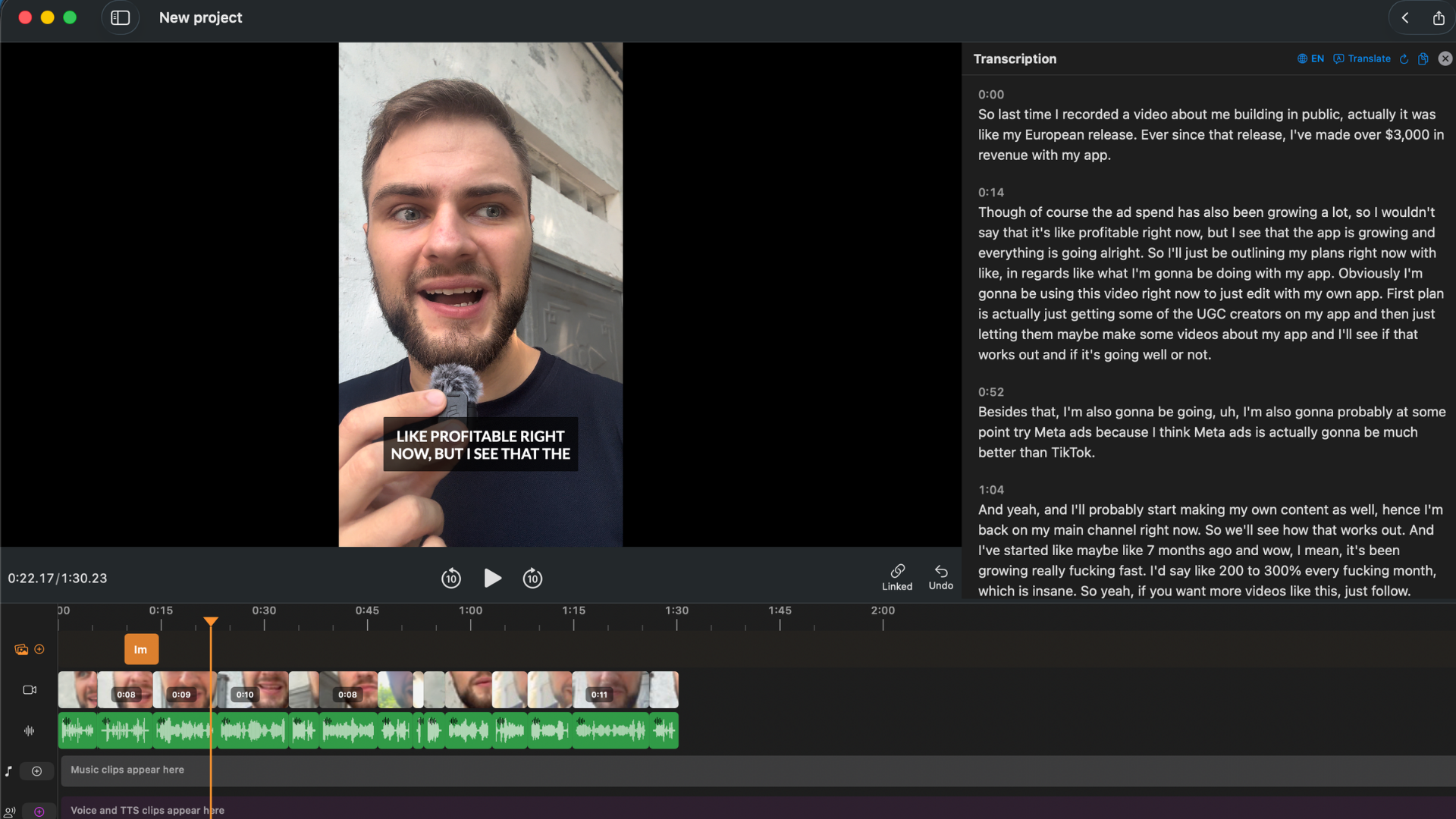
The result: clips with tighter boundaries, silence removed, and karaoke captions that outperform Magic Clips output on every engagement metric that matters for distribution on TikTok and Reels.
When Magic Clips Is the Right Call
Use Magic Clips as your primary workflow if:
- You produce 3+ episodes per week and need a clip candidate pipeline rather than perfect clips
- You don't have time to watch recordings and need AI to do first-pass selection
- Standard static captions are acceptable for your channels and audience
- You want everything inside the Riverside ecosystem without switching tools
- You're on Pro or Business and can use keyword controls to improve relevance
Add BlitzCut to the workflow if:
- Karaoke captions matter for TikTok/Reels performance
- Silence removal would improve clip quality (it will — podcast content always has pauses)
- You want precise, manually controlled clip boundaries
- Your channel has a consistent caption brand that Magic Clips can't match
Pricing: Riverside vs BlitzCut vs Combined
| Monthly cost | What it covers | |
|---|---|---|
| Riverside Free | $0 | Recording + 1 Magic Clips set per recording |
| Riverside Starter | $15/mo annual | Recording + 1 clip set |
| Riverside Pro | $24/mo annual | Recording + 3 clip sets + keyword/duration controls |
| BlitzCut Annual | $6/mo effective ($69.99/yr) | Silence removal, transcript editing, karaoke captions, export |
| Both (Starter + BlitzCut) | $21/mo effective | Full workflow: record on Riverside, clip and caption in BlitzCut |
For a solo podcaster on Riverside Starter at $15/month + BlitzCut at $6/month effective, the combined workflow costs $21/month and produces significantly better social clip output than Magic Clips alone.
Frequently Asked Questions
What is Riverside Magic Clips? Magic Clips is Riverside.fm's AI clip generation feature. It analyzes a podcast recording using keyword relevance, sentiment analysis, and speaker energy signals, then generates 9:16 social clips with auto-captions. Available on all Riverside plans — 1 set per recording on Free and Starter, 3 sets on Pro, 5 sets on Business.
Is Riverside Magic Clips free? 1 clip set per recording is included on Free and Starter. The clip generation feature is not behind an additional paywall — it's part of the plan. More clip sets and keyword controls require Pro ($24/month annual) or Business.
How accurate are Magic Clips captions? Riverside's transcription accuracy is 99%+ for clear English audio, so word accuracy is high. The limitation is style: standard static captions only, no word-by-word karaoke style, limited font and color customization.
Does Magic Clips remove silence from clips? No. Silence, pauses, and filler words remain in Magic Clips output. For silence-removed clips, export the recording and process in BlitzCut.
How does Magic Clips compare to Opus Clip? Riverside Magic Clips generates approximately 17 clips per hour; Opus Clip generates approximately 31. Riverside clips have a higher usability rate per clip. Opus Clip is generally considered the stronger dedicated clipping tool; Magic Clips' value is as a bundled feature within Riverside's recording ecosystem.
What do creators use instead of Magic Clips for final clip production? Most serious podcasters use Magic Clips for first-pass discovery, then export to BlitzCut for silence removal, precise clip editing via transcript, and karaoke caption generation. The full workflow: record on Riverside → export mix → edit and caption in BlitzCut.
Related: How to Add Captions to a Podcast Video on Mac · Podcast Transcription on Mac: Fastest Method 2026 · Best Mac Apps for Silence Removal in 2026
Post every day without spending hours editing
BlitzCut is a native app for iPhone, iPad, and Mac. Get from raw footage to TikTok-ready in under 2 minutes, so editing is never the reason you didn't post.
Try it for freeRelated Articles
Keep Reading

What Font Does TikTok Use? (2026 Answer)
TikTok uses TikTok Sans, open-sourced in July 2025 and free to download. Before that, Proxima Nova — still the app's Classic text option. History and license.

What Makes a Reel Hook Go Viral? (2026 Breakdown)
Viral Reel hooks are a mechanism, not clever writing. What Instagram measures in the first three seconds, and what every hook that travels has in common.

YouTube Shorts Length Limits (2026): Maximum Length and What Counts as a Short
YouTube Shorts can be up to 3 minutes long in 2026. What qualifies as a Short, the aspect ratio rule, and why longer Shorts don't always perform better.