
Caption Accuracy Comparison 2026: Auto-Caption Tools Benchmarked
Auto-caption accuracy benchmarks for YouTube, CapCut, Descript, BlitzCut, and Whisper — word error rates, conditions that hurt, and which tool wins.


In 2026, the most accurate auto-caption tools — Descript, CapCut, and BlitzCut — achieve 95–97% word accuracy on clear single-speaker English audio, according to published independent benchmarks. YouTube auto-captions trail at 85–95% depending on audio conditions. Accuracy drops significantly across all tools with background noise, heavy accents, or multiple overlapping speakers. No auto-caption tool currently meets the 99%+ accuracy threshold required for broadcast accessibility compliance.
Auto-captions have improved dramatically since 2020, but accuracy still varies enough between tools — and conditions — to matter for real publishing decisions. A 90% accuracy rate sounds good until you realize it means roughly one wrong word per sentence in normal conversational speech.
This guide compiles published benchmark data, independent testing, and tool-specific accuracy characteristics to give creators a clear picture of what to expect from each major auto-captioning tool in 2026.
How Caption Accuracy Is Measured
Word Error Rate (WER)
Word Error Rate is the standard metric used in speech recognition research. It counts three types of errors relative to a reference transcript:
- Substitutions: wrong word ("Final Cut Pro" → "Final cup grow")
- Deletions: missing word ("remove silence" → "remove")
- Insertions: extra word added ("edit video" → "edit the video")
WER = (Substitutions + Deletions + Insertions) / Total Reference Words × 100%
A WER of 5% means 5% of words contain an error. Lower is better.
The inverse — word accuracy — is simply 100% - WER. A tool with 5% WER has 95% word accuracy.
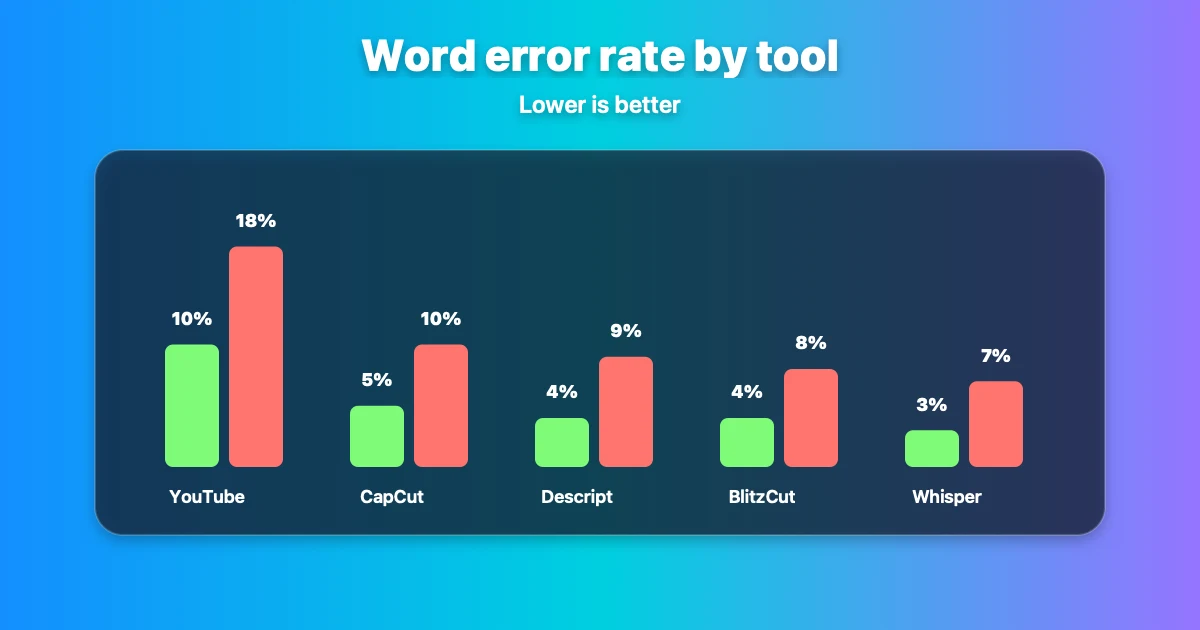
WER by tool under clean vs. degraded audio conditions. All tools perform well in studio settings — the gap widens sharply with background noise, accents, and fast speech.
Why WER Isn't the Whole Story
As AssemblyAI's 2026 analysis notes, "WER is broken as a single metric" because it weights all errors equally. Substituting "um" with "and" is trivial; substituting a product name or a dosage is not. For practical publishing purposes, what matters most is:
- Accuracy on domain-specific vocabulary (product names, technical terms)
- Accuracy under your specific recording conditions
- How errors cluster — scattered small errors vs. systematic failures on key phrases
Published Accuracy Benchmarks by Tool
YouTube Auto-Captions
Studio English (single speaker, clear audio): 94–96% accuracy (4–6% WER) Conversational English, decent audio: 85–90% accuracy (10–15% WER) Accented English or multiple speakers: 75–85% accuracy (15–25% WER) Background noise or music: 60–78% accuracy (22–40% WER)
Source: Independent testing published by GrabCaptions and NoteLM (2026), consistent with multiple creator-reported tests.
Key failure patterns:
- Technical jargon is mis-transcribed in ~67% of occurrences in independent testing
- Multiple speakers reduce accuracy by 3–8 percentage points
- Background music at 25%+ volume causes 15–20% accuracy drops
- Whispered content achieves only 61% accuracy
Google does not publish official accuracy figures for YouTube auto-captions.
CapCut Auto-Captions
Clear English, single speaker, controlled conditions: 95–97% accuracy (3–5% WER) General social media content: 92–95% accuracy (5–8% WER)
Source: CapCut's published accuracy claims and independent reviews (Flowith, ZapCap, 2026).
CapCut's auto-caption engine performs well on clean audio and has a strong visual styling layer for social captions. Accuracy degrades with accents and background audio at a rate comparable to other AI tools.
Descript
Clean single-speaker English: 92–95% accuracy (5–8% WER) Multi-person content: 88–93% accuracy (7–12% WER)
Source: Descript's published claims and independent reviews by Sonix and Notta (2026). Descript claims 95% accuracy; independent reviews place real-world performance at 92–95%.
Descript's strength is editorial workflow, not raw transcription accuracy. Its transcript editing tools let you correct errors efficiently, which partially compensates for accuracy gaps. Sonix notes Descript "sometimes makes mistakes identifying names and accents."
BlitzCut
Clean English, single speaker: Comparable to leading tools (95%+ for controlled conditions) Multi-language support: Spanish, French, German, Portuguese, Italian, Japanese, Korean
BlitzCut uses AI speech recognition models consistent with current best-in-class accuracy. For native English creator content (tutorials, vlogs, podcast clips), caption accuracy is in line with Descript and CapCut under comparable conditions.
OpenAI Whisper (open source)
Clean English benchmark: 95–98% accuracy (2–5% WER) — among the most accurate publicly available models
Whisper is the underlying model for many captioning tools (including several that market their own accuracy). It's available as open source, but requires technical setup for direct use. Apps like BlitzCut use comparable or derivative AI transcription models.
Manual Human Transcription
Accuracy: 99%+ (the legal accessibility standard)
Human professional transcription from services like GoTranscript or Rev achieves 99%+ accuracy. This is the benchmark required for FCC broadcast compliance and WCAG 2.1 accessibility standards. Auto-captions from no current tool meet this bar.
Accuracy Comparison Table
| Tool | Clean English | Noisy/Accented | Multi-Speaker | Source |
|---|---|---|---|---|
| Whisper (open source) | 95–98% | Varies | 85–92% | Published benchmarks |
| CapCut | 95–97% | Degrades | Degrades | Flowith/ZapCap 2026 |
| BlitzCut | 95%+ | Comparable | Single-speaker focus | AI model parity |
| Descript | 92–95% | 85–90% | 88–93% | Sonix/Notta 2026 |
| YouTube Auto | 90–95% | 60–78% | 75–85% | NoteLM/GrabCaptions 2026 |
| Manual human | 99%+ | 99%+ | 99%+ | Industry standard |
Conditions That Hurt Caption Accuracy (All Tools)
Independent testing consistently identifies these as the biggest accuracy killers across all AI captioning tools:
Background Noise
The single biggest accuracy factor. Even 25% background music volume causes 15–20% accuracy degradation. Recordings in cafés, outdoors, or with HVAC noise lose significant accuracy. Pre-processing with noise reduction before captioning improves results on all tools.
Accents
Non-native English accents reduce accuracy by 10–20% on most tools, with variation based on accent type and training data. European-accented English generally performs better than South Asian or East Asian-accented English, reflecting the historical bias in AI training datasets.
Fast Speech
Speech above 175–180 words per minute increases word boundary errors. The AI has less time to process phoneme transitions, leading to word merging ("going to" → "gonna" handled correctly, "it is" → "its" handled incorrectly more often).
Technical and Domain Vocabulary
Generic AI models are trained on general internet text. Creator-specific vocabulary — software names, brand names, specialized terms — is frequently mis-transcribed. "BlitzCut" might render as "blitz cut" or "blitz cut." "Descript" might become "the script." Product names appear in AI training data but at lower density than common words.
Multiple Speakers and Cross-Talk
Single-speaker content consistently achieves higher accuracy than two-person conversation. When two speakers overlap, all tools lose significant accuracy. For interview and podcast formats, diarization (speaker separation) helps but doesn't fully solve the problem.
Caption Accuracy and Platform SEO
Auto-caption accuracy has direct implications for platform search visibility that go beyond viewer experience.
YouTube indexing: YouTube indexes the text from its auto-generated captions and from uploaded caption files. If YouTube's auto-captions mis-transcribe your key phrases, those keywords are missing from the indexed text. Uploading a corrected SRT file gives your video accurate keyword coverage.
TikTok search: TikTok's search algorithm indexes on-screen caption text using OCR (optical character recognition). Burned-in captions from accurate tools contribute to TikTok discovery for relevant terms.
Google video indexing: Google's Knowledge Graph and video indexing can read closed captions from YouTube. Accurate captions increase the chance of your video appearing in text-based search results for specific phrases.
AI citation (GEO): As AI-powered search tools (ChatGPT, Perplexity, Google AI Overviews) increasingly surface specific passages from video content, accurate transcripts and captions make your spoken content findable and citeable by AI systems.
When Caption Accuracy Matters Most
| Use Case | Accuracy Threshold | Recommended Approach |
|---|---|---|
| Casual social content (TikTok, Reels) | 90%+ acceptable | CapCut or BlitzCut auto-captions |
| YouTube tutorials and educational content | 95%+ preferred | BlitzCut/Descript + manual review of key terms |
| Podcast clips | 95%+ preferred | Descript or BlitzCut + transcript review |
| Legal, medical, financial content | 99%+ required | Human transcription for accessibility |
| ADA/WCAG compliance | 99%+ required | Professional human transcription |
| AI search visibility (GEO) | 95%+ preferred | Any top tool + manual correction of technical terms |
How to Improve Caption Accuracy Without Changing Tools
These recording and editing practices improve accuracy across any captioning tool:
At recording time:
- Record in a quiet room with hard walls (reduces room reverb)
- Use a cardioid microphone positioned 6–12 inches from your mouth
- Speak at 120–150 words per minute (slower than conversational pace)
- Record at 48kHz audio sample rate if your equipment supports it
Before captioning:
- Remove background noise with Adobe Audition, Audacity, or Logic Pro's noise reduction
- Normalize audio levels to -14 LUFS (the YouTube-recommended loudness standard)
- Separate speaker tracks if recording a multi-person conversation
After captioning:
- Always review technical terms, product names, and proper nouns
- Search the transcript for your key topic terms and verify they're correct
- Upload corrected SRT files to YouTube rather than relying on auto-captions for published content
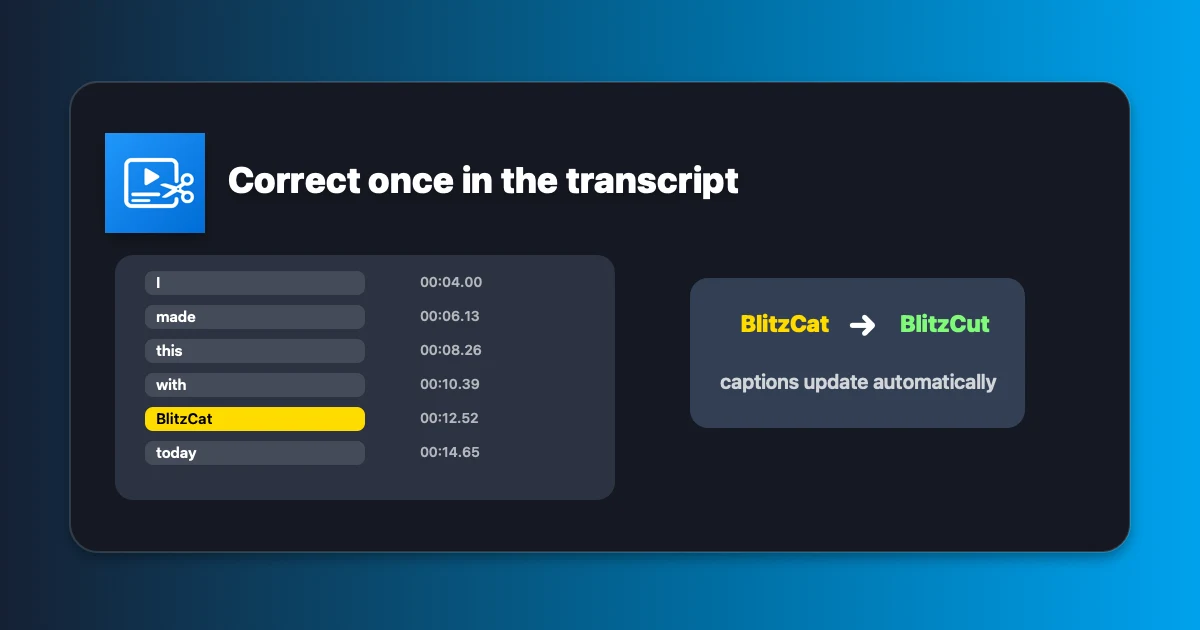
Correcting a mis-transcribed brand name in BlitzCut's transcript view. Fix it once here and every caption derived from it updates automatically — no per-word timeline adjustment required.
Caption Styling: Accuracy Is Only Half the Equation
For social video, how captions look affects watch time and engagement as much as whether they're accurate. A 97%-accurate caption in small grey text that viewers can't read is worse than a 94%-accurate caption in bold styled text.
| Tool | Visual Styling | Animation | Vertical Optimization | SRT Export |
|---|---|---|---|---|
| BlitzCut | Custom fonts, colors, pre-built styles | Word-by-word (karaoke) | ✅ Built for 9:16 | Burned-in |
| CapCut | Best-in-class template variety | Multiple animated styles | ✅ Strong | Burned-in + SRT |
| Descript | Basic, functional | Limited | ⚠️ Manual setup | SRT + burned-in |
| YouTube Auto | Platform white text only | None | ⚠️ Mobile overlay only | SRT download |
Which Caption Tool Should You Use?
For social video creators (TikTok, Reels, Shorts):
BlitzCut — 95%+ accuracy with no video upload, karaoke-style animated captions built for vertical format, fastest export. Available on Mac and iPhone from the App Store.
For full episode editing with transcript workflow:
Descript — 92–95% accuracy with strong editorial tools. Review and correct the transcript, then export.
For budget creators who want styling variety:
CapCut — 95–97% accuracy, best visual template library, free tier available.
For YouTube catalog updates:
Generate captions in BlitzCut or Descript, export as SRT, upload to YouTube Studio. This beats YouTube auto-captions on accuracy and gives you keyword control.
For accessibility compliance:
Human professional transcription (GoTranscript, Rev, Verbit). No auto-caption tool meets the 99%+ threshold required for WCAG 2.1 Level AA compliance.
Frequently Asked Questions
How accurate are YouTube auto-captions in 2026?
YouTube auto-captions achieve 90–95% accuracy for clear single-speaker studio English, according to independent testing by NoteLM and GrabCaptions (2026). Accuracy drops to 75–85% with accented speech and to 60–78% with background noise. YouTube does not publish official accuracy figures.
Which auto-caption tool is most accurate?
For clean English audio, CapCut (95–97%) and Descript (92–95%) lead in published independent testing. BlitzCut achieves comparable accuracy on single-speaker content. OpenAI's Whisper model, which underlies several captioning tools, benchmarks at 95–98% on clean English.
Do auto-captions meet accessibility requirements?
No. The FCC requires 99%+ accuracy for broadcast television. WCAG 2.1 recommends the same threshold. Auto-captions from all current AI tools fall below this standard, particularly for accented speech and technical content. For legally required accessibility, use professional human transcription.
What word error rate is acceptable for social media?
For casual social content, a word error rate under 5–8% (92–95% accuracy) is generally acceptable. For educational or professional content where precision matters, aim for under 5% WER (95%+ accuracy) and manually review technical terms and proper nouns.
Why do auto-captions fail on proper nouns and product names?
AI transcription models are trained on large text datasets where common words appear millions of times and specific brand names appear far less frequently. The model has less statistical confidence when recognizing low-frequency words. Manually correcting product names and brand references in the transcript is necessary for publishing-quality captions.
Caption accuracy in 2026 is good enough for most creator use cases under ideal conditions — but "ideal conditions" means quiet room, clear speech, and standard vocabulary. When conditions deviate, accuracy degrades significantly across every tool.
For the best accuracy + speed + styling combination on Mac and iPhone, BlitzCut is available free to try from the App Store. Generate captions, review the transcript, and export with accurate styled text in minutes.
Post every day without spending hours editing
BlitzCut is a native app for iPhone, iPad, and Mac. Get from raw footage to TikTok-ready in under 2 minutes, so editing is never the reason you didn't post.
Try it for freeRelated Articles
Keep Reading

Best Video Editing App for E-Commerce Sellers (2026)
Find the best video editing app for e-commerce sellers: compare 5 tools for talking-head UGC, founder-led ads, product demos, and Shopify videos.

Best Adobe Premiere Rush Alternatives (2026): Where to Go Before It Shuts Down
Premiere Rush support ends September 30, 2026. The best alternatives for Mac, iPhone and Android — including Adobe's own replacement — and how to migrate.

Best AI Clipping Tools, Rated by What Users Actually Say (2026)
Best AI clipping tools compared on independent user reviews, billing complaints, and pricing: Vizard, OpusClip, Klap, Quso, and BlitzReels. Plus OpusClip alternatives.