
Best AI Voiceover Apps for Mac Video Creators 2026
Best text-to-speech voiceover tools for Mac video editing in 2026 — ranked by voice quality, language support, and whether they need internet.


AI voiceover for Mac video creators breaks into two distinct product categories. The first is standalone TTS platforms — you generate audio, download it, and place it in your editor. The second is integrated tools where TTS is part of a broader editing workflow, connected to your transcript and your video timeline.
Neither category is universally better. Standalone tools give you more voice variety, higher quality ceilings, and voice cloning. Integrated tools eliminate the file management and sync work that a multi-tool workflow creates. For creators who produce video regularly, that friction adds up to real hours per week.
This guide covers both categories, ranked by what matters for video creators: voice quality, Mac workflow integration, language support, whether your files upload to a cloud server, and cost.
Quick Rankings
| Tool | Voice quality | Mac integration | Upload required | Languages | Price |
|---|---|---|---|---|---|
| BlitzCut | Good | Native app | No raw video | Multiple | $69.99/yr · $129.99 lifetime |
| ElevenLabs | Excellent | Browser only | Text only | 29–74 | Free · $5–$99/mo |
| Descript Overdub | Good–Excellent | Electron app | Full video | English | $16–$50/mo annual |
| Murf | Good | Browser only | Text only | 35+ | $19–$99/mo |
| Play.ht | Good | Browser only | Text only | 142 | ~$31–$49/mo |
| Lovo | Good | Browser only | Text only | 100+ | $24–$48/mo |
| Speechify | Good | Browser + Mac app | Text only | 30+ | $139/yr |
| HeyGen | Excellent (avatar) | Browser only | Text only | 175+ | $29–$99/mo |
1. BlitzCut — Best for Integrated Mac Workflow
Price: $16.99/month · $69.99/year · $6.99/week · $129.99 lifetime (limited time) · 3-day free trial
Voice quality: Good — natural, clear, suitable for social and tutorial content
Mac integration: Native macOS app — deepest integration of any tool on this list
Upload required: No raw video upload; TTS uses internet connection
Languages: Multiple
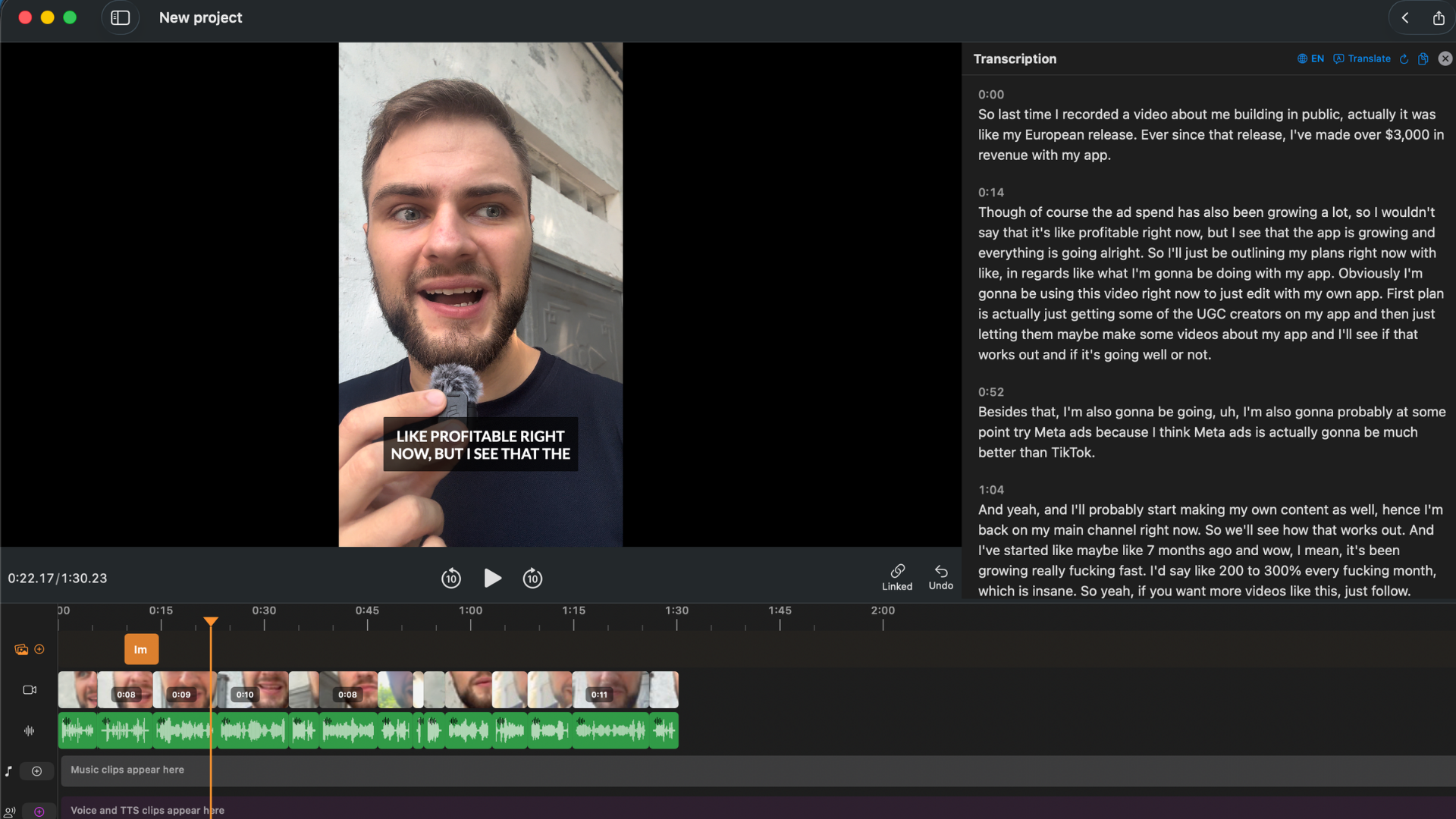
BlitzCut's TTS is built into the editing workflow — not bolted on as an add-on. You don't generate audio, download a file, import it to a timeline, and sync it manually. You write or edit text in the transcript panel, trigger TTS generation, and the audio is placed and synced automatically.
The integrated workflow advantage: For creators who edit talking-head video — podcasters, course creators, coaches, YouTubers — the friction of a multi-tool TTS workflow adds up fast. The alternative: open editor → open TTS browser tab → type script → generate → download → go back to editor → import file → find the right point on the timeline → place → adjust sync. BlitzCut replaces all of that with: edit the transcript text, generate TTS for that section. Done.
Where BlitzCut TTS fits best: Replacing stumbled lines in podcast clips. Narrating a screen recording or B-roll video. Filling gaps where original audio was cut but the video continues. All of these happen inside BlitzCut's existing session — no new tool, no file to manage.
Where dedicated platforms beat BlitzCut: Voice variety, cloning, and language coverage. ElevenLabs has 11,000+ voices and lets you clone your own voice from 1–3 minutes of audio. BlitzCut has a focused selection. If you need a specific regional accent, a character voice, or your exact voice matched to corrections, a dedicated platform is stronger.
Try BlitzCut free for 3 days →
2. ElevenLabs — Best Voice Quality Available
Price: Free (10,000 chars/month, no commercial license) · Starter $5/month (30,000 chars, commercial, Instant Voice Cloning) · Creator $22/month (121,000 chars, Professional Voice Cloning) · Pro $99/month (600,000 chars)
Voice quality: Excellent — best-in-class neural TTS in 2026
Mac integration: Browser-based only; generate audio, download, import to editor
Upload required: Text input only; no video or audio upload for standard TTS
Languages: 29 (Multilingual v2 model) · 74 (Eleven v3 model)
ElevenLabs is the quality benchmark for AI voice in 2026. In blind listener tests, 38% of respondents cannot identify top ElevenLabs voices as AI — up from 12% in 2023. The voice library has 11,000+ voices including community-shared options, covering a wide range of accents, ages, genders, and speaking styles.
Voice cloning — two tiers:
- Instant Voice Cloning (Starter plan, $5/month): Requires 1–3 minutes of clean audio. More than 3 minutes provides diminishing returns. Good for quick self-cloning; quality is high for short clips.
- Professional Voice Cloning (Creator plan, $22/month): Requires minimum 30 minutes; optimal is 1–3 hours of clean, single-speaker audio. Recommended 1 hour minimum for broadcast-ready quality. This is the tier that produces output genuinely indistinguishable from the original speaker in casual listening tests.
Language support: Multilingual v2 model covers 29 languages at the quality level creators expect. The newer Eleven v3 model extends this to 74 languages with improved non-English quality. Annual billing saves ~17% across all paid tiers.
The Mac workflow gap: ElevenLabs is browser-only. No native Mac app, no direct integration with any Mac video editor. Your workflow is: write script → generate in ElevenLabs browser → download MP3 → import into BlitzCut, Premiere, Final Cut, or your editor → place on timeline → sync manually. For creators who care about maximum voice quality and don't mind file management, this is worth it. For creators who want a seamless session from recording to export, the extra steps add friction.
3. Descript Overdub — Your Voice, Generated from Text
Price: Free (1,000-word vocab cap) · Hobbyist $16/month annual · Creator $24/month annual · Business $50/month annual (unlimited vocabulary, 30 hrs transcription, 4K export, AI Eye Contact, Studio Sound)
Voice quality: Good to Excellent (depends on sample quality and plan)
Mac integration: Electron app — not native macOS
Upload required: Full video upload before any processing
Languages: English (primarily); some other languages at lower quality
Descript's Overdub feature trains a model of your voice from a sample recording, then uses that model to generate new audio from text. When you correct a transcript mistake, the correction sounds like you said it.
Training requirements: Overdub requires uploading 10–30 minutes of clean English speech. A newer Descript feature allows training on existing recorded audio (so you don't need to record a special training script). Processing takes 24–48 hours.
The vocabulary cap — a critical detail: Free and Creator plans limit the Overdub vocabulary to 1,000 common English words. The model cannot pronounce arbitrary words outside that set — product names, technical terms, and proper nouns will frequently fail. Unlimited vocabulary requires the Business plan at $50/month annual ($600/year). This is a significant limitation for creators who use technical vocabulary or unusual proper nouns in their content.
When Overdub is compelling: Podcast editors who want replacement lines to match the original speaker. Creators who produce polished scripted content and regularly need to fix lines without re-recording. The combination of Descript's transcript editing + Overdub voice replacement is a specific workflow that works well when you're already in Descript and on Business plan.
Versus ElevenLabs voice cloning: ElevenLabs Professional Voice Cloning (Creator, $22/month) requires 30 minutes of audio — comparable to Overdub. ElevenLabs produces comparable or better quality with broader vocabulary handling. If you want your voice in TTS and aren't already a Descript user, ElevenLabs cloning is worth comparing directly before committing to Descript.
4. Murf — Professional TTS with the Fastest API
Price: Free (10,000 words/year) · Creator $19/month annual · Business $99/month (96 hours/year, 30+ languages, collaboration tools, priority rendering)
API pricing: $0.01/1,000 chars (Falcon conversational) · $0.03/1,000 chars (Studio-quality TTS)
Voice quality: Good — competitive with ElevenLabs for some voices
Mac integration: Browser-based
Languages: 35+ languages, 200+ voices
Murf is positioned at professional content producers — eLearning developers, corporate training teams, marketing video agencies — rather than individual creators. The output quality is high and consistent.
Murf Falcon model (released November 2025): Currently the fastest TTS API in the market at 55ms latency — faster than ElevenLabs, OpenAI, and Deepgram. For real-time applications or workflows where generation speed is a bottleneck, Falcon is a meaningful differentiator.
Built-in video editor: Murf includes a video timeline that lets you pair generated audio with video in the same browser session. You don't need to export audio and import it into a separate editor — Murf handles the overlay directly. Limited video editing capability, but for narration-over-B-roll workflows, it eliminates one tool from the chain.
AI dubbing: Murf can dub existing video into other languages while preserving the original speaker's tone and pacing characteristics. For creators who produce multi-language content, this is a more sophisticated tool than simply generating new voice audio.
The price: Creator at $19/month annual ($228/year) is reasonable for professional narration volume. Business at $99/month ($1,188/year) is positioned at teams and agencies — more expensive than most individual creators need.
5. Play.ht — Best Language Coverage and Fastest Cloning
Price: Free (12,500 chars/month, 1 instant voice clone) · Creator ~$31–39/month · Unlimited ~$49/month (2.5M char fair-use cap)
Voice quality: Good
Mac integration: Browser-based
Languages: 142 languages, 800+ voices
Play.ht has the widest language support of any major TTS platform — 142 languages with 800+ voices. Quality is strong in English, Spanish, French, German, and Portuguese; user reports note lower quality for Arabic, Hindi, and many African and Eastern European languages.
Voice cloning: Play.ht requires only 30 seconds of audio for instant voice cloning — the lowest sample requirement of any major platform. The 30-second clone won't match ElevenLabs Professional quality, but for quick cloning where speed matters, it's a significant advantage.
Multi-speaker and dialog mode: Play.ht can generate multi-voice conversations in a single file — two or more different voices having a conversation from a script. Useful for educational content, interview-style narration, or any scripted dialogue.
The language play: For creators targeting audiences in languages where ElevenLabs' 29-language coverage doesn't reach, Play.ht is the practical choice. The 142-language library is genuinely wide — it covers most languages that have a meaningful YouTube or social media audience.
6. Lovo — Good Quality at a Lower Price Point
Price: Free (limited) · Basic $24/month · Pro $48/month
Voice quality: Good
Mac integration: Browser-based
Languages: 100+ languages, 500+ voices
Lovo (also known as Genny) is a Murf competitor at a lower price point. Voice quality is competitive with Murf for most use cases. The platform includes basic video editor functionality — similar to Murf's — for narration-over-footage workflows.
At Basic $24/month, Lovo is the most affordable option for creators who want professional-grade TTS but find ElevenLabs Starter's character limits restrictive and don't need Murf's enterprise features.
7. Speechify — Best for Document-to-Video Narration
Price: Free · Premium $139/year
Voice quality: Good (Speechify scored lower than ElevenLabs and Murf in the 2026 VocalImage benchmark)
Mac integration: Mac app + browser
Languages: 30+
Speechify started as a text-to-speech reading assistant and expanded into video narration. The Mac desktop app is a differentiator — unlike most TTS platforms, Speechify has a downloadable Mac application, though it's not a native macOS app in the App Store sense.
For creators who produce content from written documents — taking a blog post and narrating it as video — Speechify's document-to-audio workflow is optimized for that path. Quality is lower than ElevenLabs; use it for workflows where convenience matters more than voice quality.
8. HeyGen — AI Avatar + TTS Combined
Price: Free (3 watermarked videos/month) · Creator $29/month (200 credits) · Pro $99/month (2,000 credits) · Business $149/month (1,000 shared pool credits, 4K rendering)
Voice quality: Excellent (Avatar IV model)
Mac integration: Browser-based
Languages: 175+
HeyGen is a different product category from the others on this list. Rather than generating audio that you overlay on your footage, HeyGen generates a talking-head video — an AI avatar that speaks the script on screen. Avatar IV (August 2025) was described as "the first AI avatar model that can be put in front of a client without an explanation" — a significant quality jump from the previous generation.
Where HeyGen fits in a Mac video workflow:
- Multilingual content at scale: generate the same video in 175+ languages with localized presenters
- Faceless channel talking-head content: a consistent AI presenter who never has a bad hair day
- Scaled marketing video: same script, multiple presenter appearances, no studio time
- As a downstream step from TTS: write script → generate TTS in ElevenLabs → feed audio into HeyGen for lip-synced avatar video
Credit costs: Avatar IV = 1 credit per 10 seconds. Credits don't roll over. For a Creator plan at 200 credits/month, you get approximately 33 minutes of Avatar IV video per month.
Choosing the Right Tool
If you want TTS built into your Mac video editor with no file management
→ BlitzCut. TTS connected to transcript, native Mac, no raw video upload.
If you want the best possible voice quality
→ ElevenLabs. Browser-based, manage audio files yourself. Best-in-class neural voice.
If you want TTS that sounds like your own voice
→ ElevenLabs Professional Voice Cloning (Creator, $22/month, needs 30+ min sample) or Descript Overdub Business ($50/month, needs 10–30 min, unlimited vocabulary). ElevenLabs produces comparable quality with better vocabulary handling.
If you need languages outside the top 20
→ Play.ht (142 languages, 30-second cloning) or Lovo (100+ languages, lower price point).
If you need a talking-head presenter on screen
→ HeyGen. Generates video of an avatar speaking the script. 175+ languages.
If budget is the main constraint
→ ElevenLabs free tier (10k chars/month), BlitzCut's 3-day trial for integrated editing, Lovo free tier for standalone generation.
If you produce high-volume professional narration (eLearning, corporate training)
→ Murf for quality + built-in video editor, or Play.ht Unlimited for volume + language coverage.
Frequently Asked Questions
What is the best AI voiceover app for Mac video creators in 2026? BlitzCut for integrated editing workflow where TTS is part of a complete session. ElevenLabs for highest standalone voice quality. The right answer depends on whether you want TTS connected to your editing workflow or as a separate audio generation step.
Can I clone my own voice for video narration on Mac? Yes. ElevenLabs Instant Voice Cloning needs 1–3 minutes of audio (Starter, $5/month). Professional Voice Cloning needs 30 minutes to 3 hours (Creator, $22/month). Descript Overdub needs 10–30 minutes of speech (Business, $50/month, for unlimited vocabulary).
Does AI voiceover require uploading my video to a server? BlitzCut sends text to AI processing but your video stays on your Mac. All standalone browser-based tools (ElevenLabs, Murf, Play.ht, HeyGen) only receive text or images — they never see your raw video. Descript requires full video upload before any processing.
What languages are supported for AI voiceover on Mac? ElevenLabs: 29–74 languages depending on model. Play.ht: 142 languages. HeyGen: 175+ languages. BlitzCut: multiple languages. For non-English content, test your specific language on the platform before committing — quality depth varies significantly.
Is the BlitzCut voiceover free? TTS is included in BlitzCut's subscription plans. The 3-day free trial includes full access to TTS alongside captions, silence removal, and export.
What's the difference between ElevenLabs Instant and Professional Voice Cloning? Instant (Starter, $5/month): 1–3 minutes of sample audio, good for short content, some quality ceiling. Professional (Creator, $22/month): 30 minutes to 3 hours of sample audio, broadcast-ready quality, better vocabulary handling, preserves more of the original voice's range.
Related: How to Add AI Voiceover to a Video on Mac · Text-to-Speech for Video Editing: Does It Work in 2026? · BlitzCut for Mac: Everything You Need to Know
Post every day without spending hours editing
BlitzCut is a native app for iPhone, iPad, and Mac. Get from raw footage to TikTok-ready in under 2 minutes, so editing is never the reason you didn't post.
Try it for freeRelated Articles
Keep Reading

What Font Does TikTok Use? (2026 Answer)
TikTok uses TikTok Sans, open-sourced in July 2025 and free to download. Before that, Proxima Nova — still the app's Classic text option. History and license.

What Makes a Reel Hook Go Viral? (2026 Breakdown)
Viral Reel hooks are a mechanism, not clever writing. What Instagram measures in the first three seconds, and what every hook that travels has in common.

YouTube Shorts Length Limits (2026): Maximum Length and What Counts as a Short
YouTube Shorts can be up to 3 minutes long in 2026. What qualifies as a Short, the aspect ratio rule, and why longer Shorts don't always perform better.