
How to Add Captions to X (Twitter) Video in 2026
X now takes an .srt upload straight from the composer. How the SRT route works, when burned-in captions still win, and the specs X actually enforces.


X takes a subtitle file. Attach a video in the composer and an "Upload caption file (.srt)" control appears next to "Tag people" — no Media Studio, no ads account, no Premium hoop. That changes the advice this article used to give. You now have two real options: an SRT track viewers can toggle, or captions burned into the file that everyone sees whether they toggle anything or not.
Which one you want depends on whether you're optimising for reach or for accessibility. Usually the answer is both, and there's a right way to do both without ending up with two sets of text on screen.
X Takes an SRT Now
Attach the video to a normal post. Under the player, beside Tag people, there's a Upload caption file (.srt) link.
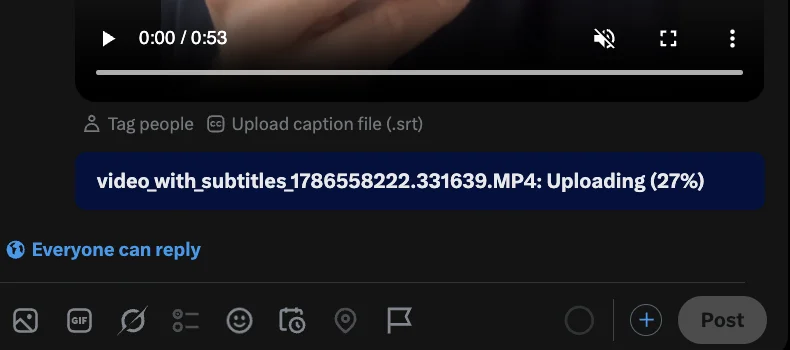
The control sits under the player in the normal post composer. Note the video is still uploading at 27% — you don't have to wait for it to finish before attaching the caption file.
Tap it and you get the Upload captions screen. X states the rules plainly: the file has to be valid SRT, and captions survive later edits to the video.
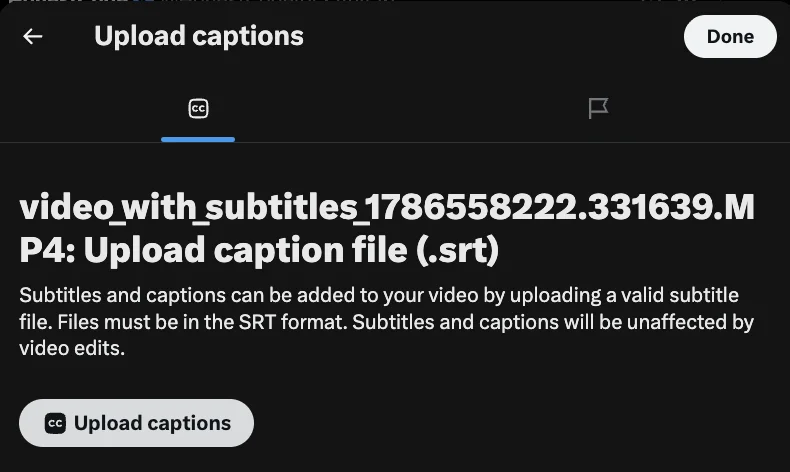
SRT only — no VTT, no SBV. "Subtitles and captions will be unaffected by video edits" means trimming the clip afterwards won't wipe the track.
Two things worth knowing before you build a workflow on this:
- It's SRT or nothing. VTT and the other subtitle formats get rejected. If your tool exports VTT, convert first.
- Availability has moved around. X has added and pulled caption features repeatedly across clients and account tiers. Confirmed working in the iOS composer as of August 2026. Check your own composer before promising a client a caption track.
SRT vs Burned-In on X
An SRT track is a toggle. A burned-in caption is pixels.
| SRT upload | Burned-in | |
|---|---|---|
| Visible in muted autoplay | No — off until the viewer enables CC | Yes, always |
| Survives download and repost | No — the track stays on X | Yes, travels with the file |
| Survives quote-tweets | Yes, the post is embedded | Yes |
| Viewer can turn it off | Yes | No |
| Styling control | None — X renders it | Total |
| Accessible to CC users by default | Yes, respects their preference | It's text on screen, not a track |
The reach argument favours burned-in. X autoplays muted and CC is off unless the viewer turned it on. Someone scrolling past decides whether to unmute based on what's already visible, and an untoggled SRT track is not visible.
The accessibility argument favours SRT. Someone who relies on captions has CC enabled system-wide already. A real caption track respects that preference, and it's machine-readable in a way burned-in pixels never are.
Doing both doubles the text. Burn captions into the file and upload an SRT, and anyone with CC on sees your styled captions plus X's rendering of the same words underneath. It looks broken.
What to actually do
- Short clips built for the timeline — burn in, skip the SRT. Muted autoplay is the whole game and you want styling control.
- Longer talking-head video people will click into — upload the SRT, don't burn in. Viewers who want captions have them, and you don't cover a third of a 16:9 frame with text.
- Anything where accessibility is a stated requirement — upload the SRT. A caption track is the answer that holds up.
The Burned-In Workflow
1. Cut the video first. Lock the edit before captioning or you'll caption footage you then delete. Kill dead air — the timeline is unforgiving of slow openings. See how to remove silence from video automatically.
2. Transcribe and style. BlitzCut transcribes and applies caption styling in one pass on Mac and iPhone. CapCut, Descript, Submagic and Veed all work too.
3. Proofread. Names, handles and technical terms are what automatic transcription gets wrong, and on X those are usually the point of the post.
4. Style for a muted timeline — see below.
5. Burn in and export. How to burn subtitles into video on Mac covers the free FFmpeg and HandBrake routes.
6. Upload natively. Never post a link to video hosted elsewhere. X's algorithm heavily favours native video and a linked video gets a fraction of the reach.
The SRT Workflow
1. Cut the video first. Same reason — SRT timings are absolute, and re-cutting after the fact desyncs everything.
2. Generate the SRT. Descript, Veed, CapCut desktop and MacWhisper all export SRT. See how to create an SRT file on Mac and best subtitle generator for Mac.
Note that BlitzCut burns captions into the exported video rather than writing a separate SRT — it's built for the burned-in route. For a standalone file, use one of the tools above.
3. Proofread the SRT. It's a plain text file. Open it, fix the handles and the proper nouns.
4. Attach the video, then the SRT. You can start the caption upload while the video is still uploading.
5. Check it back. Post it, open the post, toggle CC on. Confirm timing didn't drift and X accepted the whole file rather than truncating it.
Styling for X
For burned-in captions. X is its own context — neither TikTok nor LinkedIn — and the styling should reflect that.
Aspect ratio: 16:9 and 1:1 both display well. Vertical 9:16 gets cropped in the timeline preview and needs a tap to see fully, which costs views. 1:1 square is the safest default — more vertical space than 16:9 without the crop.
Font: heavy sans — Montserrat Bold, Inter Bold or Roboto Black.
Size: each line at 6–8% of frame height. X's timeline preview is small, especially on desktop where video sits in a narrow column. Err larger than you think.
Contrast: white fill, 2–3px black outline. Non-negotiable at small size against unpredictable footage.
Position: X's video overlay is light — a play control and a duration badge in the corners. Centre or lower-third both work. Stay clear of the bottom edge where the progress bar sits.
Lines: two maximum. Three lines of text on a small timeline preview is a wall.
Animation: modest. X's audience skews toward text and commentary rather than produced video, and heavy karaoke captions read as imported TikTok content — which they usually are, and which the audience notices.
Why Captions Matter Specifically on X
Muted autoplay is universal. Video plays silently in the timeline by default. Someone decides whether to unmute based entirely on what they can see.
The scroll is faster than any other platform. X's timeline moves quickly and video competes with text posts consumable in half a second. Captions are what let a video be partially consumed at scroll speed.
Video gets downloaded and reposted constantly. This is one of the few platforms where your video being reuploaded by someone else is a normal outcome — and burned-in captions are the only thing that survives it. An SRT track does not travel with the file.
Quote-tweets strip context. A caption often supplies what the quote-tweet took away.
X Video Specs Worth Knowing
- Max length: varies by account tier — standard accounts are limited to a few minutes, premium tiers much longer. Short-form performs better regardless.
- Aspect ratios: 16:9, 1:1 and 9:16 all accepted; 1:1 and 16:9 display best in-timeline.
- Format: MP4 with H.264, AAC audio.
- Caption format: SRT only.
- Resolution: 1080p is the practical ceiling for timeline video; higher resolutions get re-encoded down.
- Compression: X's re-encode is aggressive. Fine caption outlines and low-contrast text degrade noticeably — another reason to go heavier on weight and outline than you would elsewhere. This is an argument for the SRT route on longer video, since a rendered track doesn't get compressed.
Full cross-platform reference: social video specs 2026.
Cross-Posting to X
If the video is also going to TikTok, Reels or Shorts, three things change.
The safe zone differs. A caption at 55% of frame height in a 9:16 TikTok video sits somewhere else when the video is 1:1 for X. Export separately per aspect ratio, or accept a compromise position that works for both.
Remove the platform watermark. A TikTok-watermarked video on X reads as recycled, gets less engagement, and advertises a competitor's platform in your own timeline.
The hook may need rewriting. X's audience responds to a claim or a statement more than a "wait for it" structure. The video can be identical; the first line often shouldn't be.
Frequently Asked Questions
Can you add subtitles to X videos?
Yes. Attach a video in the composer and an "Upload caption file (.srt)" control appears under the player. It opens an Upload captions screen that accepts a valid SRT file. This used to be limited to Media Studio and the ads tools; it's in the normal composer now.
What subtitle format does X accept?
SRT only. VTT and other formats get rejected — convert first.
Do I still need to burn captions in?
For short clips built for the timeline, yes. X autoplays muted with CC off by default, so an SRT track is invisible to the scroll. Burned-in captions are what get a video watched. For longer video people click into, the SRT track is the better call.
Should I burn in and upload an SRT?
No. Viewers with CC enabled would see both sets of text at once. Pick one per video.
Does uploading an SRT break if I edit the video?
No. X states captions are unaffected by video edits made after upload. Re-cutting the source file and re-uploading it is a different matter — that desyncs the timings and needs a new SRT.
Does X have automatic captions?
X has shipped auto-caption behaviour inconsistently across versions and clients. It isn't reliable enough to depend on, and you can't control the styling or fix errors. Supply your own file.
What's the best aspect ratio for X video?
1:1 square. It takes more vertical space in the timeline than 16:9 without being cropped the way full 9:16 vertical is.
Should I post the same video to X and TikTok?
You can, with two changes: re-export in a timeline-friendly aspect ratio, and strip any platform watermark. Caption position usually needs adjusting between aspect ratios too.
How do I burn captions into a video for X on a Mac?
HandBrake or FFmpeg for free, Final Cut or Premiere if you own them, or a captions app that handles transcription and styling in one pass. See how to burn subtitles into video on Mac.
Burned-in is still what the timeline sees. BlitzCut AI transcribes, styles and burns captions in one pass on Mac and iPhone — including square exports sized for a timeline.
Try BlitzCut AI free for 3 days
Related: How to Burn Subtitles into Video on Mac · How to Create an SRT File on Mac · How to Add Captions to LinkedIn Video · Social Video Specs 2026 · How to Add Captions to Any Video · Vertical vs Horizontal Video
Last Updated: August 28, 2026 Category: Captions & Platforms Topic: X (Twitter) Video Captions
Post every day without spending hours editing
BlitzCut is a native app for iPhone, iPad, and Mac. Get from raw footage to TikTok-ready in under 2 minutes, so editing is never the reason you didn't post.
Try it for freeRelated Articles
Keep Reading

Best Adobe Premiere Rush Alternatives (2026): Where to Go Before It Shuts Down
Premiere Rush support ends September 30, 2026. The best alternatives for Mac, iPhone and Android — including Adobe's own replacement — and how to migrate.

Best AI Clipping Tools, Rated by What Users Actually Say (2026)
Best AI clipping tools compared on independent user reviews, billing complaints, and pricing: Vizard, OpusClip, Klap, Quso, and BlitzReels. Plus OpusClip alternatives.

Best AI Video Editor for iPhone (2026): 8 Apps Ranked
The best AI video editor for iPhone and iOS in 2026: 8 apps ranked by captions, silence removal, speed, and price for TikTok, Reels, and Shorts.