
Best iPhone Tripod for TikTok Creators (2026)
Best iPhone tripods for TikTok in 2026 — budget, flexible, full-size, magnetic, and gimbal options compared by stability, height, portability, and price.


This article contains affiliate links. If you buy through our links, we may earn a small commission at no extra cost to you.
The best iPhone tripod for most TikTok creators is a 62–68" adjustable phone tripod with a Bluetooth remote (~$20–35). It's tall enough for standing talking-head content, stable enough for any fixed-position filming, and the remote eliminates the 3-second countdown. Flexible tripods like the Joby GorillaPod are better for non-standard angles and small spaces. MagSafe magnetic mounts are the fastest setup for iPhone 12+ users. Gimbals (DJI Osmo Mobile 8) are for creators who film while moving.
Your TikTok lighting can be perfect. Your audio can be clear. Your content can be interesting. If your phone is propped against a book or held in one hand while you gesture with the other, the video still looks amateur.
A tripod is the cheapest production upgrade with no ceiling. You don't outgrow a good tripod. Whether you're just starting or posting 60 times a month, stable, properly framed footage is the baseline that everything else is built on.
The right tripod depends entirely on how you film.
Four Types of iPhone Tripods — Pick Your Style
Standard Phone Tripod (Adjustable Height)
Fixed legs, adjustable center column, universal phone mount. This is what most TikTok creators use. Best for fixed-position filming where you set up once and record multiple videos.
Flexible Tripod (Gorilla-Style)
Bendable legs that wrap around objects, flatten to tabletop position, or stand on uneven surfaces. Best for travel, unconventional setups, and small spaces.
Magnetic / MagSafe Mount Tripod
Attaches to iPhone via MagSafe magnets — no clamp, just snap and go. Only works with iPhone 12 and newer. Best for creators who value speed of setup above all else.
Gimbal with Integrated Tripod
A motorized stabilizer that keeps your phone smooth while you move. Best for creators who film while walking, demonstrating products, or moving through spaces. Significantly more expensive than a standard tripod.
Best iPhone Tripods for TikTok in 2026
1. SENSYNE 62" Phone Tripod — Best Overall Value
Price: ~$18–25 | Check on Amazon
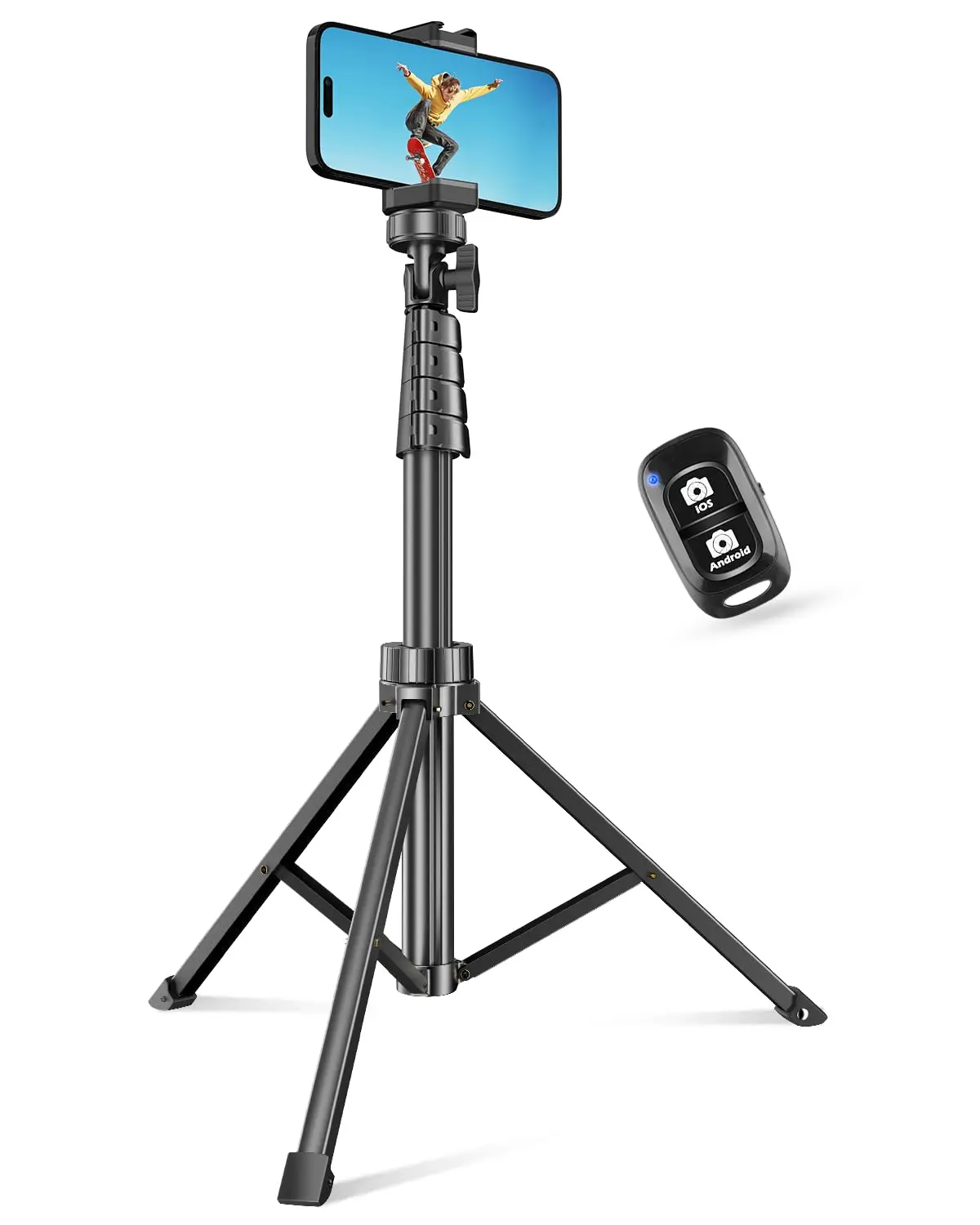
The SENSYNE 62-inch tripod is the default recommendation for TikTok creators who want stable footage at any height without spending more than $25. It extends to 62 inches — tall enough for standing content — and collapses to a carry bag size.
The included Bluetooth remote is what makes it genuinely useful for solo creators. Set up the phone, step into frame, hit the remote to start recording. No 3-second countdown. No reaching past yourself to tap the screen.
Key specs:
- Height: 17–62 inches adjustable
- Bluetooth remote included (10m range)
- Universal phone mount fits iPhones and most Android phones
- Lightweight at under 1 lb
- 360° rotation mount
The honest caveat: At $19, this tripod is lightweight and the build quality reflects the price. It's not for windy outdoor shoots or heavy attachments. For standard indoor TikTok filming, it's completely solid.
Best for: Beginners and daily creators who want a full-height tripod with remote for under $25.
2. TONEOF 68" Magnetic Selfie Stick Tripod — Best Height + Magnetic Mount
Price: ~$30–40 | Check on Amazon
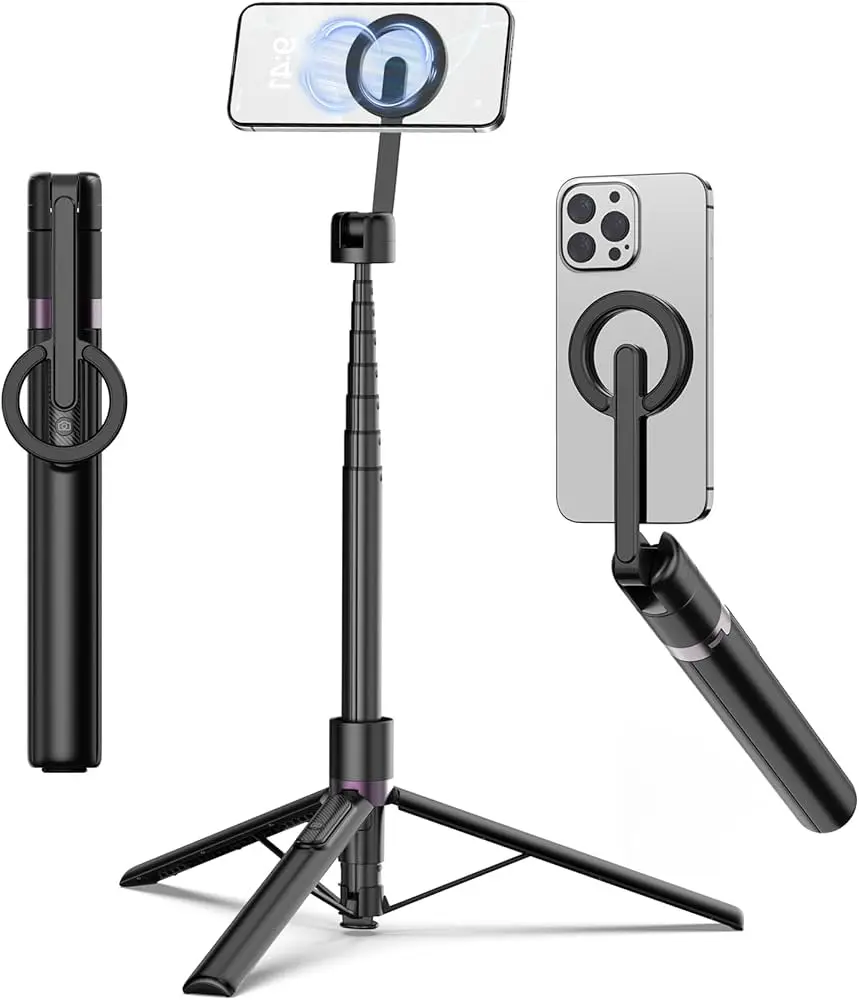
The TONEOF 68-inch magnetic tripod is the tallest in this roundup and includes a MagSafe-compatible magnetic mount. For iPhone 12 and newer, your phone snaps on without the clamp adjustment that standard mounts require. It also extends into a selfie stick for walking shots.
Key specs:
- Height: up to 68 inches (tallest in this list)
- MagSafe-compatible magnetic mount for iPhone 12+
- Also works as selfie stick
- Bluetooth remote included
- Folds to 11 inches
Best for: Tall creators who need full standing height, iPhone 12+ users who want MagSafe speed, or creators who want both tripod and selfie stick in one.
3. Joby GorillaPod 1K Mobile Rig — Best Flexible Tripod
Price: ~$50–65 | Check on Amazon
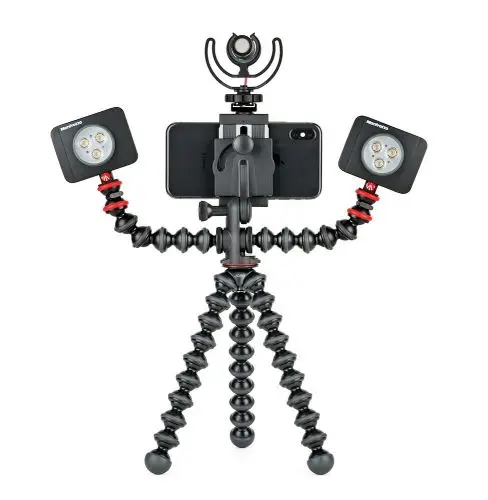
The Joby GorillaPod is the best-known flexible tripod brand for good reason. Bendable legs grip poles, railings, and furniture. They flatten for a sturdy tabletop stand. They wrap around uneven surfaces where standard tripods can't stand.
The Mobile Rig version adds a proper smartphone mount with 1/4"-20 cold shoe connections for accessories — you can attach a small mic, fill light, or action camera to the rig.
Key specs:
- Flexible, bendable legs — grips poles, furniture, any surface
- GripTight mount secures iPhones and most smartphones
- 1/4"-20 connections for mic, light, GoPro accessories
- 2 cold shoe mounts included
- Supports up to 1kg (2.2 lbs)
Best for: Travel content, outdoor filming, cramped spaces, or any setup where a standard tripod can't stand flat. Also good for creators who want to attach accessories to their rig.
4. KraftGeek JustTap Magnetic Tripod — Best MagSafe Experience
Price: ~$40–55 | Check on Amazon
If you have an iPhone 12 or newer and want the cleanest possible MagSafe setup, the KraftGeek JustTap is built around it. The magnetic mount is purpose-designed for MagSafe rather than a generic clamp with a magnetic attachment — the grip is stronger and the snap-on is faster.
Comes with a rechargeable Bluetooth remote with 10m range.
Best for: iPhone 12+ creators who want the fastest phone mount experience and clean aesthetics without visible clamps.
5. DJI Osmo Mobile 8 — Best Gimbal
Price: ~$149 | Check on Amazon
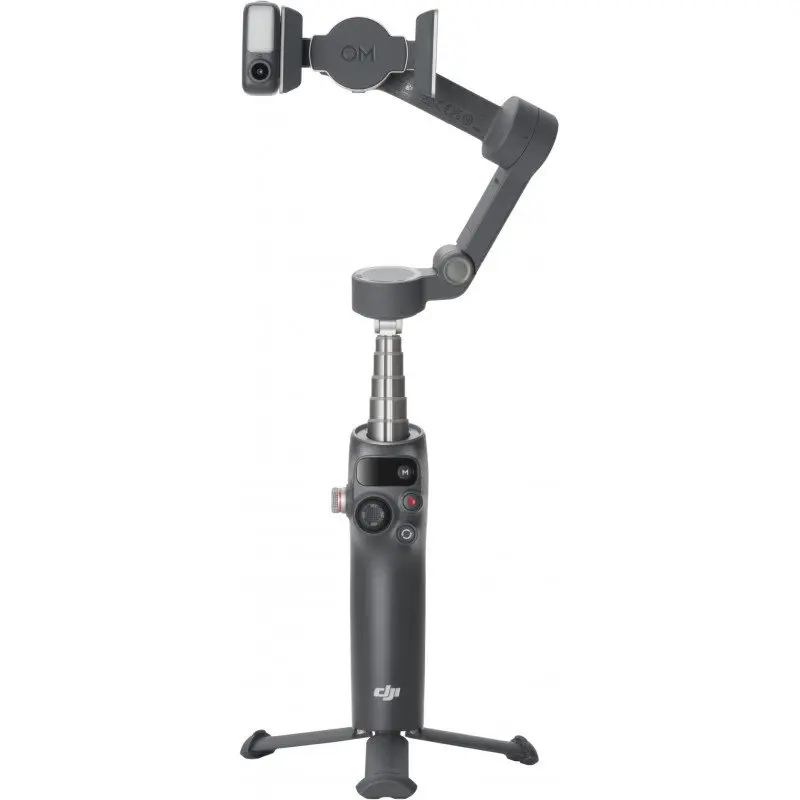
The DJI Osmo Mobile 8 is not a tripod — it's a motorized 3-axis gimbal stabilizer that keeps your phone silky smooth while you move. It also has fold-out legs for use as a standing tripod, making it the most versatile single device in this list.
Why a gimbal matters for TikTok: walking tutorials, product demos, fitness content, and "follow me" vlogging all look dramatically better when the camera isn't shaking. The DJI's AI tracking mode locks on to you automatically and follows you around the frame as you move.
Key specs:
- 3-axis motorized stabilization
- AI subject tracking — follows you automatically
- Integrated extension rod for high/low angles
- Built-in tripod legs
- ActiveTrack 7.0 — advanced subject tracking
- Works with DJI Mimo app
Best for: Creators who film while moving — cooking, fitness, unboxing, walking tours, product demonstrations.
Be realistic: If you film from a fixed position 95% of the time, a $19 tripod and a $149 gimbal produce identical footage. Buy the gimbal when movement is a real part of your content style.
Comparison Table
| Tripod | Height | Price | Type | Best For |
|---|---|---|---|---|
| SENSYNE 62" | 62" | ~$20 | Standard + remote | Budget, everyday filming |
| TONEOF 68" | 68" | ~$35 | Magnetic + selfie stick | iPhone 12+, height + versatility |
| Joby GorillaPod 1K | Variable | ~$55 | Flexible rig | Travel, unconventional angles |
| KraftGeek JustTap | ~60" | ~$48 | Magnetic MagSafe | iPhone 12+, fastest setup |
| DJI Osmo Mobile 8 | Variable | ~$149 | Gimbal + tripod | Moving content, AI tracking |
What Height Do You Actually Need?
This is the most overlooked variable when buying a phone tripod.
Seated desk content: 24–36 inches is sufficient. Most tabletop tripods handle this.
Standing talking-head (most TikTok content): You need a minimum of 55–62 inches to position the phone at eye level while standing. A lot of "full-size" tripods top out at 55 inches — enough if you're under 5'8", not enough if you're taller. The SENSYNE 62" and TONEOF 68" both handle standard adult height comfortably.
Full-body content (dance, fitness): You need the phone higher and further back. A 68-inch stand with the phone in landscape or vertical mode, positioned 6–8 feet from the subject, captures full body. For this use case, get the tallest tripod available.
How to Set Up a TikTok Filming Position in 60 Seconds
- Extend the tripod to your standing eye level (roughly your chin height — slightly above eye level creates a flattering downward angle)
- Attach your phone to the mount, confirm it's locked
- Step back to your filming distance (typically 5–8 feet for upper-body framing, 8–12 feet for full body)
- Check the frame on your phone screen before recording
- Use the Bluetooth remote to start and stop recording without touching the phone
One setup. Multiple videos. Consistent framing every session.
Frequently Asked Questions
What height should an iPhone tripod be for TikTok?
For standing talking-head TikTok content, the tripod should position your phone at roughly eye level — typically 60–66 inches for most adults. Phones positioned slightly above eye level (angled slightly down) create a more flattering perspective than phones positioned below eye level.
Do I need a tripod for TikTok?
You don't need one, but unstable handheld footage is immediately noticeable and signals lower production quality to viewers. For talking-head, tutorial, or commentary content filmed from a fixed position, a tripod is the single cheapest improvement you can make. At $19–25 for a full-size tripod with remote, it's hard to argue against.
What is the difference between a gimbal and a tripod for TikTok?
A tripod holds your phone in a fixed position and eliminates shake from a stationary setup. A gimbal uses motorized stabilization to eliminate shake when you're moving — walking, filming handheld, or tracking a moving subject. Most creators need a tripod first; gimbals become worth adding when movement is a core part of the content.
Can I use a ring light and a tripod at the same time?
Yes. Most ring lights (like the NEEWER 18-inch) include a center phone mount — your phone attaches in the center of the ring, and the light stand acts as the tripod. This is the standard TikTok setup: phone centered in ring light, ring light on stand. You don't need a separate tripod if you have a ring light with a phone mount.
What is a Bluetooth remote for a tripod and do I need one?
A Bluetooth remote connects to your iPhone and triggers the camera shutter or starts/stops video recording wirelessly. It eliminates the need to tap the phone screen to start recording, which means no running back into frame after a countdown. For any solo creator filming themselves, a remote (usually included with tripods in the $20–40 range) is a significant convenience.
Stable footage, clean editing: BlitzCut AI removes silence and adds captions to your TikTok content automatically. Try it free for 3 days.
Related: Best Ring Light for TikTok Creators · Best Microphone for YouTube Shorts and Reels · Budget Home Studio Setup for TikTok Creators
Last Updated: May 21, 2026 Category: Gear & Equipment Topic: Best iPhone Tripods for TikTok
Post every day without spending hours editing
BlitzCut is a native app for iPhone, iPad, and Mac. Get from raw footage to TikTok-ready in under 2 minutes, so editing is never the reason you didn't post.
Try it for freeRelated Articles
Keep Reading

Best Video Editing App for E-Commerce Sellers (2026)
Find the best video editing app for e-commerce sellers: compare 5 tools for talking-head UGC, founder-led ads, product demos, and Shopify videos.

Best Adobe Premiere Rush Alternatives (2026): Where to Go Before It Shuts Down
Premiere Rush support ends September 30, 2026. The best alternatives for Mac, iPhone and Android — including Adobe's own replacement — and how to migrate.

Best AI Clipping Tools, Rated by What Users Actually Say (2026)
Best AI clipping tools compared on independent user reviews, billing complaints, and pricing: Vizard, OpusClip, Klap, Quso, and BlitzReels. Plus OpusClip alternatives.