
Best Apps to Edit YouTube Shorts in 2026 (CapCut, YouTube Create)
Best apps for editing YouTube Shorts in 2026. CapCut, YouTube Create, BlitzCut, and InShot compared by speed, AI features, and Shorts-specific workflow.


The best app for editing YouTube Shorts in 2026 depends on your content type. For talking-head content (tutorials, vlogs, educational), BlitzCut is fastest — auto silence removal and AI captions in under 10 minutes. For effects-heavy content, CapCut. For a completely free official option built by YouTube, YouTube Create. Each solves a different editing problem.
YouTube Shorts now supports up to 3 minutes of vertical video. The longer limit means editing efficiency matters more than ever — you need an app that keeps your Shorts tight without wasting time on a timeline.
Quick Comparison
| App | Best For | Silence Removal | Auto Captions | Platform | Price |
|---|---|---|---|---|---|
| BlitzCut | Talking-head Shorts | ✅ AI | ✅ AI | iOS/Mac | Free trial |
| CapCut | Effects, templates | ❌ | ✅ | iOS/Android | Free |
| YouTube Create | Official Shorts workflow | ❌ | ✅ | iOS/Android | Free |
| InShot | Quick trims, simple edits | ❌ | ✅ Limited | iOS/Android | Free / $4.99/mo |
| VN Editor | Advanced free editing | ❌ | ❌ | iOS/Android | Free |
1. BlitzCut — Best for Talking-Head YouTube Shorts
Platform: iPhone, iPad, Mac Price: Free trial, then subscription Best for: Creators who talk to camera
BlitzCut is built specifically for talking-head content — the format that dominates educational, tutorial, vlog, and commentary Shorts. The workflow is designed around two things that consume the most editing time: cutting silence and adding captions.
What it does
AI silence removal: BlitzCut scans your raw footage and removes every pause automatically. A 3-minute raw take with natural hesitations becomes a tight Short without touching a timeline. One tap.
AI captions: After silence is removed, add captions in one tap. Multiple styled options pre-optimized for Shorts — bold word-by-word, clean subtitle, animated styles. Synced automatically.
9:16 export: Exports directly in the correct Shorts format. No manual format selection, no guessing at resolution.
Time to complete one Short
Import → silence removal → captions → export: under 10 minutes.
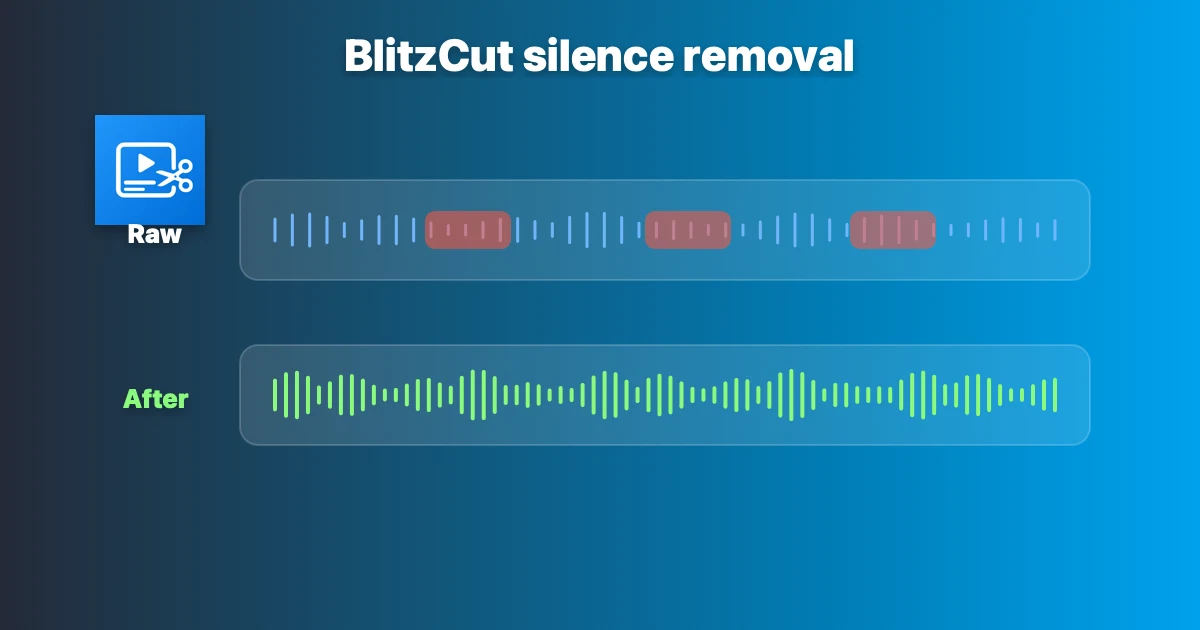
BlitzCut's AI silence removal applied to a raw talking-head recording. Dead air between sentences is detected and cut automatically — no timeline scrubbing, no blade tool.
Who it's for
- Educational creators
- Coaches and course creators
- Podcasters making Shorts clips
- Any creator where talking is the content
Limitations
- iOS and Mac only (no Android)
- Not built for multi-clip B-roll heavy edits
2. YouTube Create — Official Free App by YouTube
Platform: iOS, Android Price: Free Developer: Google/YouTube Best for: Creators who want native integration with YouTube
YouTube Create is YouTube's own editing app, launched to help creators make Shorts directly inside the YouTube ecosystem. It's free, has no watermark, and publishes directly to YouTube without leaving the app.
What it does
Auto captions: Built-in captions generated from speech, editable before export.
Templates and effects: Curated Shorts-specific templates, transitions, and effects. Updated with trending styles.
Music library: Access to YouTube's licensed music library directly in the editor — no copyright issues on Shorts.
Direct publishing: Edit and publish without leaving YouTube's interface.
What it doesn't do
- No automatic silence removal
- No advanced color grading
- Limited export options for posting to other platforms
Who it's for
- Creators posting exclusively to YouTube Shorts
- Beginners who want the simplest possible path from edit to publish
- Creators who want to use YouTube's licensed audio without worrying about copyright
Limitations
YouTube Create is a simpler tool. It handles basic cuts, captions, and effects. It doesn't automate the heavy lifting of silence removal or caption styling that BlitzCut handles. For talking-head content with natural pauses, you'll still need to cut manually.
3. CapCut — Best for Effects-Heavy Shorts
Platform: iOS, Android, Desktop Price: Free (Pro features behind paywall) Developer: ByteDance Best for: Creators who want trending effects and templates
CapCut is the most widely used Shorts editing app in 2026. It has the deepest effects library, the most trending templates, and a large creator community constantly sharing new styles.
What it does
Auto captions: Speech-to-text with customizable styles. More styling options than most apps.
Templates: One-tap application of trending Shorts formats — synced to music, pre-timed, pre-animated.
AI effects: Background removal, face retouching, auto reframe for different aspect ratios.
Multi-clip timeline: Combine multiple clips, add B-roll, build complex sequences.
What it doesn't do
- No automatic silence removal (must cut manually)
- Caption styling requires many manual steps for custom looks
- Owned by ByteDance — some creators prefer tools not tied to TikTok's parent company
Who it's for
- Creators making visual-heavy, effect-driven Shorts
- Creators who want to replicate trending templates instantly
- Android users (BlitzCut is iOS/Mac only)
Talking-head content in CapCut takes 5–10x longer than in BlitzCut because every pause must be cut manually and captions styled by hand.

CapCut's desktop timeline. Deep effects library and trending templates — but pauses must be found and cut manually, adding 10–20 minutes per Short compared to BlitzCut's automated workflow.
Read: BlitzCut vs CapCut
4. InShot — Best for Simple Trims
Platform: iOS, Android Price: Free / $4.99 per month Best for: Quick cuts, simple vertical edits
InShot is the go-to for fast, simple edits. Trim clips, add music, adjust speed, apply basic filters. No learning curve.
What it does
- Basic cut and trim
- Speed adjustment (slow motion, time-lapse)
- Music and sound effects
- Basic text overlays
- Auto captions (lower accuracy than BlitzCut or CapCut)
What it doesn't do
- No silence removal
- No advanced AI features
- Caption customization is limited
Who it's for
Creators who need quick trims on simple footage — lifestyle content, B-roll montages, product videos. Not ideal for talking-head content because silence removal is manual.
5. VN Editor — Best Free Advanced Option
Platform: iOS, Android Price: Free (no watermark) Best for: Creators who want a full timeline without paying
VN offers a multi-track timeline, keyframe animations, advanced color grading, and no export watermark — all free.
What it does
- Multi-track timeline editing
- Keyframe-based animations
- Color grading tools
- Speed curves
- No watermark on exports
What it doesn't do
- No AI features of any kind
- No auto captions, no silence removal
- Everything is manual
Who it's for
Creators comfortable with timeline-based editing who want desktop-level control on mobile without paying. High ceiling, high time investment.
How to Choose
You talk to camera → BlitzCut Silence removal alone saves 10–20 minutes per Short. Captions in one tap. 2-minute total workflow.
You want effects and templates → CapCut Deepest effects library, most trending templates, free.
You post only to YouTube and want zero complexity → YouTube Create Official app, direct publish, licensed music, no cost.
You need quick trims on simple footage → InShot Fast, intuitive, handles basic cuts well.
You want full timeline control for free → VN Editor Professional features, no cost, but entirely manual.
What Matters Most for YouTube Shorts in 2026
The algorithm rewards completion rate. Completion rate comes from tight pacing. Tight pacing requires removing every pause and dead moment from your footage.
Only BlitzCut automates that step on mobile. Every other app requires manual cutting, which means scrubbing through your timeline to find and remove pauses one by one.
For creators posting daily, that manual work compounds into hours per week. Automating it with BlitzCut is the single highest-leverage change you can make to your Shorts workflow.
Frequently Asked Questions
What's the best free app for YouTube Shorts?
YouTube Create is the best free option with no watermark and direct YouTube publishing. CapCut is free with more features. BlitzCut has a free trial with the full feature set.
Does YouTube have its own editing app?
Yes. YouTube Create is YouTube's official editing app, available for iOS and Android. It includes auto captions, templates, and direct publishing to Shorts.
Can CapCut remove silence automatically?
No. CapCut requires manual cutting for silence removal. BlitzCut is the only mobile app with AI-powered automatic silence removal.
What app do YouTube Shorts creators use most?
CapCut has the largest user base. BlitzCut is the fastest for talking-head content. YouTube Create is growing as the official option. Most prolific creators use specialized tools rather than general editors.
Is YouTube Create better than CapCut?
For YouTube Shorts specifically: YouTube Create offers simpler workflow and native integration. CapCut offers more features and effects. Neither has silence removal — for that, use BlitzCut.
Related Guides
- YouTube Shorts Length 2026 — what the 3-minute limit means for your content
- How to Add Captions to YouTube Shorts — caption setup guide
- YouTube Shorts: Vertical or Horizontal? — format explained
- BlitzCut vs CapCut — full head-to-head comparison
- Best AI Video Editing Software 2026 — broader tool comparison
Post every day without spending hours editing
BlitzCut is a native app for iPhone, iPad, and Mac. Get from raw footage to TikTok-ready in under 2 minutes, so editing is never the reason you didn't post.
Try it for freeRelated Articles
Keep Reading

Best Video Editing App for E-Commerce Sellers (2026)
Find the best video editing app for e-commerce sellers: compare 5 tools for talking-head UGC, founder-led ads, product demos, and Shopify videos.

Best Adobe Premiere Rush Alternatives (2026): Where to Go Before It Shuts Down
Premiere Rush support ends September 30, 2026. The best alternatives for Mac, iPhone and Android — including Adobe's own replacement — and how to migrate.

Best AI Clipping Tools, Rated by What Users Actually Say (2026)
Best AI clipping tools compared on independent user reviews, billing complaints, and pricing: Vizard, OpusClip, Klap, Quso, and BlitzReels. Plus OpusClip alternatives.