
Best Caption Style for YouTube Shorts (2026)
Best caption style for YouTube Shorts in 2026: bold white text, outline, word-by-word vs full-sentence — what drives completion rate and watch time.


The best caption style for YouTube Shorts in 2026 is bold white text with a thin black stroke or outline, displayed word-by-word or in short 2–5 word phrases, positioned in the center-lower third of the frame. Videos with captions see 12–15% higher completion rates on Shorts. YouTube's algorithm indexes caption text for search, which means caption accuracy affects both retention and discoverability.
Shorts captions have three jobs: keep muted viewers watching, reinforce the spoken word for viewers with sound on, and give YouTube's indexing system keyword-rich text. The best style satisfies all three.
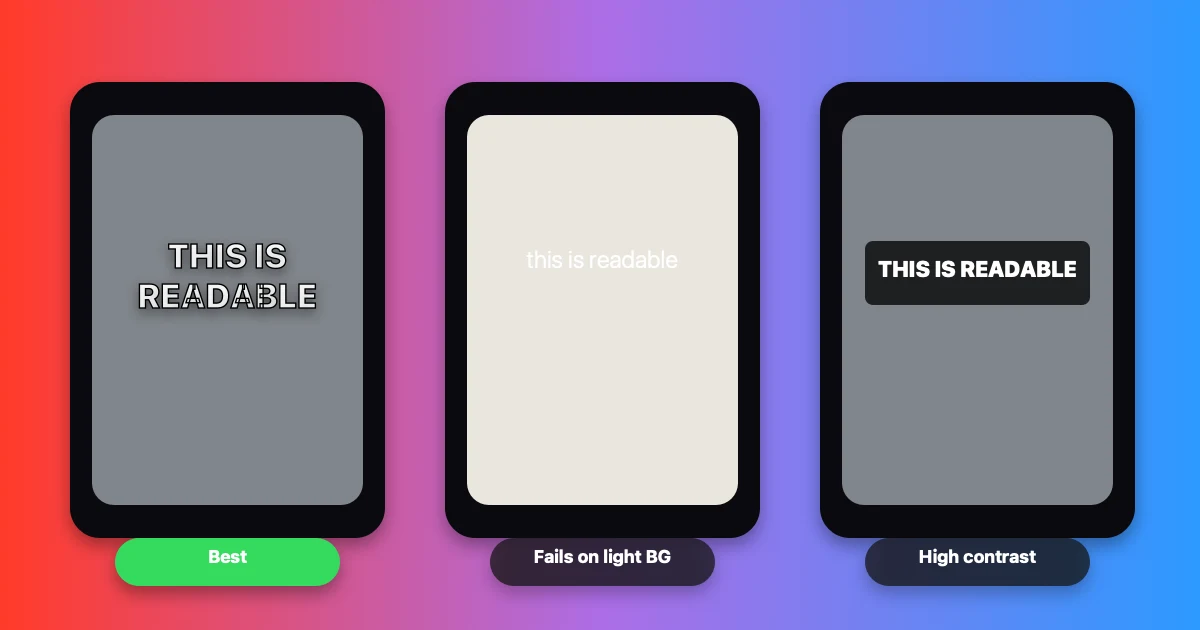
Three caption styles on the same Shorts frame. Bold white with outline (left) reads fastest at mobile size. Thin white without treatment (center) disappears on light backgrounds. Background box (right) reads clearly but covers more of the frame.
Why Caption Style Matters Specifically for Shorts
Shorts is a vertical, full-screen, algorithm-driven feed — same structural conditions as TikTok and Reels. But Shorts has characteristics that make caption style choices slightly different:
YouTube indexes caption text. Unlike TikTok and Instagram, YouTube reads your captions as searchable text. Accurate, keyword-rich captions improve your Shorts' discoverability through YouTube's search engine. Caption accuracy is a ranking factor here, not just a retention tool.
Shorts audience is broader in age. YouTube's demographic skews older than TikTok. Caption styles that trend on TikTok (ultra-bold, neon, word-by-word animated with emojis) can work on Shorts but aren't the only option — clean, professional caption styles perform well across YouTube's wider age range.
Shorts is now up to 3 minutes. Longer content means more captions. A caption style that's manageable for a 30-second Short may become visually overwhelming at 2 minutes. Design for the full length you're posting.
The Core Caption Style for Shorts
Font
Bold sans-serif is the standard. Montserrat Bold, Anton, or equivalent weights. The font must be readable at a glance on a 6-inch screen.
Avoid: thin weights, script fonts, serif fonts, italic styles in caption streams.
Color
White fills the majority of use cases. White on a dark background (most talking-head Shorts) reads at maximum contrast without any additional treatment.
Yellow is a secondary option. Yellow has historically strong contrast on dark backgrounds and is used in broadcast captioning for this reason. On Shorts it reads as high-energy; use it when the content matches that tone.
Avoid red, green, or blue text — these create contrast issues on various background colors and can be inaccessible for viewers with color vision deficiencies.
Treatment: Outline vs Shadow vs Background
For Shorts specifically:
Thin black stroke (2–4px): Works on both dark and light backgrounds. The outline keeps white text visible whether the speaker is in front of a dark or bright background. Best choice for variable-background content.
Drop shadow: Works on dark backgrounds but fails if the background is light or changes between shots. Use as a supplement to stroke, not as the only treatment.
Background box: Maximum readability, used in broadcast captioning. On Shorts it covers more of the frame — acceptable for content where readability is more important than visual polish (accessibility-first content, complex information, older audience).
Full comparison: Caption Background vs Outline vs Shadow: Which Is More Readable
Size
7–10% of frame height. At 1080×1920 (standard Shorts resolution), this is approximately 54–70pt depending on the font.
Netflix standard: Maximum 42 characters per line. This is a useful ceiling for Shorts too — captions that exceed 42 characters per line require too much reading time per display cycle.
BBC standard: 37 fixed characters for broadcast, 68% of 16:9 frame width for online video. For 9:16 Shorts: keep caption width to 80–85% of frame width to maintain safe zone margins.
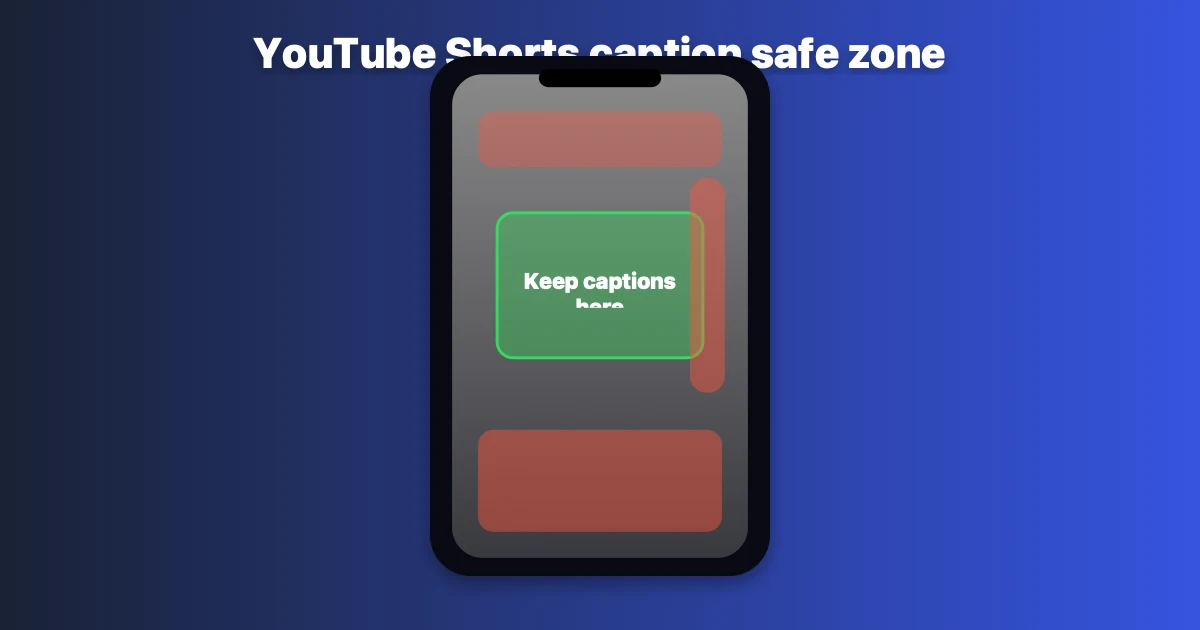
Caption size guide for YouTube Shorts. Safe zone keeps text clear of the subscribe button (bottom right) and navigation UI. Center of frame, lower third.
Word-by-Word vs Full-Sentence Captions on Shorts
This is the most common style decision creators face. Both work — but for different content and audiences.
Word-by-Word (Karaoke Style)
Each word highlights as it's spoken. Creates a visual rhythm that follows the speaker's pace.
Advantages on Shorts:
- Keeps viewers visually tracking even on fast speech
- Works well with word-by-word hooks ("You. Need. To. Hear. This.")
- Matches the TikTok-influenced aesthetic that younger YouTube audiences expect
- Easier to read with sound off — the highlight shows which word is current
Disadvantages:
- Can feel gimmicky on slower, educational content
- Takes up more visual space when words are large
- Less readable for complex vocabulary (medical, legal, technical)
Best for: Fast-paced content, entertainment, motivation, lifestyle Shorts
Full-Sentence (Block Style)
2–5 word blocks appear and persist for 2–4 seconds before updating.
Advantages on Shorts:
- Cleaner, more professional look
- Better for complex information where viewers need time to process
- Netflix/BBC-aligned reading speed (17–20 characters per second)
- Less visually distracting for content where the visuals matter
Disadvantages:
- Less engaging on high-energy content
- Doesn't create the same visual rhythm as word-by-word
Best for: Educational content, tutorials, business Shorts, older audience demographics
The Data Point
OpusClip's analysis of Shorts with captions found a 12–15% completion rate increase across content categories. The improvement was consistent across both word-by-word and full-sentence styles — the presence of captions matters more than the specific format.
Caption Timing for Shorts
Display duration: Aim for 3–7 seconds per caption block (aligns with Netflix's standard of maximum 7 seconds per subtitle). Under 1.5 seconds is too fast to read at a glance; over 7 seconds means the caption sits stale while the speaker has moved on.
Reading speed: Netflix's standard is 20 characters/second for adults, 17 characters/second for children's content. For YouTube Shorts, which skews adult: 20 characters/second is the ceiling. Faster than that, viewers can't read.
Sync: Captions must sync to speech within 0.5 seconds. Out-of-sync captions are more confusing than no captions.
Positioning: Where to Place Captions on Shorts
Center-bottom of the frame is the standard position — roughly 55–78% down from the top of the 1920px frame height.
What to avoid:
- Bottom 20% of frame: covered by the subscribe button, username, and navigation UI in the Shorts player
- Right edge: covered by the like/comment/share button column
- Top 10% of frame: covered by the title bar in some viewing contexts
Place captions in the visual center of the lower half of the frame — high enough to clear the UI, low enough to not cover the speaker's face.
See the full safe zone guide: Safe Zone Guide for YouTube Shorts, Reels & TikTok
How BlitzCut Handles Shorts Captions
BlitzCut generates AI captions pre-styled for short-form video — bold sans-serif, white with outline treatment, positioned in the Shorts-safe zone automatically.
Available styles include word-by-word (karaoke) and full-sentence block. Both are pre-sized at the 7–9% frame height sweet spot. No manual font selection, sizing, or positioning.
The workflow: import raw footage → remove silence → add captions → export in 9:16. Under 2 minutes for a finished Short.
Caption Style Cheat Sheet for YouTube Shorts (2026)
| Element | Recommended Value |
|---|---|
| Font | Montserrat Bold, Anton, Poppins Bold |
| Color | White (primary), Yellow (high-energy content) |
| Treatment | 2–4px black stroke; shadow as supplement |
| Size | 7–10% of frame height (~54–70pt at 1080p) |
| Max chars/line | 42 (Netflix standard) |
| Display duration | 3–7 seconds per caption block |
| Reading speed | Max 20 characters/second |
| Position | Center, 55–78% down from top |
| Style | Word-by-word for fast content; block for educational |
Frequently Asked Questions
What caption style works best for YouTube Shorts?
Bold white text with a thin black outline, word-by-word for fast/energetic content, full-sentence for educational. Position in center-bottom of frame, above the Shorts UI overlay zone.
Do captions help YouTube Shorts rank?
Yes. YouTube indexes caption text for search — accurate captions with relevant keywords improve discoverability in YouTube search results. Captions also increase completion rate by 12–15%, which is a primary algorithmic ranking signal.
Should YouTube Shorts captions be word-by-word or full sentence?
Word-by-word fits high-energy, fast-paced, entertainment content. Full-sentence fits educational, tutorial, and information-dense content. Both improve completion rate equally — the decision is aesthetic and audience-driven.
What font size should I use for YouTube Shorts captions?
7–10% of frame height. At 1080×1920 resolution, this is approximately 54–70pt depending on font. Below 5% frame height is too small to read on mobile. Above 12% covers too much of the video.
Where should captions be positioned on YouTube Shorts?
Center of the frame, roughly 55–78% down from the top. Avoid the bottom 20% (covered by Shorts UI) and the right edge (covered by interaction buttons).
Do YouTube Shorts captions need to be burned in or can I use auto-generated ones?
Both work, but burned-in captions (embedded in the video file) are visible on every platform and always on by default. YouTube's auto-generated captions activate only on YouTube and may have lower accuracy. For cross-platform posting, burned-in is more reliable.
Related Guides
- Best Caption Font for Instagram Reels (2026) — Reels-specific font guide
- Caption Background vs Outline vs Shadow: Which Is More Readable — treatment comparison
- How to Add Captions to YouTube Shorts — setup walkthrough
- Word-by-Word vs Full-Sentence Captions — format comparison
- Safe Zone Guide for YouTube Shorts, Reels & TikTok — positioning guide
- YouTube Shorts Length 2026 — Shorts specs
Post every day without spending hours editing
BlitzCut is a native app for iPhone, iPad, and Mac. Get from raw footage to TikTok-ready in under 2 minutes, so editing is never the reason you didn't post.
Try it for freeRelated Articles
Keep Reading

Best Video Editing App for E-Commerce Sellers (2026)
Find the best video editing app for e-commerce sellers: compare 5 tools for talking-head UGC, founder-led ads, product demos, and Shopify videos.

Best Adobe Premiere Rush Alternatives (2026): Where to Go Before It Shuts Down
Premiere Rush support ends September 30, 2026. The best alternatives for Mac, iPhone and Android — including Adobe's own replacement — and how to migrate.

Best AI Clipping Tools, Rated by What Users Actually Say (2026)
Best AI clipping tools compared on independent user reviews, billing complaints, and pricing: Vizard, OpusClip, Klap, Quso, and BlitzReels. Plus OpusClip alternatives.