
Best YouTube Shorts Hooks (2026): Examples That Stop the Swipe
Best YouTube Shorts hook types with real examples for 2026 — the swipe-away metric, Shorts vs TikTok differences, and hooks that hold the first 2 seconds.


The YouTube Shorts algorithm uses swipe-away rate as its primary filter. If too many viewers swipe past your Short in the first 2 seconds, distribution stops — regardless of how good the rest of the video is. That makes the Shorts hook the single most important editing decision you make. Research across viral Shorts in 2026 shows that the hooks with the lowest swipe-away rates all share one quality: they answer "why should I spend the next 30 seconds here?" before the first spoken sentence is finished.
This guide covers the hook types that perform best specifically on Shorts — with real examples, templates, and what to avoid.
Why Shorts Hooks Are Different From TikTok Hooks
The same hook won't perform identically across platforms. Shorts has specific characteristics that change what works:
Swipe-away is the algorithm's first filter. YouTube tracks the percentage of viewers who swipe past in the first 2 seconds. TikTok measures similar signals, but YouTube's algorithm is more transparent about this — creators can see the exact second-by-second drop-off in YouTube Studio. The practical implication: on Shorts, your hook window is 2 seconds, not 3.
Shorts loops. Unlike TikTok, where the video ends and the next one autoplays, Shorts loops back to the beginning. This means your last frame feeds directly into your first frame again — viewers who are on the fence about rewatching will see your hook a second time. A hook that improves on the second pass (because the viewer now has context) can significantly increase loop rate.
Educational hooks outperform on Shorts. Research from vidIQ and OpusClip's 2025 analysis shows that "how-to" and factual claim hooks have higher completion rates on Shorts than on TikTok or Reels. Shorts audiences, built from YouTube's search-and-education base, skew toward information-seeking behavior.
Text overlays hit before audio. Shorts often begins playing before a viewer has tapped for sound. A text overlay on frame 1 that states the hook gives you a second hook channel — your spoken hook and your visual hook work in parallel.

The Shorts algorithm's first filter is 2 seconds. Viewer decisions made in that window determine whether the Short gets distributed further or throttled.
The 8 Best YouTube Shorts Hook Types (With Examples)
1. The Instant Payoff Hook
State the most interesting or valuable part of your video in the first sentence. Don't build to it — lead with it. On Shorts, viewers don't grant you setup time.
Template: "[Most surprising/valuable result/fact], and here's how."
Examples:
- "I cut my editing time from 3 hours to 20 minutes with one tool."
- "This one framing mistake is killing your retention — and it takes 10 seconds to fix."
- "Your Shorts aren't growing because of the first frame, not the content."
Why it works on Shorts specifically: The algorithm rewards videos where viewers don't swipe before the value begins. When the value is the beginning, there's no pre-value drop zone.
Best for: Tutorial, creator tip, productivity, any "result-first" content.
2. The Curiosity Gap Hook
Open a question that the video answers — but don't answer it immediately. Create the gap, then fill it.
Template: "Why does [common thing] actually [surprising result]?" or "What happens if you [unusual action]?"
Examples:
- "Why do Shorts with no captions get more views sometimes?"
- "What happens when you post 5 Shorts per day for 30 days straight?"
- "Why does YouTube push some creators immediately and ignore others for months?"
Why it works on Shorts specifically: Curiosity gaps drive loop behavior. A viewer who finishes the video and still feels slight uncertainty about the framing will replay. Loop rate is a direct Shorts ranking signal.
Best for: Educational content, platform/algorithm explainers, experiment content.
3. The Bold Counter-Claim Hook
Challenge a widely-held belief in your niche. The controversy creates the urge to watch and argue.
Template: "[Common belief] is wrong. Here's what actually works."
Examples:
- "Posting every day doesn't grow your Shorts channel. This does."
- "Going viral doesn't help you grow. Here's why."
- "Long videos don't kill your watch time. Short videos with bad hooks do."
Why it works on Shorts specifically: Counter-claim hooks drive comments — "that's not true" or "you're wrong about X" — and comments are a high-weight signal in the Shorts algorithm. Shorts with high early comment rates get expanded distribution.
Best for: Creator education, marketing, finance, any niche with established conventional wisdom.
⚠️ Caution: The counter-claim must hold up. A bold hook followed by a weak argument produces dislikes and "Not interested" reports — both actively reduce Shorts distribution.
4. The Relatable Failure Hook
Start with a mistake, problem, or embarrassing moment the viewer can identify with.
Template: "I [made a specific mistake] for [timeframe]. Here's what I learned."
Examples:
- "I uploaded 80 Shorts with no growth. Then I found the actual problem."
- "I spent $200 on equipment and my audio was still terrible. This is why."
- "I edited the same video four times. Here's what I was doing wrong."
Why it works on Shorts specifically: Relatable content drives DM shares on adjacent platforms (Instagram, TikTok), but on Shorts specifically it drives saves — viewers who recognize the problem want to return to the solution. Saves are a Shorts growth signal.
Best for: Creator journey, personal development, productivity.
5. The Specific Number Hook
Lead with a precise, specific number. Specificity signals credibility and sets a concrete promise.
Template: "[Specific number] [result/tool/tip] that [specific outcome]."
Examples:
- "7 Shorts hooks that hit 70%+ retention — with examples."
- "3 seconds. That's how long you have to hook a Shorts viewer."
- "I analyzed 500 viral Shorts. These 4 things were in almost all of them."
Why it works on Shorts specifically: Numbered hooks give Shorts viewers a time contract — they know what they're signing up for. "7 hooks" means 7 payoff moments across 45 seconds. Viewers who commit to the premise are more likely to watch the full runtime.
Best for: List content, analysis, data-driven tips.
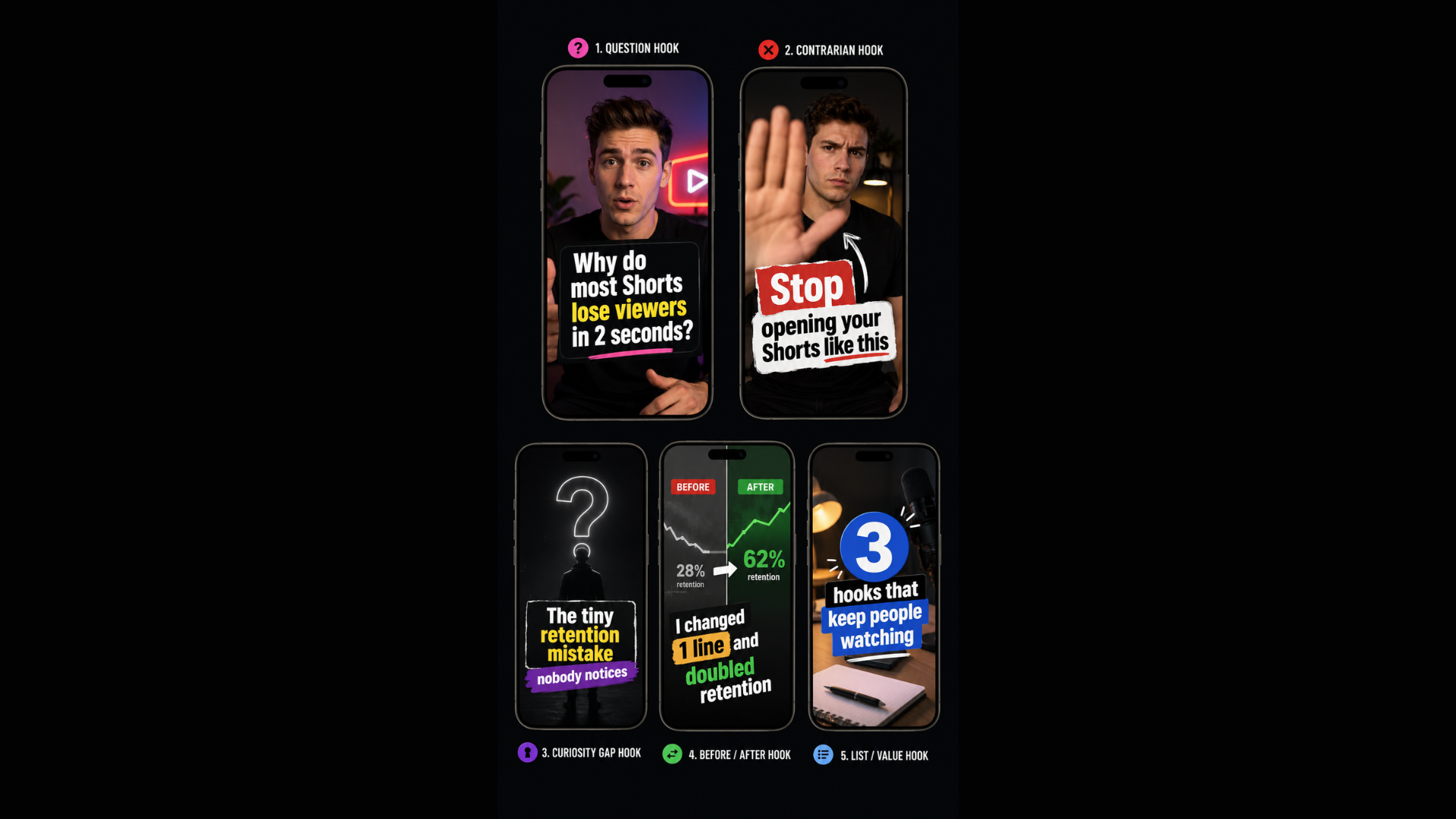
Five Shorts hook types in practice. Each first-frame text overlay delivers the hook before the viewer has unmuted — doubling the hook's reach.
6. The Before/After Hook
Show or describe the transformation first, before explaining how it happened.
Template: "Before: [bad state]. After: [good state]. Here's the one thing that changed."
Examples:
- "Before: 200 views per Short. After: averaging 40K. Here's what changed."
- "Before: 3 hours of editing per video. After: 18 minutes. One tool."
- "Before: zero subscribers from Shorts. After: 12K in 6 weeks. This is the exact hook formula I used."
Why it works on Shorts specifically: The transformation hook is perfect for the Shorts loop mechanic — when the Short loops back, "before" follows "after" naturally, giving the hook a second impression with new context.
Best for: Results-driven content, productivity, fitness, creator growth.
7. The Direct Call-Out Hook
Address your specific viewer by their situation, not by generic "you."
Template: "If you [specific situation], this Short is for you."
Examples:
- "If your Shorts are stuck under 500 views, watch this."
- "If you've been editing videos for months with no growth — stop. Do this first."
- "If you're a creator who spends more time editing than filming, this changes everything."
Why it works on Shorts specifically: Shorts viewers make instant decisions. Addressing their exact situation tells them in the first second that this content is relevant to them specifically — reducing swipe probability dramatically.
Best for: Creator tools, education, niche-specific audiences.
8. The Visual-First Hook (No Verbal Required)
The first frame shows something interesting enough that the viewer doesn't need a spoken hook to stay.
What this looks like:
- Starting mid-action (hands already moving, something already happening)
- A shocking before/after split visible in the first frame
- Text overlay that states the hook while the visual shows something compelling
- A dramatic zoom or cut in the first second that signals movement and energy
Why it works on Shorts specifically: Shorts frequently plays before the viewer has tapped to unmute. A compelling first frame reaches the large portion of the audience in silent mode. The visual hook is your first impression for every viewer, regardless of audio status.
How to execute: Film your setup and recording with the understanding that frame 1 matters more than any other. Start mid-action when possible. Use BlitzCut, CapCut, or your editor to add bold text overlay in the first 1–2 seconds that reinforces the visual with a written hook.
Best for: Fitness, food, design, before/after content, product reveals.
The Two-Part Hook: Verbal + Visual
The highest-performing Shorts hooks in 2026 combine both channels — what you say and what's on screen simultaneously.
| Element | What it does | How to execute |
|---|---|---|
| Verbal hook | Engages viewers with audio on | First spoken sentence = the hook, no preamble |
| Visual hook | Engages muted viewers | Bold text overlay in first 1–2 seconds restating the hook |
| First-frame energy | Holds attention before either lands | Start mid-action, eye contact with lens, no static opening |
A Short that starts with the creator already mid-sentence, bold text overlay visible, looking directly at the camera — that's a three-channel opening that catches every viewer type simultaneously.
What Kills a Shorts Hook
Slow intro music. Any music-only intro before content starts is a swipe magnet. Start with voice or a visual hook from frame 1.
"Hey guys, welcome back." This phrase signals to the algorithm and the viewer that value is 5–10 seconds away. Most viewers won't wait.
"In this video I'll show you how to..." Announce less. Deliver more. Replace the announcement with the first piece of the delivery.
Starting static. If the first frame is a still shot of you getting ready to speak, you've lost viewers who are already mid-swipe. Enter already speaking.
Dead air before the hook. Even a 0.5-second silent pause before your first word increases swipe probability significantly. Silence removal — cutting any gap before the first word — is one of the simplest hook optimizations available.
BlitzCut runs silence removal on-device immediately after import (Mac and iPhone, under $6/month billed annually). The transcript shows exactly where dead air appears, including any gap at the very start of the recording.
Testing Your Hooks
YouTube Studio gives you second-by-second retention data for every Short. Check two things:
- The 2-second mark. A sharp drop here means the hook failed. The first sentence needs to change before anything else.
- The completion vs. swipe ratio. YouTube Studio's "Viewed vs. Swiped Away" metric shows this directly. Aim for 75% or higher "Viewed" at the 3-second mark.
The fastest test: Post the same core content with two different hook sentences across consecutive Shorts. Compare retention curves at 3 seconds. The hook with the higher 3-second retention rate — replicate that across the next 10 videos, then test again.
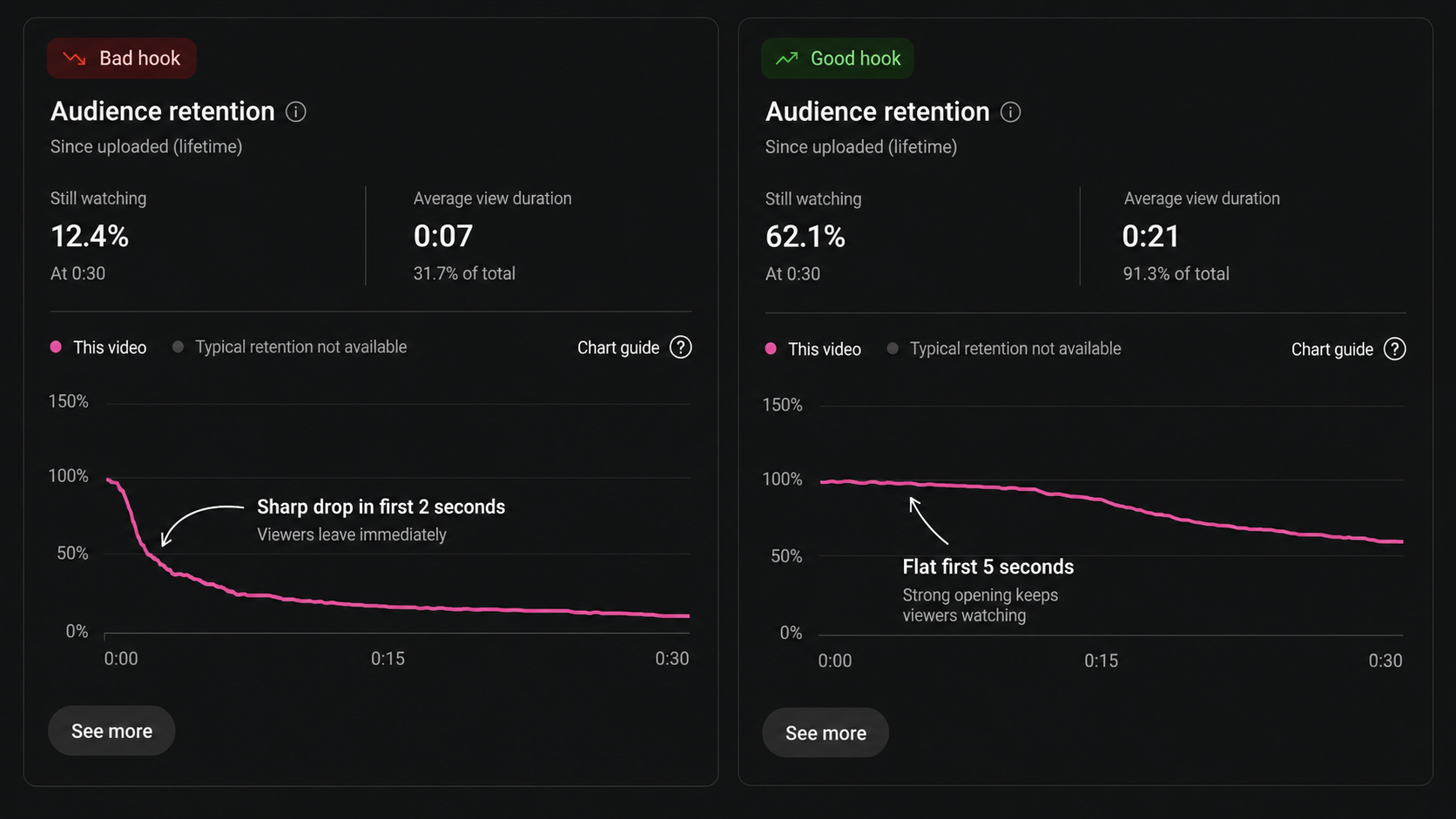
YouTube Studio retention graph for a Short. The 2-second drop shows where the hook lost viewers. A well-executed hook produces a flat curve through the first 5 seconds before natural drop-off begins.
Frequently Asked Questions
How long should a YouTube Shorts hook be?
Under 2 seconds — roughly one sentence, 8–12 words spoken at a natural pace. The swipe-away window is 2 seconds. Your hook must land before that window closes.
Do I need different hooks for educational vs. entertainment Shorts?
The structure is the same — immediate value, no preamble — but the framing differs. Educational Shorts hooks tend to use specific claims, numbers, and "how I" frames. Entertainment Shorts hooks tend to use surprise, relatability, and visual-first approaches. Both still need to deliver within 2 seconds.
Does the Shorts hook text overlay matter?
Yes, significantly. A text overlay in frame 1 reaches muted viewers who would otherwise miss the verbal hook entirely. The overlay should match or restate the verbal hook in 5–8 words — not a caption of everything you're saying, just the core hook in bold text.
Should I use the same hook formula every time?
Test variety. Once you find a hook type that performs (check 2-second retention in YouTube Studio), use it consistently for 4–6 Shorts — then test a variation. The algorithm needs enough consistent signal to build your recommendation profile, so variety during the testing phase is fine, but consistency after finding what works is better.
Can bad editing kill a good hook?
Yes. A strong hook followed by dead air, shaky footage, or no captions will lose the viewers the hook captured. Think of the hook as getting viewers through the door — tight editing and captions keep them in the room.
Related: YouTube Shorts Algorithm 2026 · How to Add Captions to YouTube Shorts · YouTube Shorts Editing Tips · TikTok Hook Types
Last Updated: May 22, 2026 Category: Content Strategy
Editing a talking-head video?
BlitzCut is available on Android, iPhone, iPad, and Mac. It is designed for recorded UGC-style videos, founder-led ads, tutorials, and testimonials and other talking-head content.
Try it for freeRelated Articles
Keep Reading

How to Add Music to a Video on iPhone: Soundtracks and Imports
Learn how to add music to a video on iPhone with soundtracks or imported audio, balance it beneath speech, and finish the edit in iMovie or BlitzCut.

How to Add Pictures to a Video: Clips, Cutaways, and Overlays
Learn how to add pictures to a video as clips, cutaways, or overlays in iMovie and BlitzCut, while keeping narration and image timing clear.

YouTube Studio Setup Under $200: A Home Studio for Content Creators (2026)
A YouTube studio setup under $200, built around your phone: two budget tiers, gear ranked by impact, and what to skip for YouTube, TikTok, and podcasts.