
Best Caption Size for Instagram Reels (2026) — Exact px, em, and % Values
Best caption size for Instagram Reels: 60–75px at 1080×1920. Exact numbers, updated safe zones, and why font size alone isn't enough.


The best caption size for Instagram Reels is 60–75px at 1080×1920 resolution — equivalent to 3.1–3.9% of frame height. That range is readable on every modern phone at standard viewing distance without overwhelming the frame. Below 48px you lose the majority of muted-audio viewers. Above 100px you start blocking your own video.
Instagram Reels runs at the same 1080×1920 (9:16) resolution as TikTok and YouTube Shorts. That means the raw pixel range for optimal caption size is identical across all three platforms. Where Reels differs is in its UI dead zones — Instagram's interface elements eat into your frame differently, especially after the expanded bottom bar update in late 2025 — and in the visual expectations of the Reels audience, which trends slightly more polished than TikTok.
This guide gives you the exact numbers: pixel sizes, em equivalents, percentage of frame height, and the safe zone measurements that keep your captions clear of Instagram's UI.
The Direct Answer: Caption Size for Instagram Reels
| Use case | Pixel size (px) | % of frame height | Notes |
|---|---|---|---|
| Minimum readable | 48–55px | 2.5–2.9% | Use only for secondary text |
| Standard (talking head, education) | 60–75px | 3.1–3.9% | Optimal for most content types |
| Bold/hype/motivational content | 75–95px | 3.9–4.9% | Matches high-energy pacing |
| Hard maximum | 100px | 5.2% | Anything larger blocks the video |
| Text block height (all lines) | 200–350px | 10–18% of frame | Safe zone limit for caption stack |
The working rule: Use 65–70px as your default. Adjust up to 80–90px for bold or motivational content. Never go below 55px for primary captions.
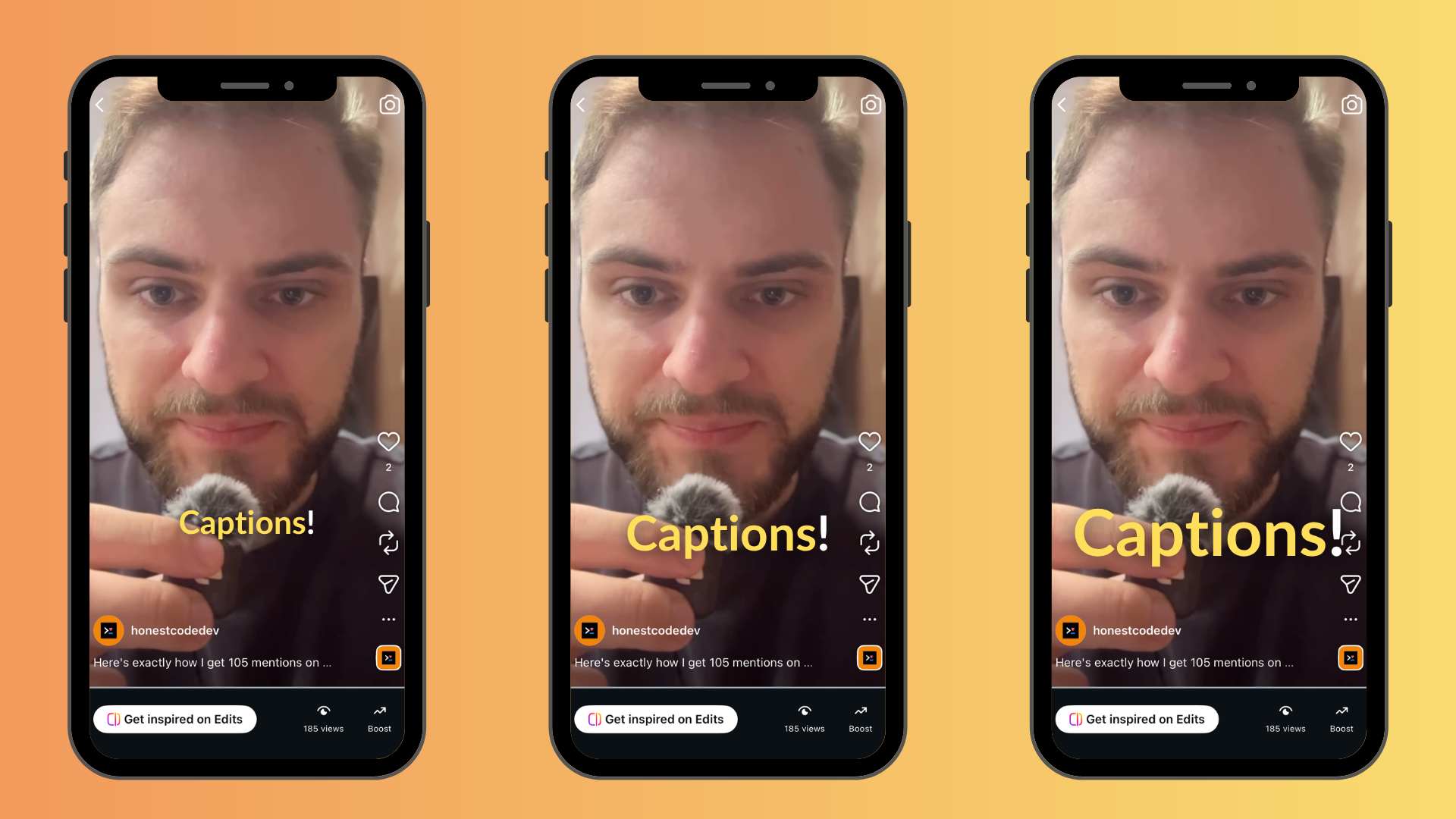
Caption size comparison at 1080×1920: 48px (left) is technically readable but loses muted-audio viewers. 65px (center) is the sweet spot. 80px (right) works for high-energy content but leaves less room for video.
Why the Same px Range Applies Across TikTok, Reels, and Shorts
Instagram Reels, TikTok, and YouTube Shorts all use 1080×1920 pixels (9:16 aspect ratio). The physical relationship between your caption text and the viewer's phone screen is identical across platforms because the video frame is the same size.
On a 6.1-inch iPhone 16, a 1080×1920 video occupies the full screen in portrait mode. The screen measures approximately 5.8 inches diagonally in the video area. At that physical size:
- A 48px caption = approximately 0.07 inches tall per line of text
- A 65px caption = approximately 0.10 inches tall per line of text
- A 80px caption = approximately 0.12 inches tall per line of text
The difference between 48px and 65px is small in absolute terms but significant in a passive scroll environment where viewers are not straining to read.
Where platforms diverge: Not in required font size, but in where you can safely place captions without UI overlap. Reels has a different dead zone layout than TikTok and Shorts — covered in the placement section below.
px, em, and % — All Three Conversions
Video editing tools use different unit systems. Here's how the same values translate:
Pixel Values (px)
Pixels are the native unit for video — 1080×1920 means 1,080 pixels wide, 1,920 pixels tall. Every video editing app (Premiere, Final Cut, CapCut, BlitzCut) accepts pixel font sizes directly. When an app asks for font size in pt (points), 1pt ≈ 1.33px — so 60px ≈ 45pt.
| Recommendation | px | pt equivalent |
|---|---|---|
| Minimum | 48px | ~36pt |
| Standard | 60–75px | ~45–56pt |
| Bold content | 75–95px | ~56–71pt |
| Maximum | 100px | ~75pt |
Percentage of Frame Height (%)
Percentage of frame height is the most portable unit — it stays consistent regardless of export resolution.
| Recommendation | % of frame height | At 1080×1920 |
|---|---|---|
| Minimum | 2.5% | 48px |
| Standard | 3.1–3.9% | 60–75px |
| Bold content | 3.9–4.9% | 75–95px |
| Maximum | 5.2% | 100px |
Why % matters: If you ever export at a different resolution — say 720×1280 for a compressed preview, or 2160×3840 for 4K — a pixel-based size becomes wrong. At 3.5% of frame height, your caption stays proportional at any resolution.
em Values (Relative to Base Font Size)
em is primarily a web/CSS unit. In video contexts, em values are only meaningful when an editing tool has a defined base font size (typically 16px for browser-based editors like CapCut Web, Kapwing, or VEED).
At a 16px base:
| Recommendation | em at 16px base |
|---|---|
| Minimum (48px) | 3em |
| Standard low (60px) | 3.75em |
| Standard high (75px) | 4.69em |
| Bold content (90px) | 5.63em |
| Maximum (100px) | 6.25em |
For native app editors (Final Cut Pro, DaVinci Resolve, Premiere, BlitzCut), em is not a used unit. Work in px or %. For browser-based tools with a CSS base, use the em conversions above.
Instagram Reels Safe Zone: Where to Place Captions
Caption size and caption placement solve different problems. You can get the size right and still have captions hidden under Instagram's UI. The safe zone on Reels is defined by where Instagram's interface elements sit on top of your video.
Reels Dead Zones (Updated Late 2025)
Instagram expanded its audio attribution bar and description overlay in late 2025. The bottom dead zone is now larger than it was before 2025 guides were written.
| Zone | Dead zone from edge | What covers it |
|---|---|---|
| Top | 108–220px from top | Navigation, profile, camera toggle |
| Bottom | 310–450px from bottom | Username, description, audio bar (expanded late 2025) |
| Right edge | ~120px from right | Like, comment, share, audio buttons |
| Left edge | ~60px from left | Minimal overlap |
Safe zone for captions: approximately 900×1440px centered in the 1080×1920 frame. This is where your captions, text overlays, and any other on-screen elements should live.
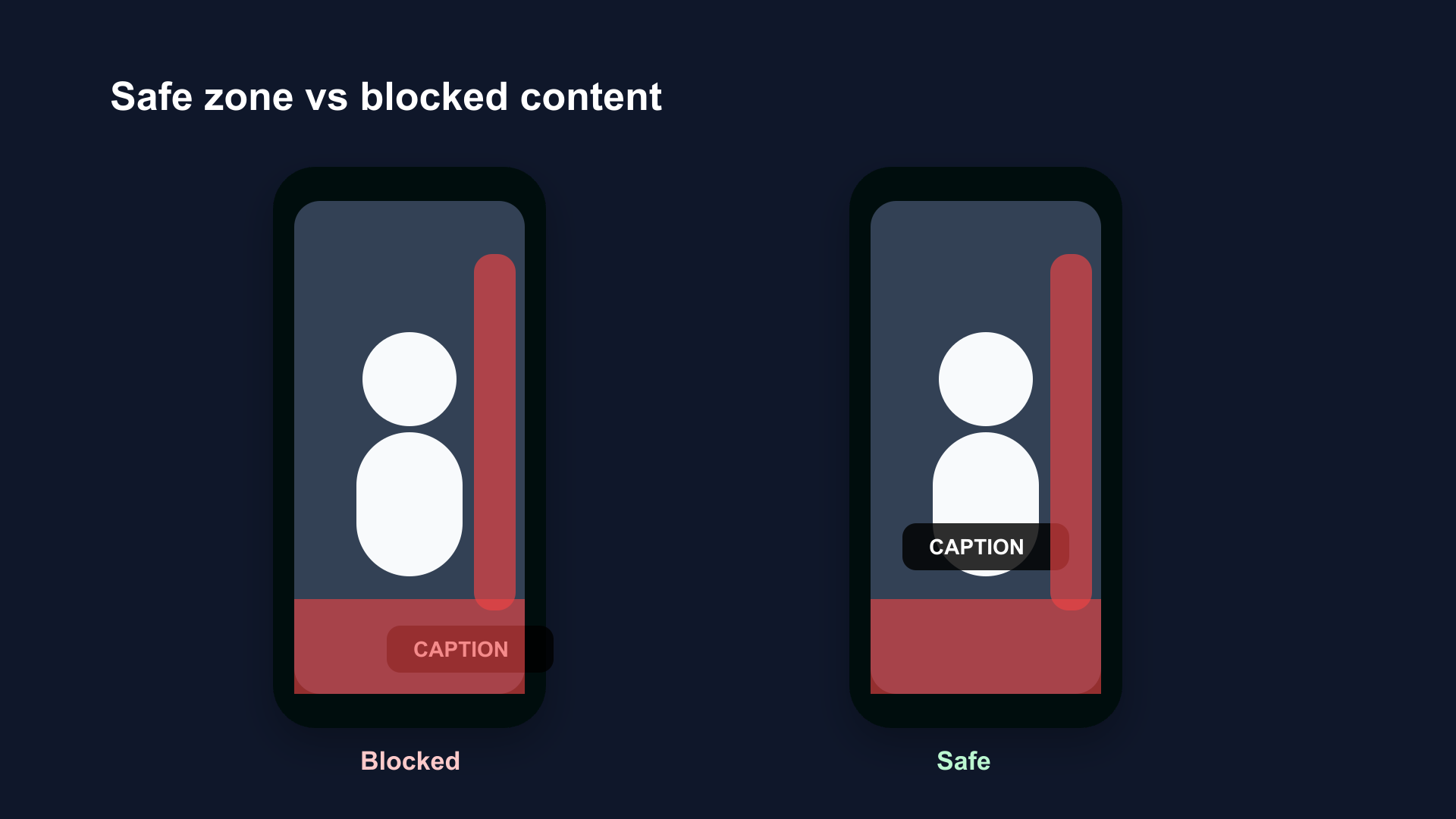
Instagram Reels safe zone at 1080×1920. The bottom dead zone expanded in late 2025 — place captions no lower than 450–480px from the bottom edge.
The Late 2025 Bottom Dead Zone Change
If you're following a guide published before late 2025, the bottom dead zone figures are outdated. Instagram's expanded audio bar and description text overlay now occupy significantly more of the bottom area.
Old guidance (pre-late 2025): Keep captions above 280px from the bottom.
Current guidance (2026): Keep captions above 450–480px from the bottom, or centered in the safe zone. When in doubt, center your caption block between 500px and 1400px from the bottom.
This change particularly affects center-positioned karaoke captions that were placed in the lower-center of the frame — that position now overlaps the expanded audio bar on many devices.
The Reels Aesthetic: How Caption Size Fits In
Instagram's creator community has different visual conventions from TikTok. Reels content trends toward more polished production, cleaner aesthetics, and slightly more restrained caption styling compared to TikTok's high-energy bold-text convention.
What this means for size:
| Content type | Recommended size | Why |
|---|---|---|
| Lifestyle, fashion, travel | 55–65px | Clean aesthetic; large text feels too loud |
| Educational, tutorial, how-to | 65–75px | Readability priority; viewers follow along closely |
| Motivational, business, finance | 75–90px | Energy match; bold text signals authority |
| Comedy, entertainment, fast cuts | 65–80px | Fast pacing; medium-large size works |
| Fitness, sports, transformation | 80–95px | High-energy signals; bold is expected |
The Reels community still responds to well-executed bold captions — the Hormozi-style all-caps approach works on Reels when the content energy matches. But the same caption size that looks natural for a fitness TikTok can look overly aggressive on a minimalist lifestyle Reel.
Multi-Line Captions: How Many Lines at Each Size
Caption size interacts with line count. More words per screen = smaller text needed or more lines = more frame space consumed.
Word-by-Word (Karaoke) Style
1–3 words on screen at a time. The text block is sparse. At 65–80px, a 2–3 word phrase fits comfortably in the safe zone on a single line. This is the most forgiving format for larger sizes.
At 70px: A 3-word phrase is approximately 250–350px wide. Fits on one line within the 900px safe zone width.
Short Phrase Style
3–8 words on screen. At 65px, a 6-word line is approximately 400–480px wide. Still one line within safe zone. At 75px, an 8-word line may require wrapping to two lines, consuming more vertical space.
Full Sentence Style
8–15 words on screen. At 65px, a 10-word sentence requires two lines. The two-line block at 65px occupies approximately 160px of vertical space — within the safe zone but leaving less margin.
At 80px, the same 10-word sentence requires two lines and occupies approximately 200px of vertical space. Monitor this against the safe zone boundaries.
Practical rule: For full-sentence captions, cap at 65px and two lines maximum per caption block.
How to Set Caption Size in Common Tools
CapCut (Mobile and Desktop)
- Import video → Text → Auto Captions
- After generation, tap any caption bubble → Style
- Font size appears in the style panel — set to 65–75 for standard, 80–90 for bold
- CapCut uses its own unit (roughly equivalent to px at standard export resolution)
BlitzCut (Mac and iPhone)
BlitzCut's caption styles (standard, bold center, karaoke word-by-word) are pre-configured for the 1080×1920 frame at the optimal size range. For Reels export, select 9:16 in the export panel — the caption layout applies automatically.
For Mac creators who export to multiple platforms from a single edit: BlitzCut's export settings keep captions in the cross-platform safe zone (900×1440px centered), which works for Reels, TikTok, and Shorts without per-platform adjustment.
Adobe Premiere Pro
- Captions panel → text layer → Essential Graphics panel
- Font size is in px — set to 65–75 for standard
- For percentage control, divide desired px size by 1920 × 100 to verify you're within the 3.1–3.9% range
DaVinci Resolve
- Add text in the Edit or Fusion page
- Inspector panel → Font Size is in points
- For 65px equivalent: 65 ÷ 1.33 ≈ 49pt
Caption Size and Font Weight: They Work Together
A 65px caption in a thin 300-weight font is significantly harder to read than a 55px caption in a bold 700-weight font. Weight and size are not interchangeable, but they compound.
Research benchmark: Bold fonts (weight 700–900) score 31% better on mobile readability tests than medium-weight fonts at the same size. On Reels, where many viewers are scrolling quickly rather than deliberately watching, that readability gap affects completion rates.
The effective combinations:
| Weight | Size | Result |
|---|---|---|
| Thin (300) | 75px | Mediocre — large but not legible in scroll |
| Regular (400) | 65px | Acceptable — mid-range readability |
| Semibold (600) | 60px | Good — standard caption quality |
| Bold (700) | 60–65px | Strong — recommended default |
| Black/Extrabold (900) | 55–60px | Excellent — readable at smaller sizes |
For Reels' more polished aesthetic, Semibold (600) at 65–70px hits the sweet spot: readable without feeling aggressive. For motivational or bold content, Bold (700–900) at 70–80px is more appropriate.
The Phone Preview Test
Everything above describes numbers that work on a calibrated screen. The test that confirms they work for your specific content:
- Export a test clip
- Send to your phone (AirDrop or message yourself)
- Open in full screen, portrait mode, sound off
- Hold the phone at arm's length (approximately 14–18 inches)
- Read every caption line without consciously focusing on them
If you have to consciously focus to read the text, increase by 10px and re-test. If the caption block feels like it's covering too much of the video, reduce by 5–10px.
This test catches the mobile readability problems that desktop preview consistently misses. Desktop monitors display the 1080×1920 video at a much larger physical size than any phone — what's readable at 50px on a 27-inch monitor is frequently not readable at 50px on a 6-inch phone at arm's length.
Cross-Platform Sizing: Reels, TikTok, and Shorts from One File
Many creators post the same video to all three platforms. Since all three use 1080×1920, a file sized correctly for Reels at 65–70px is sized correctly for TikTok and Shorts as well.
The challenge is safe zone position. TikTok has a larger right-side dead zone (120–164px) than Shorts (48px) and a different bottom dead zone than Reels. If you position captions at the Reels bottom safe limit (480px from bottom), that position is safe on TikTok and Shorts as well — they all share a common center zone.
Cross-platform safe zone (all three platforms): 900×1380px centered in the 1080×1920 frame. Any caption positioned within this area is clear of UI elements on TikTok, Reels, and Shorts simultaneously.
| Caption size | Suitable for cross-platform | Notes |
|---|---|---|
| 65–70px Bold | Yes | Safe across all three |
| 80px Bold | Yes (with centered positioning) | Slightly more aggressive on Reels aesthetic |
| 95px+ | Evaluate per platform | May feel too loud for Reels lifestyle content |
Frequently Asked Questions
What is the best caption size for Instagram Reels? 60–75px at 1080×1920 for most content. Use 65–70px as a starting default for talking head and educational content. 75–90px for high-energy, motivational, or fitness content.
Is caption size different for Reels vs. TikTok? The optimal pixel range is the same (60–75px at 1080×1920) because both platforms use the same video resolution. The safe zone for placement differs — Reels has a larger bottom dead zone than TikTok, especially after the late 2025 expansion.
What size in em should I use for Instagram Reels captions? In web-based editors with a 16px base (CapCut web, VEED, Kapwing): 3.75em–4.69em corresponds to 60–75px. For native app editors (Premiere, Final Cut, DaVinci, BlitzCut), use px directly.
What percentage of frame height should captions be? 3.1–3.9% of frame height for standard content. This range scales correctly regardless of export resolution and is the most portable specification.
How many lines should Reels captions have? For word-by-word (karaoke) style: 1 line at 65–75px. For short-phrase captions: 1–2 lines at 65px. For full-sentence captions: maximum 2 lines at 60–65px. More than two lines at any size starts crowding the safe zone.
My captions keep getting covered by the Instagram UI. What's the safe zone? Keep captions within the 900×1440px centered zone. In pixel terms from each edge: top 220px, bottom 480px, left 90px, right 120px. The bottom measurement is the most critical — Instagram expanded this zone in late 2025 and many older guides give outdated numbers.
Does bold font weight change the size I should use? Yes. Heavier font weights (700–900) are more readable at smaller sizes. A Black/Extrabold font at 60px is more readable than a Thin font at 75px. With Bold (700+) weight and a dark outline, you can use 60px for clean-aesthetic Reels content without sacrificing legibility.
Related: Best Caption Size for TikTok 2026 · Best Caption Size for YouTube Shorts 2026 · Best Caption Placement for Short-Form Video · Best Caption Colors for TikTok
Editing a talking-head video?
BlitzCut is available on Android, iPhone, iPad, and Mac. It is designed for recorded UGC-style videos, founder-led ads, tutorials, and testimonials and other talking-head content.
Try it for freeRelated Articles
Keep Reading

How to Add Music to a Video on iPhone: Soundtracks and Imports
Learn how to add music to a video on iPhone with soundtracks or imported audio, balance it beneath speech, and finish the edit in iMovie or BlitzCut.

How to Add Pictures to a Video: Clips, Cutaways, and Overlays
Learn how to add pictures to a video as clips, cutaways, or overlays in iMovie and BlitzCut, while keeping narration and image timing clear.

YouTube Studio Setup Under $200: A Home Studio for Content Creators (2026)
A YouTube studio setup under $200, built around your phone: two budget tiers, gear ranked by impact, and what to skip for YouTube, TikTok, and podcasts.